R&S
®
ZVA / R&S
®
ZVB / R&S
®
ZVT GUI Reference
Channel Menu
Operating Manual 1145.1084.12 – 30 313
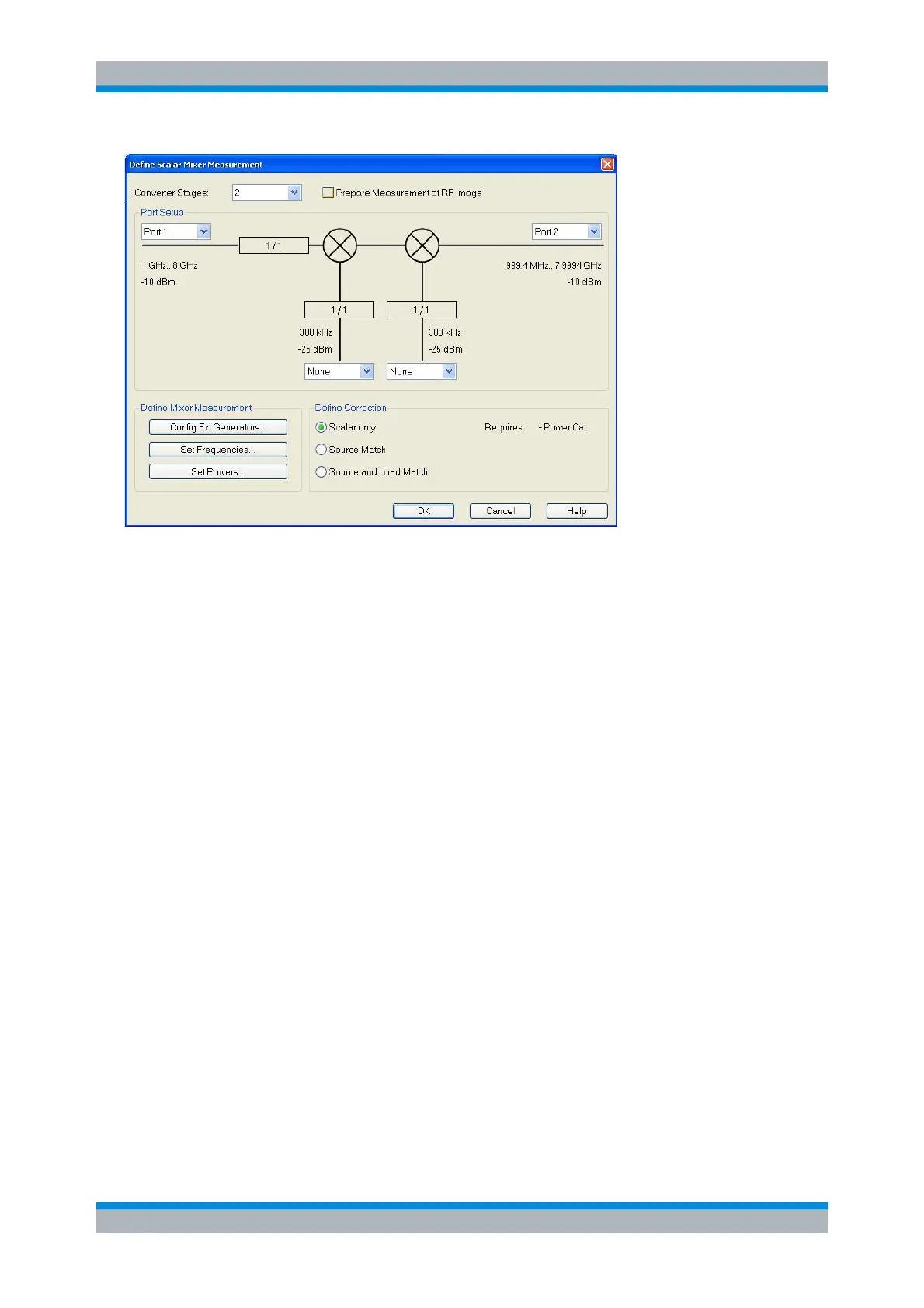
The upper part the Define Mixer Measurement dialog shows a diagram with the RF and LO signals, the
mixing product (IF), and the current frequency and power ranges for all signals. The diagram is adjusted
according to the selected Converter Stages; see Test Setup with Two Mixers. In addition the dialog
provides the following control elements:
Prepare Measurement of RF Image prepares an additional mixer measurement at the second RF
frequency (range) that the mixer converts to the selected IF frequency (RF Image Frequency,
RF
image
). When this option is selected, the image frequency (range) RF
image
is displayed below the
RF frequency (range). An error message appears if the image frequency range RF
image
exceeds
the analyzer's frequency range. In the Scalar Mixer Measurement Power Calibration dialog, a
source power calibration step of the RF port in the new frequency range is added. The RF and
RF
image
power settings are identical.
The RF image measurement provides the image conversion gain, the generated wave at the drive
port, and the received wave at the receive port as additional measurement results. These RF
image traces can be selected via Trace – Measure – Mixer Meas.
The port selection lists contain all analyzer ports or external generators which can provide the RF
signal (left side) and local oscillator (LO) signals (lower signal(s)). The fractional numbers in the
rectangles indicate the frequency conversion settings from the Define Frequencies dialog. The
receive port for the IF signal is selected on the right side. Generators must be configured explicitly
in the System Configuration – External Generators dialog before they appear in the list.
None means that the input signal at LO is not controlled by the analyzer, but known exactly.
Embedded means that the input signal at LO is neither controlled by nor synchronized with the
analyzer. Its frequency is not known exactly, but its deviation from the nominal LO frequency is
"small" compared to the measurement bandwidth.
The distinction between None and Embedded is most significant for Mixer Noise Figure
Measurements, where a different measurement approach is taken for the Embedded case (see
Mixer Noise Figure Measurement with Embedded LO).
Config Ext. Generators... opens the System Configuration – External Generators dialog for adding
and configuring external generators.
Set Powers... opens a dialog to control the power of the RF and the LO signals.
Set Frequencies... opens a dialog to control the frequency of the RF and the LO signal and the
receiver (IF signal) frequency.



 To Next Page