•GPSDatum
•Wind
•Time&Date
Ifyoudonotwanttousetheautomaticallyselecteddatasourceyoucanmanuallyselectyour
preferreddatasource
.
Note:
ForMDStobeavailableonyoursystem,allproductsinthesystemthatreportdatamustbe
MDS-compliant.ThesystemwillreportanyproductsthatareNO
TMDS-compliant.Itmaybe
possibletoupgradethesoftwareforthesenon-compliantproducts,tomakethemcompliant.Visit
theRaymarinewebsite(www.raymarine.com)toobtainthelatestsoftwareforyourproducts.
IfMDS-compliantsoftwareisnotavailablefortheproductandyoudoNOTwanttousethe
system’spreferreddatasource,youmustremoveanynon-compliantproductsfromthesystem.
Y oushouldthenbeabletoselectyourpreferreddatasource.
Onceyouhavecompletedsettingupyourpreferreddatasources,youmaybeabletoadd
non-compliantproductsbackintothesystem.
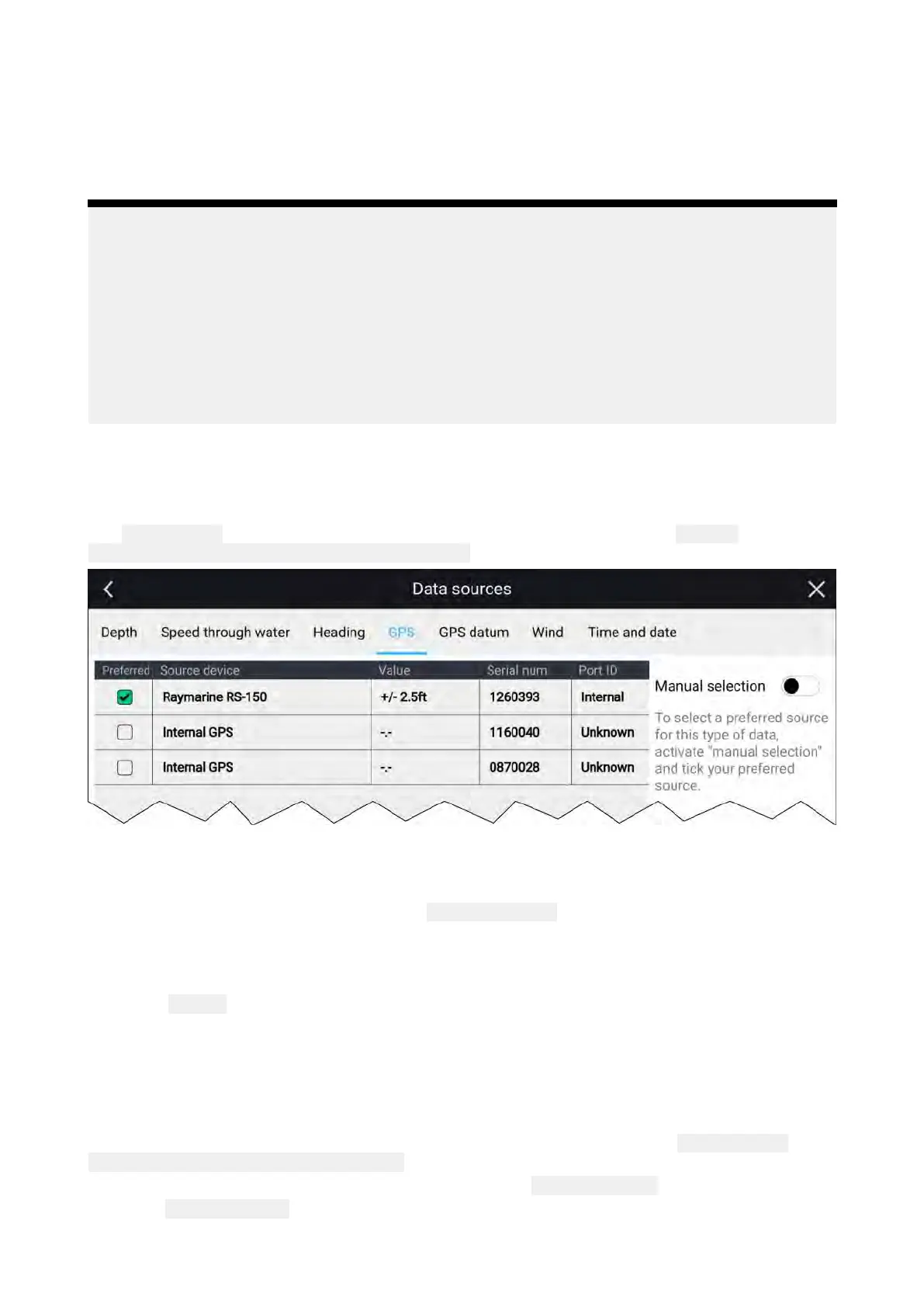
Datasourcesmenu
WhenasystemincludesmultiplesourcesofanMDScompatibledatatypethesystemwillchoosethe
mostappropriatesourceforthedata.Ifyouprefer
,youcanmanuallyselectyourowndatasource.
The
DatasourcesmenucanbeaccessedonyourDatamasterMFD,fromthe Settingsmenu:
Homescreen>Settings>Network>Datasources.
Eachmenutabenablesyoutoviewtheavailabledatasourcesand,ifrequired,manuallyselect
yourpreferreddatasource .Thecurrentlyactivedatasourcewillbetickedanddisplayitscurrent
valueinuse.
Tomanuallyselectadatasource,enablethe Manualselectiontoggleswitchandthenselectyour
preferreddatasourcefromthelist.
NetworkedMFDswillautomaticallybeupdatedtousetheDatasourcesselectedonyourData
masterMFD.
Selectthe Refreshbuttonatthebottomofthescreentorefreshthelist.
Identifyingengines
Enginedatacanbeshownonyourdisplay,ifyourenginesaretransmittingtherelevantsupported
dataonthesamenetworkasyourdisplay.Ifyoursystemhasmislabelledyourenginesthenyoucan
correctthisusingtheEngineidentificationwizard.
TheEngineidentificationwizardcanbeaccessedfromtheBoatdetailsmenu: Homescreen>
Settings>Boatdetails>Identifyengines.
1.Ensurethecorrectnumberofenginesisselectedinthe
NumofEngines:box.
2.Select Identifyengines.
3.Followtheonscreenpromptstocompletetheengineidentificationwizard.
44


 To Next Page