Chapter 6 — Configuring and Managing Partitions Creating a Cleaning Partition
November 2016 User Guide—Spectra T950 Library
188
Define the Initial Cleaning Partition Settings
1. Loginasauserwithsuperuseroradministratorprivileges.
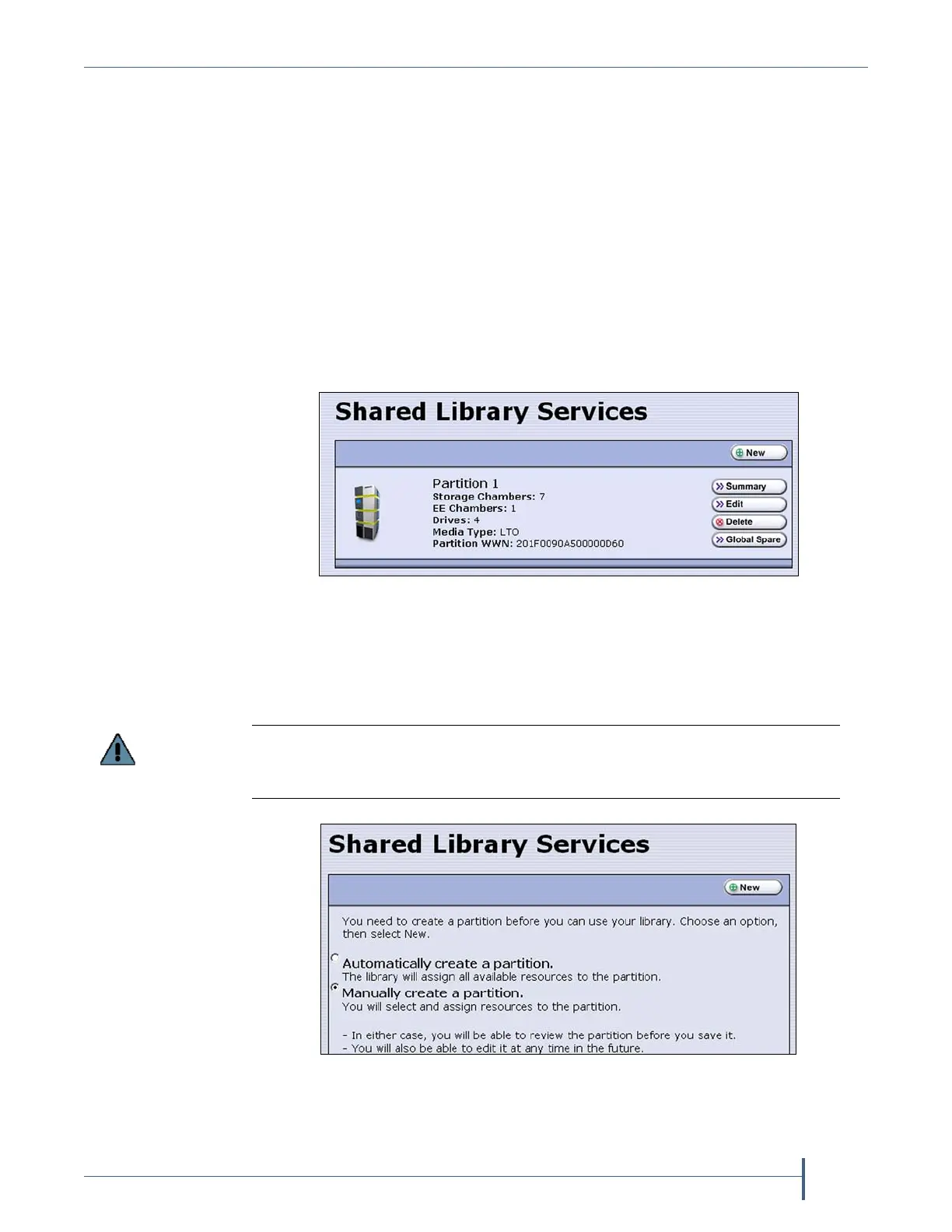
2. Fromthetoolbarmenu,selectConfiguration > Partitionstodisplaythe
SharedLibraryServicesscreen.
Ifoneormorepartitionsarealreadycreated,theexistingpartitions
arelistedinalphabeticalorder.ClickNewtodisplaytheNameand
MediaTypescreen.
Note: IftheNewbuttonisNOTdisplayedthenallchambersin
thelibraryareallocated.Youneedtoeditanexisting
partitiontofreeupchambersbeforeyoucancreatea
cleaningpartition.
Ifthelibrarydoesnotcurrentlyhaveanypartitionsconfigured,
selectManually create a partition,thenclickNewtodisplaythe
NameandMediaTypescreen.
Figure 115 Click New on the Shared Library Services screen to
begin creating the cleaning partition.
Do not select the Automatically create a partition option. Doing so configures all
of the licensed chambers in the library as a storage partition. You then need to
modify the storage partition to make chambers available for a cleaning partition.
Figure 116 Select Manually create a partition.



 To Next Page