Chapter 14 — Maintaining the Library Installing Cord Locks
November 2016 User Guide—Spectra T950 Library
458
INSTALLING CORD LOCKS
Installthecordlocksincludedwitheachframetopreventthepowercords
frombeinginadvertentlydisconnectedfromthedualACinputconnectors.
1. PausePostScanifitisrunning(seePausethePostScanProcesson
page307).Anytapescurrentlybeingscannedarereturnedtotheir
storagelocations.
2. Discontinueallfilestorageoperationstothelibrary.
3. Poweroffthelibrary(seePowerOfftheLibraryonpage160).
4. SettheACbreakerswitchesonthedualACmoduletothe“off”
position.
5. Ifthepowercordsarepluggedintowallplugs,unplugthem.Also
unplugthemfromthedualACmodulewhereyouplantoinstallthe
cordlocks.
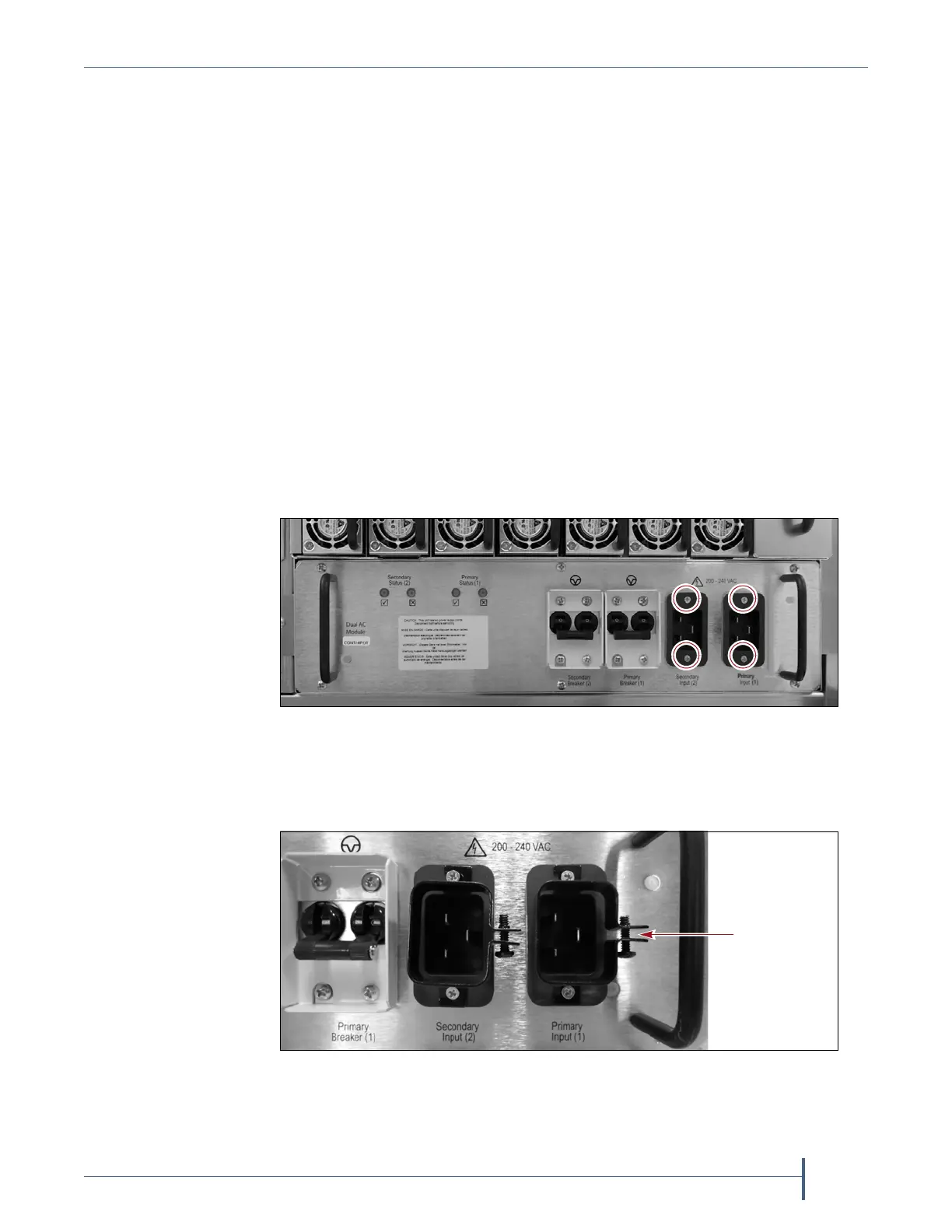
6. Usinga#2Phillipsscrewdriver,removethetwoscrewssecuringeach
ofthetwoinputplugstothedualACmodule(circledinFigure295).
7. Placeacordlockovertheconnectorontheendofthepowercordthat
connectstothelibrary.Orientthecordlockasshownin
Figure296.
Figure 295 Remove the screws securing the input plugs to the AC
power module (dual AC module shown).
Figure 296 Install the cord locks on the power cords.



 To Next Page