Chapter 9 — Configuring and Using Media Lifecycle Management Using MLM Reporting
November 2016 User Guide—Spectra T950 Library
313
2. IfyouwanttosavetheMLMreporttoaUSBdevice,connectthedevice
toaUSBportontheLCMoroperatorpanel(T950Bonly)andallow
timeforthedevicetomountbeforecontinuing.
Note: TheoptiontosavethereporttoaUSBdeviceisonlyavailableif
youconnectaUSBdevicetothelibrarybeforeyouclickSave
ReportontheMediaLifecycleManagementReportscreen.
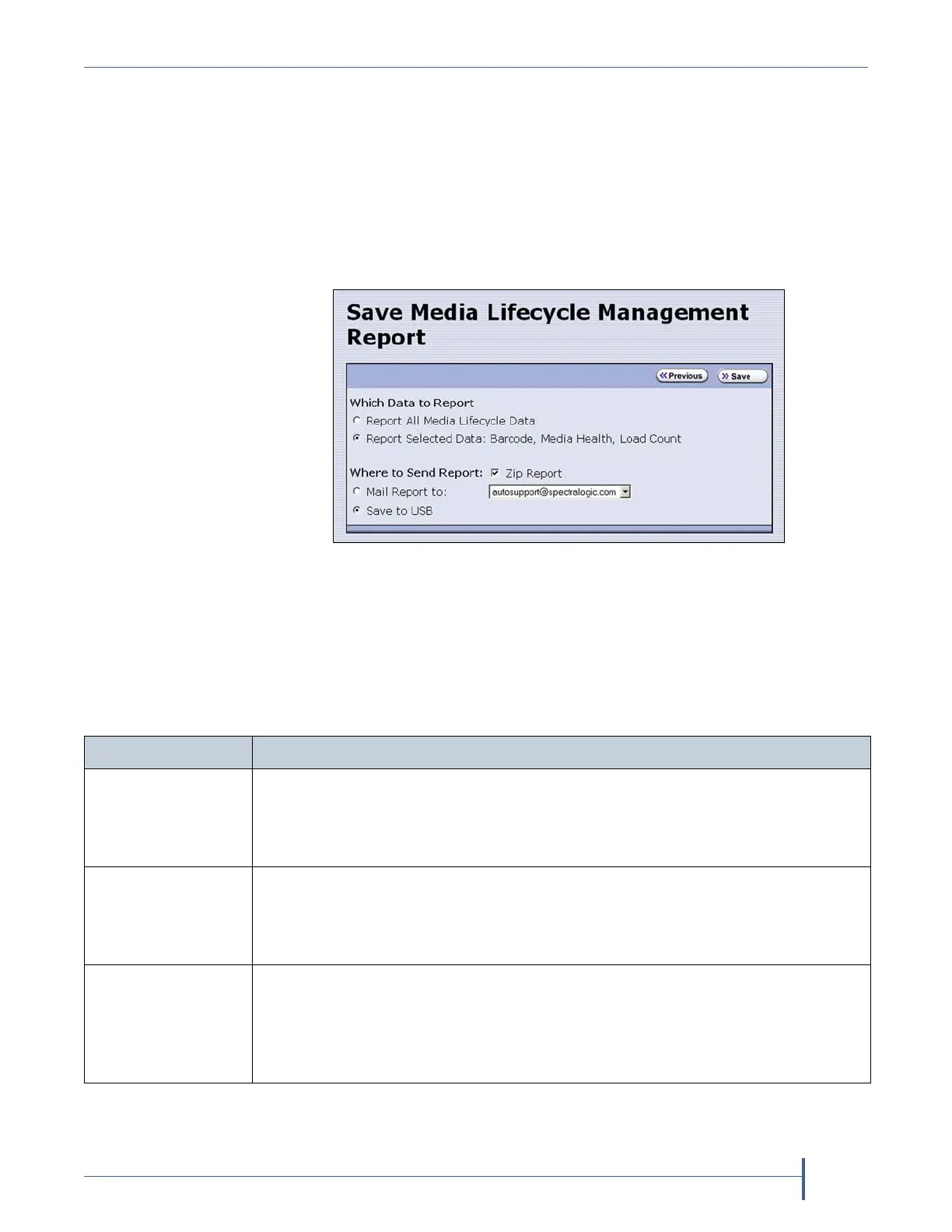
3. ClickSave Report todisplaytheSaveMediaLifecycleManagement
Reportscreen.
4. Selectthedatatoincludeinthesavedreportandhowyouwantthe
reportsaved.
Note: Ifyouwanttoemailthereport,theintendedrecipientmustbea
previouslyconfiguredmailuser(seeConfigureMailUserson
page118).
Figure 188 Select the desired options on the Save Media
Lifecycle Management Report screen.
This option... Saves...
Report All Media
Lifecycle Data
AreportcontainingalloftheavailabledetailedMLMdataforMLM‐enabled
mediaintheselectedlocation(aspecificpartitionorthetotallibrary).
Note: Dependingonthenumberofcartridgesintheselectedlocation,this
reportcanbequitelarge.
Report Selected
Data
OnlythefieldsdisplayedinthereportthatyouselectedontheMediaLifecycle
ManagementReportscreen(Figure186onpage310).
Note: Theheadingsinthesavedreportreflectthefieldsdisplayedinthe
reportyouselectedintheMediaLifecycleManagementReportscreen.
Zip Report Thereportasazipfile.Zippingthereportisespeciallyusefulwhenemailing
theReportAllMediaLifecycleDatareport.
Note: Ifyouunzipthereportusingthestandardformatusedbymostfile‐
zippingapplications,theapplicationcreatesthefollowingdirectorystructure:
*\harddisk\lc\reports.



 To Next Page