5 Operation
Commissioning
BQ_31_en
1
32
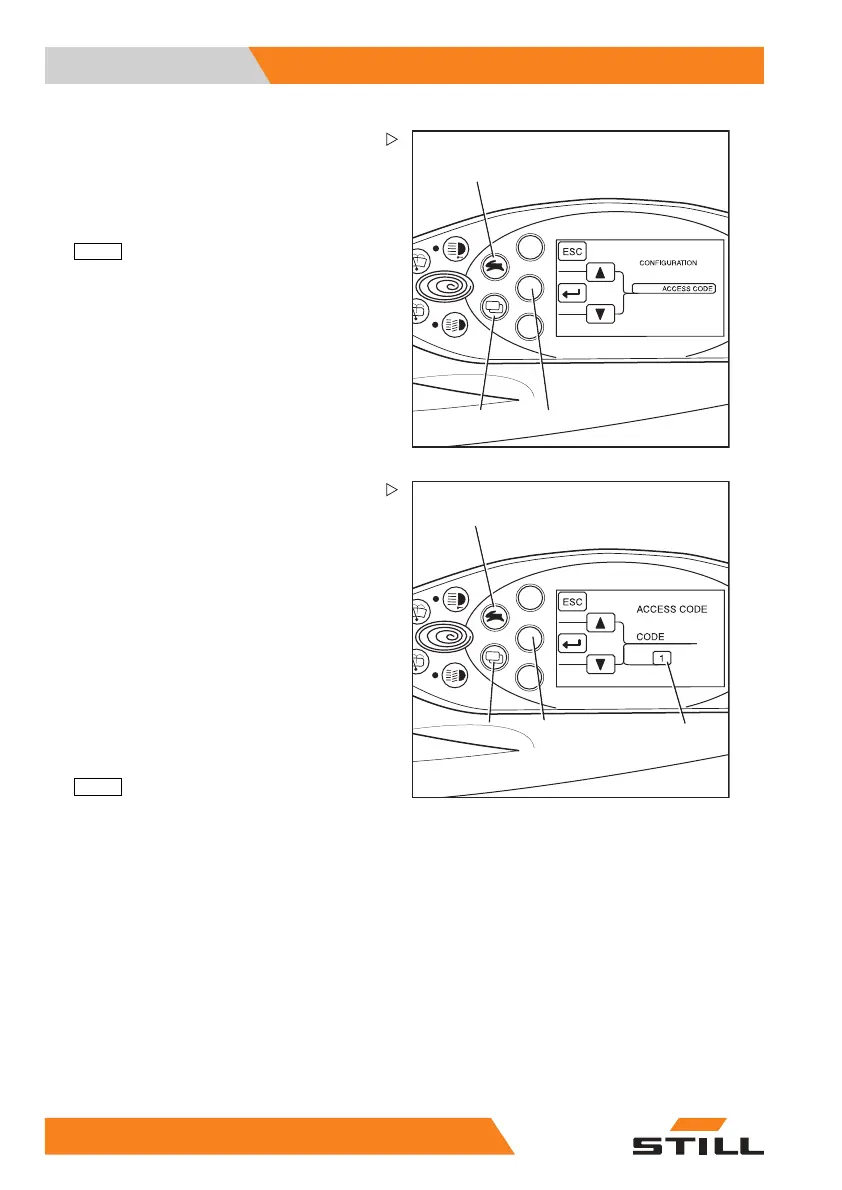
CONFIGURATION appears in the display.
– Use the drive program selection button (1)
and the menu change button (3) to select
the
ACCESS CODE menu.
– Confirm your selection by press
ing the
ENTER
button (2).
BQ_025_en_V3
1
3
4
2
Selecting the driver PIN
In the ACCESS CODE menu, there are fifty
possible driver PINs to choose from.
The digit sequenc
es can be set or changed in
the
NEW CODE subme
nu.
Once the
ACCESS CODE menu has been ac-
cessed, the
CODE selection field (2) contains
the number
1. The first of the fifty driver PINs
can now be defined.
– Use the drive program selection button (1)
and the menu change button (4) to select
the desired driver PIN (
1 to 50).
– Confirm your sel
ection by pressing the
ENTER
button (3).
90
55048011501 EN - 12/2015



 To Next Page