Operation 5
Handling the battery
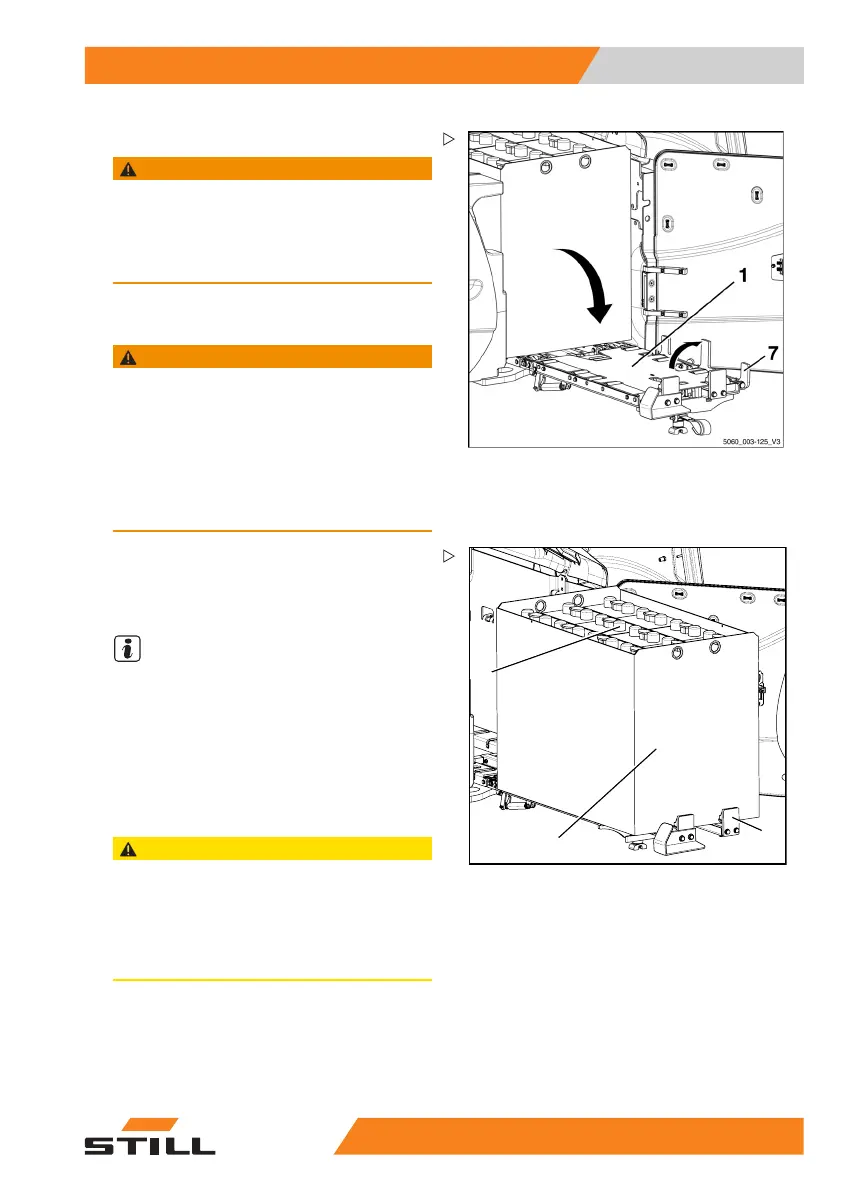
– Fold down the bridge (1) at the red web belt.
WARNING
If the bridge folds down whilst the battery is being
taken out, the battery can roll forward in an uncon-
trolled manner, creating a risk of crushing!
– Ensure that the bridge support stands vertically
under the bridge.
– Grip the side battery stop (7) at the front and
fold it up.
WARNING
The battery can now move freely and may roll away
unimpeded, creating a risk of crushing!
– People must not stand directly in the battery’s
direction of travel or in the battery compartment.
– Do not place objects or any parts of the body
between the battery and the truck chassis.
– Do not attempt to keep hold of the battery if it rolls
away.
5060_003-126_V2
6
5
9
– Carefully pull the battery tray (6) with the
battery (9) completely out of the battery
compartment to the battery stop (5) on the
bridge.
NOTE
The battery stop is mounted on a pull-out piece
and travels with the battery to the end stop of
the pull-out piece.
– Transfer the battery using the crane; see
chapter "Battery transport with crane".
Installing the battery
CAUTION
If when the battery is being installed the battery
hood or the battery door are not fully open, or the
battery stops are not folded in or pulled out, or if
there are objects in the truck’s battery compart-
ment, considerable damage will be done to these
components during installation of the battery.
– Open the battery hood.
– Open the battery door.
– Fold down the side battery stop.
55
048011501 EN - 12/2015 265



 To Next Page