WEILER E2850 REMIXING TRANSFER VEHICLE
2-7
Machine Controls
2
Machine Controls
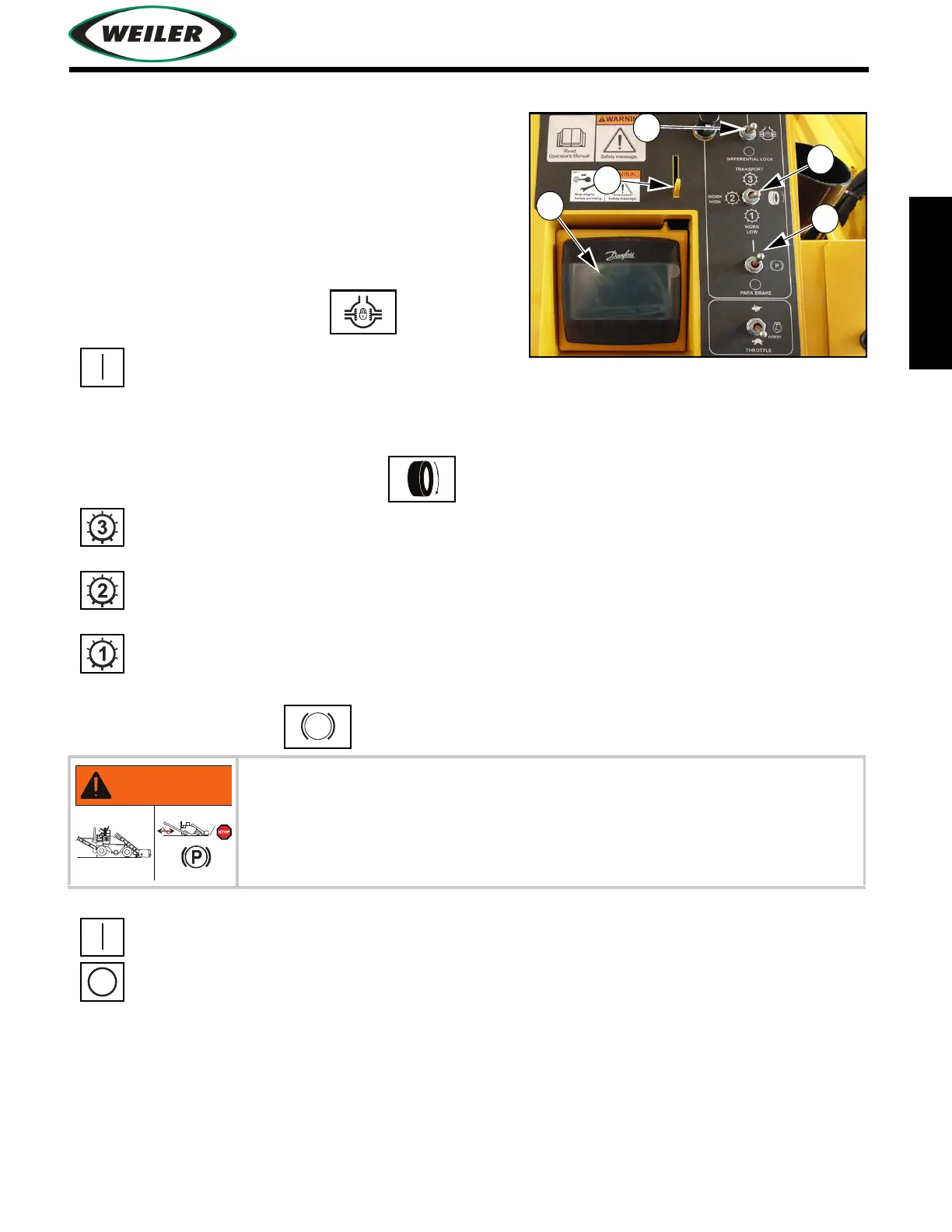
Center Control Panel
(1) Electronic Display
Refer to
"Electronic Display Navigation", page 2-31
for additional information.
(2) Display Screen Tilt Lever
Tilts display screen for optimal viewing.
(3) Differential Lock Switch
NOTICE: To avoid machine damage, engage differential locks only when in Work Low speed.
(4) Propel 3-Speed Control Switch
(5) Park Brake Switch
Push and hold up to engage.
Transport - Push up to place propel motors in
high speed/low torque mode.
Work High - Center to place propel motors in
medium speed/high torque mode.
Work Low - Push down to place propel motors
in low speed/high torque mode.
Brake application is abrupt and may cause injury to operator if applied
when machine is in motion.
Apply park brake only when machine is stopped, unless required by
emergency.
Push up to turn on park brake.
Push down to turn off park brake.


 To Next Page