WEILER E2850 REMIXING TRANSFER VEHICLE
3-43
Operating Instructions
3
Paving
Tire Spray Control System (Optional)
The tire spray control system automatically applies tire spray solution during operation to help
prevent material build-up on tire tread. System will pulse on/off based on tire rotation to prevent over
saturation of tires at lower speeds.
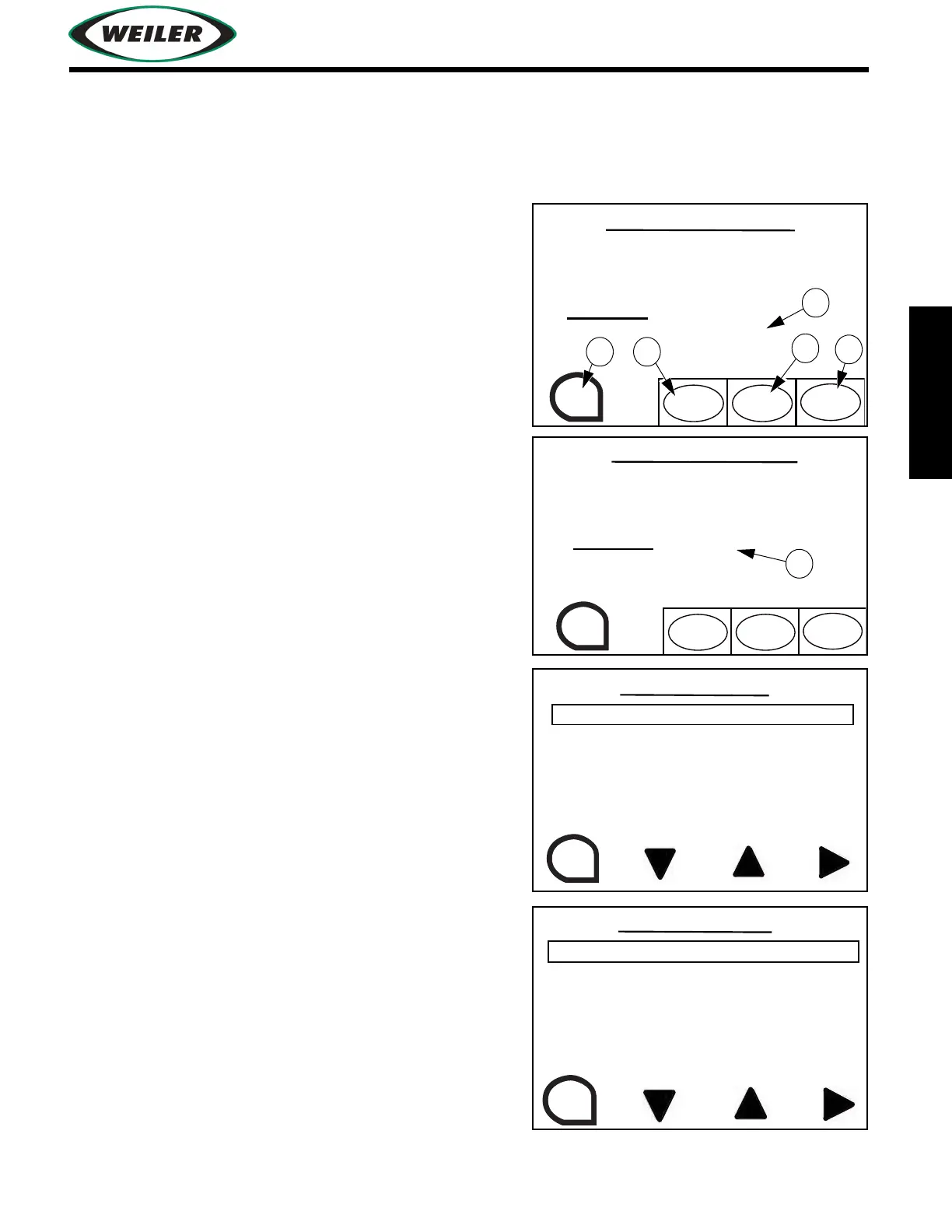
Tire Spray Control Screen
(1) ESC Button
Press to exit to previous screen.
(2) AUTO START / AUTO STOP Button
Press to turn automated tire spray on or off.
(3) CYCLE START Button
Press to spray 1 rotation of tire.
(4) MODE Button
Press to switch between tire spray and conveyor chain
spray down screens.
The number of tire rotations tire spray is on will display
(A). When selected number of tire rotations is met, tire
spray will turn off. When selected number of off rotations
is met, the system turns on automatically and repeats the
cycle.
The remaining time until the next tire spray cycle is
displayed (B).
To select number of rotations tire spray is on, enter
system settings screen, and select number of tire
rotations on.
To select number of rotations tire spray is off, enter
system settings screen, and select number of tire
rotations off.
WASH DOWN CONTROL
TIRE WASH WILL ONLY
BE ACTIVE WHEN
MACHINE IS IN MOTION
TIRE WASH - ON
(AUTO ACTIVE)
NUMBER OF ROTATIONS: 1
ESC
CYCLE
START
MODE
TIRE WASH MODE
AUTO
START
TIRE WASH WILL ONLY
BE ACTIVE WHEN
MACHINE IS IN MOTION
TIRE WASH
(AUTO ACTIVE)
STARTS IN 120 SEC.
ESC
CYCLE
START
MODE
TIRE WASH MODE
AUTO
START
SELECTS THE NUMBER OF
ROTATIONS THE TIRE
WASHDOWN SYSTEM
WILL SPRAY THE TIRES
ESC
TIRE ROTATIONS (ON) - 1
SYSTEM SETTINGS
SELECTS THE NUMBER OF
TIRE ROTATIONS BETWEEN
TIRE SPRAY CYCLES
ESC
TIRE ROTATIONS (OFF) - 4


 To Next Page