1
WEILER E2850 REMIXING TRANSFER VEHICLE
2-32
Machine Controls
2
Machine Controls
Electronic Display Screen Descriptions
The system incorporates gauges and diagnostics with a display of current readings.
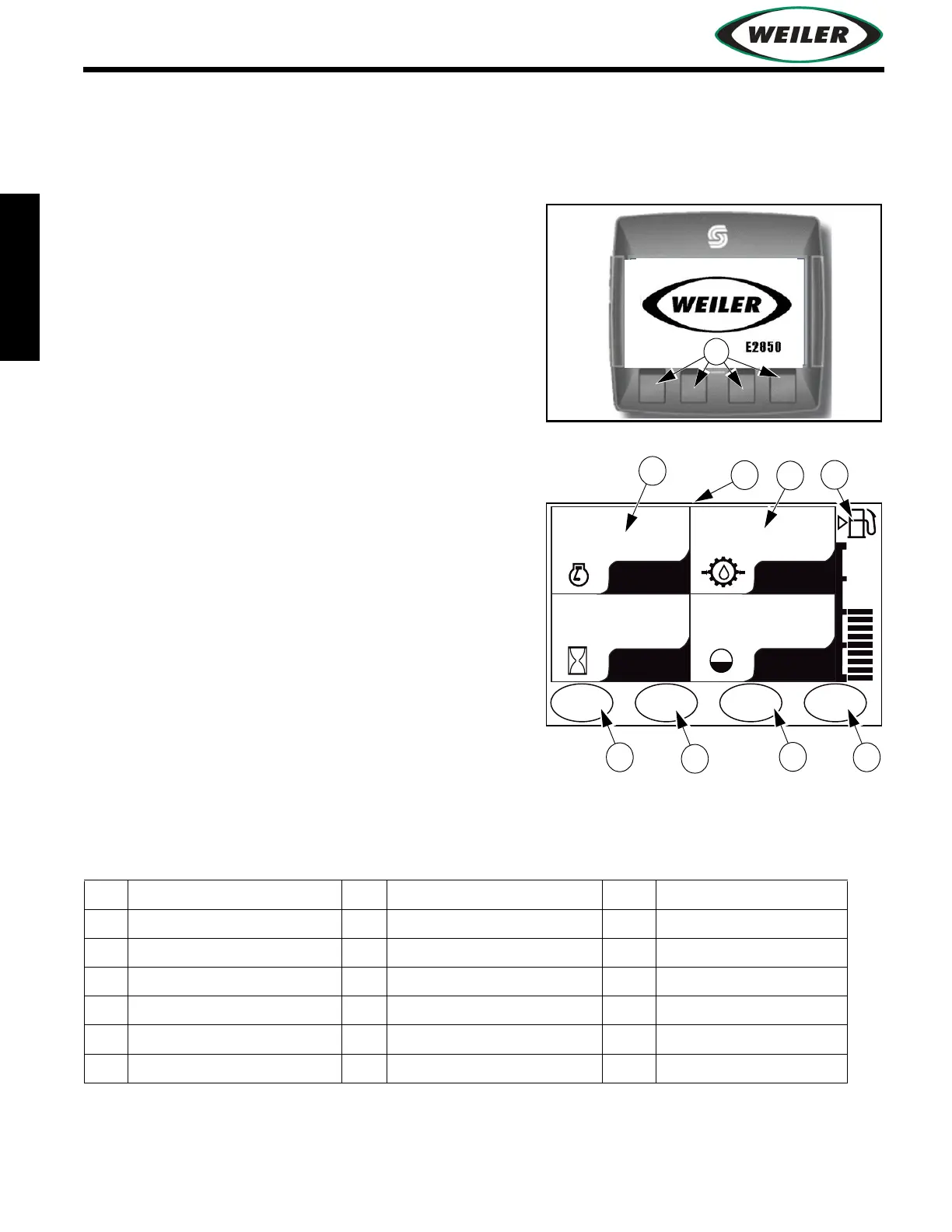
Start-Up Screen Display
Appears for 5 seconds after Ignition Switch is turned on.
(1) Control Buttons
Functions change depending on screen displayed.
Button functions are displayed with each screen.
Main Operating Screen
(1) Main Screen
Parameters displayed on the four panels are user
selectable from a list of engine and machine items.
To select parameters to display, enter Menu Screen
and select Systems Settings.
(2) Engine rpm
(3) Machine Ground Speed (Optional)
(4) Fuel Level
(5) Press to display gauge screen
(6) Press to turn generator on/off (optional)
(7) Press to enter spray down screens
(8) Press to enter menu mode
Electronic Display Parameters
The following monitored engine parameters are available:
To select a parameter, press the up or down arrow Control Button. Once desired number selection is
displayed, press right arrow to select option. Press “ESC” Control Button to return to Menu Screen.
1 Generator Voltage 8 Oil Pressure 15 Fuel Pressure
2 Battery Voltage 9 Manifold Temperature 16 Conveyor Pressure
3 Hours 10 Boost Pressure 17 Elevator Pressure
4 Engine rpm 11 Ground Speed 18 Remix Pressure
5 Percent Load 12 Fuel Level 19 Asphalt Level
6 Hydraulic Temperature 13 Fuel Temperature
7 Coolant Temperature 14 Fuel Rate
RPM
HRS.
FPM
LEVEL
00
0.0 0 %
MENU
WASH
DOWN
GAUGE
DATA
GEN.
ON


 To Next Page