1
WEILER E2850 REMIXING TRANSFER VEHICLE
2-34
Machine Controls
2
Machine Controls
Tire Spray Down Control Screen (Optional)
The tire spray down control system is designed to provide consistent tire wash coverage, regardless of
operating speed, without continuous operator adjustment or monitoring.
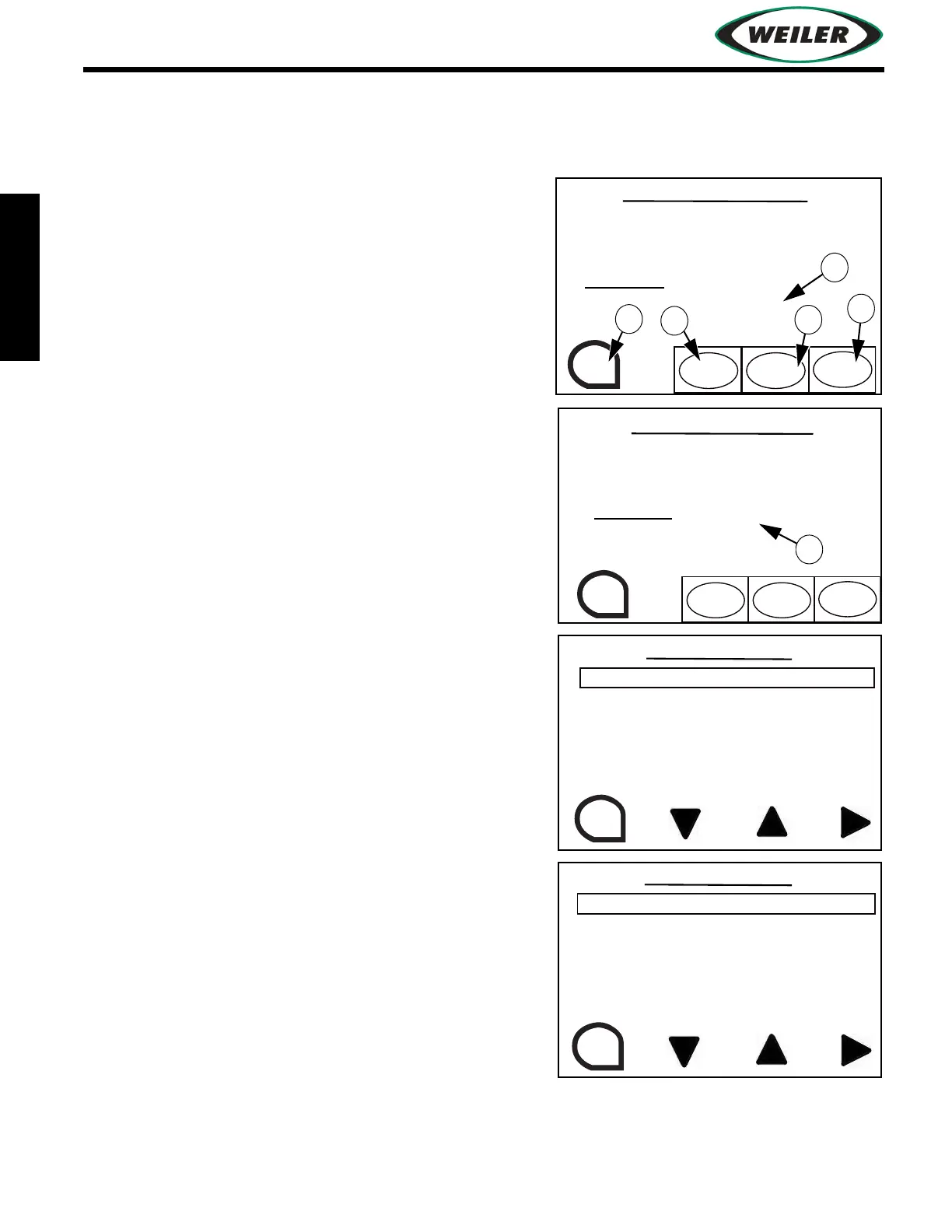
(1) ESC Button
Press to exit to previous screen.
(2) AUTO START Button
Press to turn on automated tire wash.
(3) CYCLE START Button
Press to spray one revolution of the tire.
(4) MODE button
Press to enter conveyor spray down screen.
From the system settings screen, the operator selects how
often to spray the tires based on tire rotations. For example,
1 rotation on, 5 rotations off. In automatic mode, display
shows the number of rotations spray is “on” (A).
Time until the next tire spray down cycle is displayed (B).
If machine slows to less than 40 FPM, tire spray down
system will pulse on/off to prevent excessive spray. If
machine stops, the system turns off, then back on when
machine moves again.
WASH DOWN CONTROL
TIRE WASH WILL ONLY
BE ACTIVE WHEN
MACHINE IS IN MOTION
TIRE WASH - ON
(AUTO ACTIVE)
NUMBER OF ROTATIONS: 1
ESC
CYCLE
START
MODE
TIRE WASH MODE
AUTO
START
WASH DOWN CONTROL
TIRE WASH WILL ONLY
BE ACTIVE WHEN
MACHINE IS IN MOTION
TIRE WASH
(AUTO ACTIVE)
STARTS IN 120 SEC.
ESC
CYCLE
START
MODE
TIRE WASH MODE
AUTO
START
SELECTS THE NUMBER OF
ROTATIONS THE TIRE
WASHDOWN SYSTEM
WILL SPRAY THE TIRES
ESC
TIRE ROTATIONS (ON) - 1
SELECTS THE NUMBER OF
TIRE ROTATIONS BETWEEN
TIRE SPRAY CYCLES
ESC
TIRE ROTATIONS (OFF) - 4


 To Next Page