WEILER E2850 REMIXING TRANSFER VEHICLE
2-37
Machine Controls
2
Machine Controls
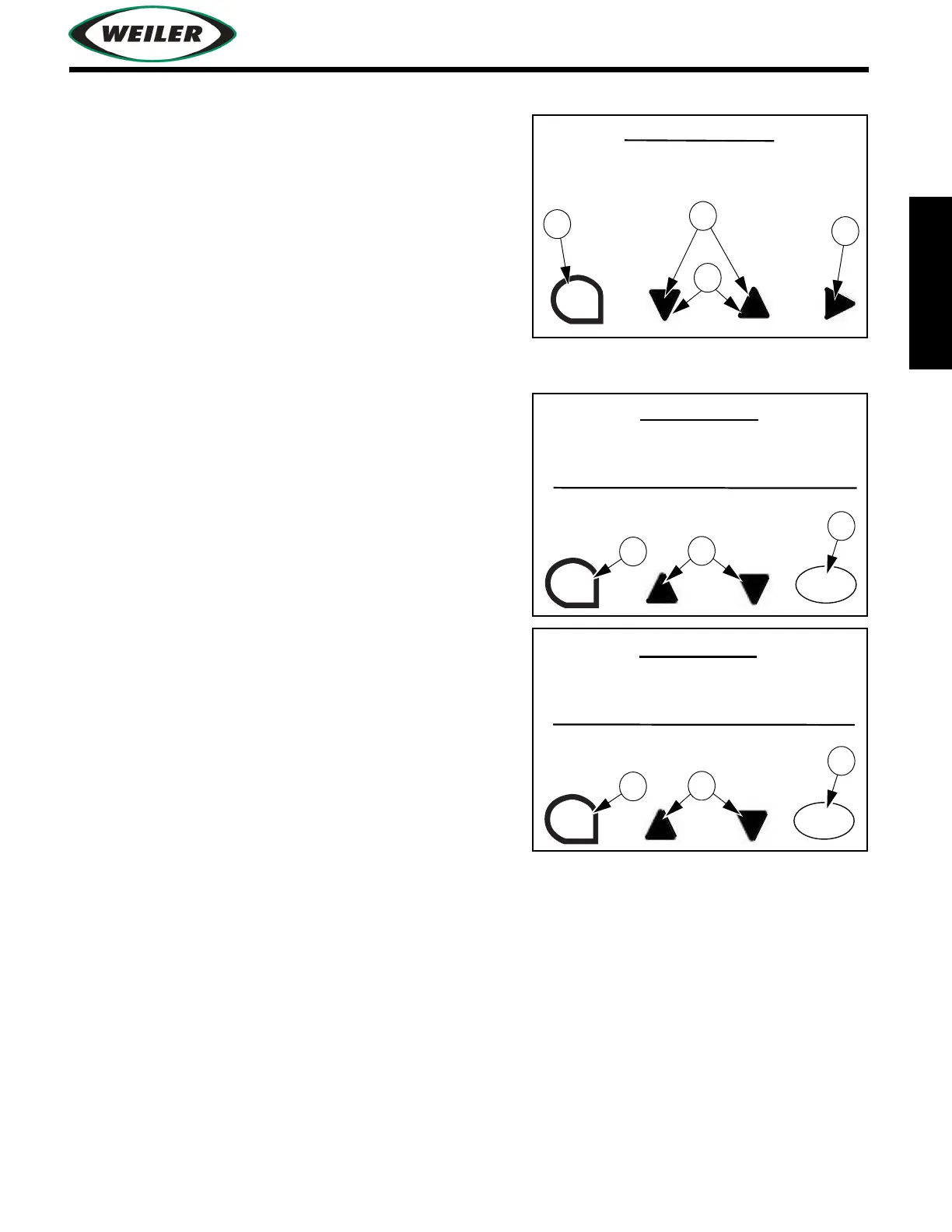
System Settings Screen
(1) Press to navigate up or down systems settings list.
(2) Press to select/deselect highlighted item in list.
(3) Press to increase/decrease setting.
(4) Press to exit to previous screen.
View Errors Screen
Number of active errors is displayed. Occurrences and
descriptions of displayed errors scroll on the display. The
upper section of screen displays machine error messages,
and lower section displays engine ECM errors.
(1) ESC Button
Press to exit to previous screen.
(2) Up and Down Arrow Buttons
Use to navigate up or down to view errors list.
(3) ACTIVE / LOGGED Errors Button
Press to cycle between active and logged errors.
SYSTEM SETTINGS
RESET ALL
ESC
VIEW ERRORS
ACTIVE ERROR COUNT 0
ESC
ACTIVE ERROR OCCURRENCES 0
ENGINE ERROR
SPN 0
FMI 0
OC 0
ACTIVE
VIEW ERRORS
ACTIVE ERROR COUNT 0
ESC
ACTIVE ERROR OCCURRENCES 0
SPN 0
FMI 0
OC 0
LOG


 To Next Page