............................................................................................................................................................................................................................................................
To configure call blocking for an organizationProvisioning and Account Management
4-52
8AL90208USAD ed01
November 20, 2008
............................................................................................................................................................................................................................................................
To configure call blocking for an organization
Note: You may access this page through Provisioning–>Organizations.
(see Provisioning organizations)
........................................................................................................................................................................................................................
1 Click the Provisioning tab.
........................................................................................................................................................................................................................
2 Click the Call Blocking item.
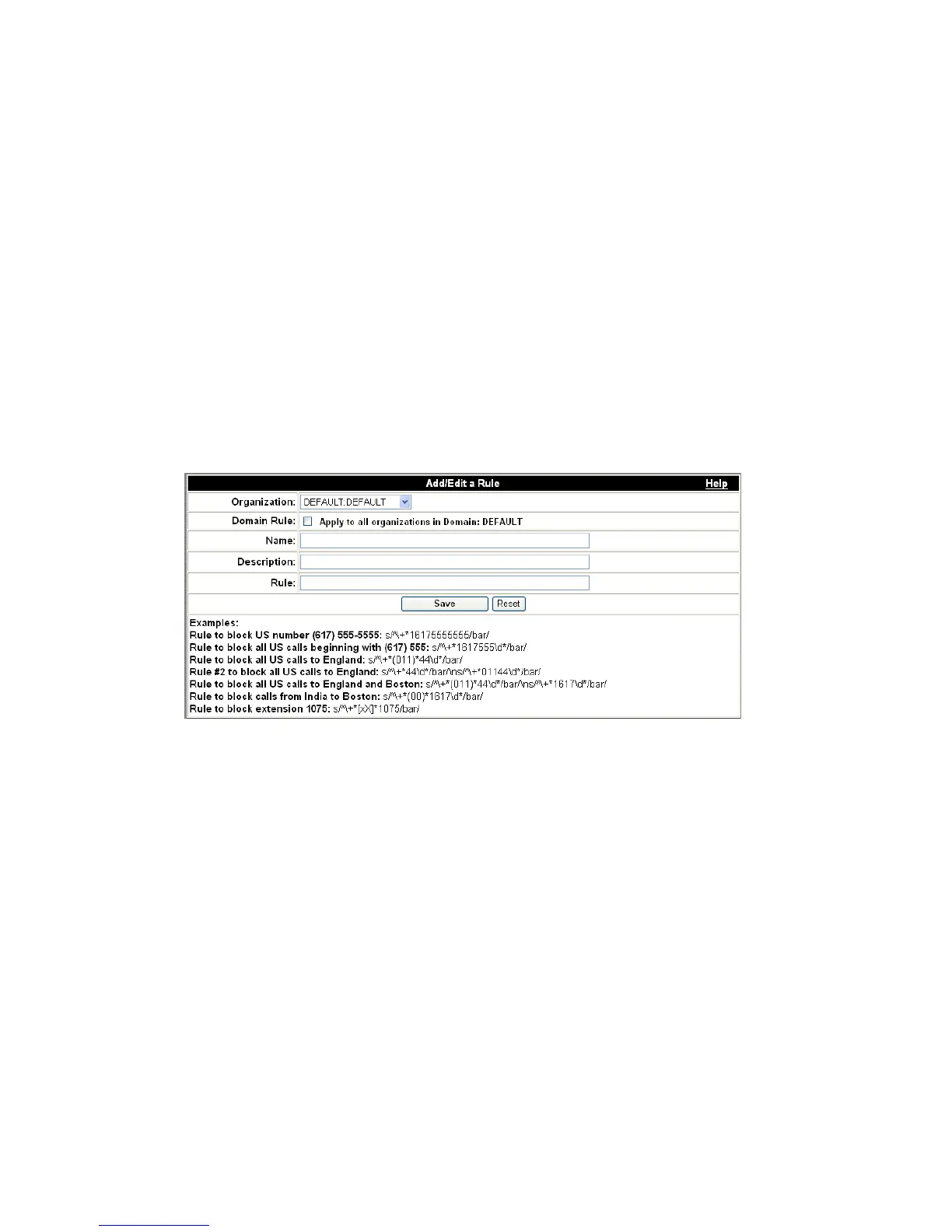
The Add/Edit a Rule page appears.
Figure 4-26 Add or Edit a Call Blocking Rule
........................................................................................................................................................................................................................
3 Select the Organization you want the rule to apply to.
If you want the rule to apply to all organizations in a Domain, check the Domain Rule
checkbox.
........................................................................................................................................................................................................................
4 Type a meaningful name for the rule in the Name box.
........................................................................................................................................................................................................................
5 Type a brief description of the rule in the Description box.
........................................................................................................................................................................................................................
6 Type your Perl expressions in the Rule box.












 To Next Page