Viewing active callsMonitoring
............................................................................................................................................................................................................................................................
8AL90208USAD ed01
November 20, 2008
5-3
............................................................................................................................................................................................................................................................
Viewing active calls
To view all conferences on the controlling (primary) server
which are currently up on all systems in a stack
........................................................................................................................................................................................................................
1 Click the Monitoring tab.
........................................................................................................................................................................................................................
2 Click the Active Calls item.
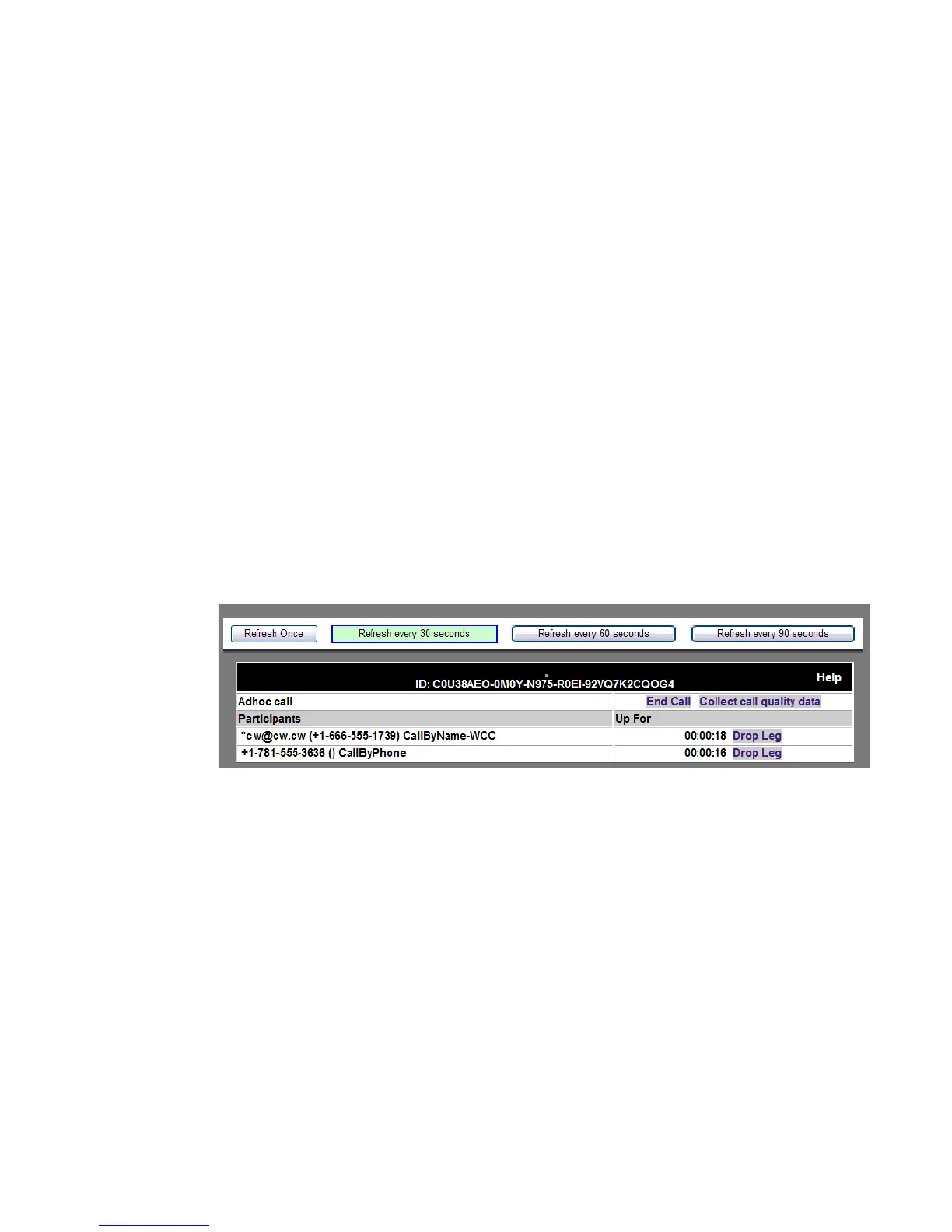
The Active Calls screen shows the calls and participants currently in those calls on this
system.
........................................................................................................................................................
E ND OF STEPS
Figure 5-2 Viewing Active Calls
From this screen, the System-wide Administrator can view all active calls with legs that
are controlled by this individual server or stack – when they were scheduled for, who the
participants are, and how long each leg has been up. The administrator can select the
refresh frequency rate by selecting one of the following:
• Refresh Once – This creates a static ‘snapshot’ of the active calls at a moment in time.
It is helpful when you have a large group of users and are trying to locate the activity of
a specfic user.
• Refresh every 30 seconds
• Refresh every 60 seconds
• Refresh every 90 seconds












 To Next Page