4
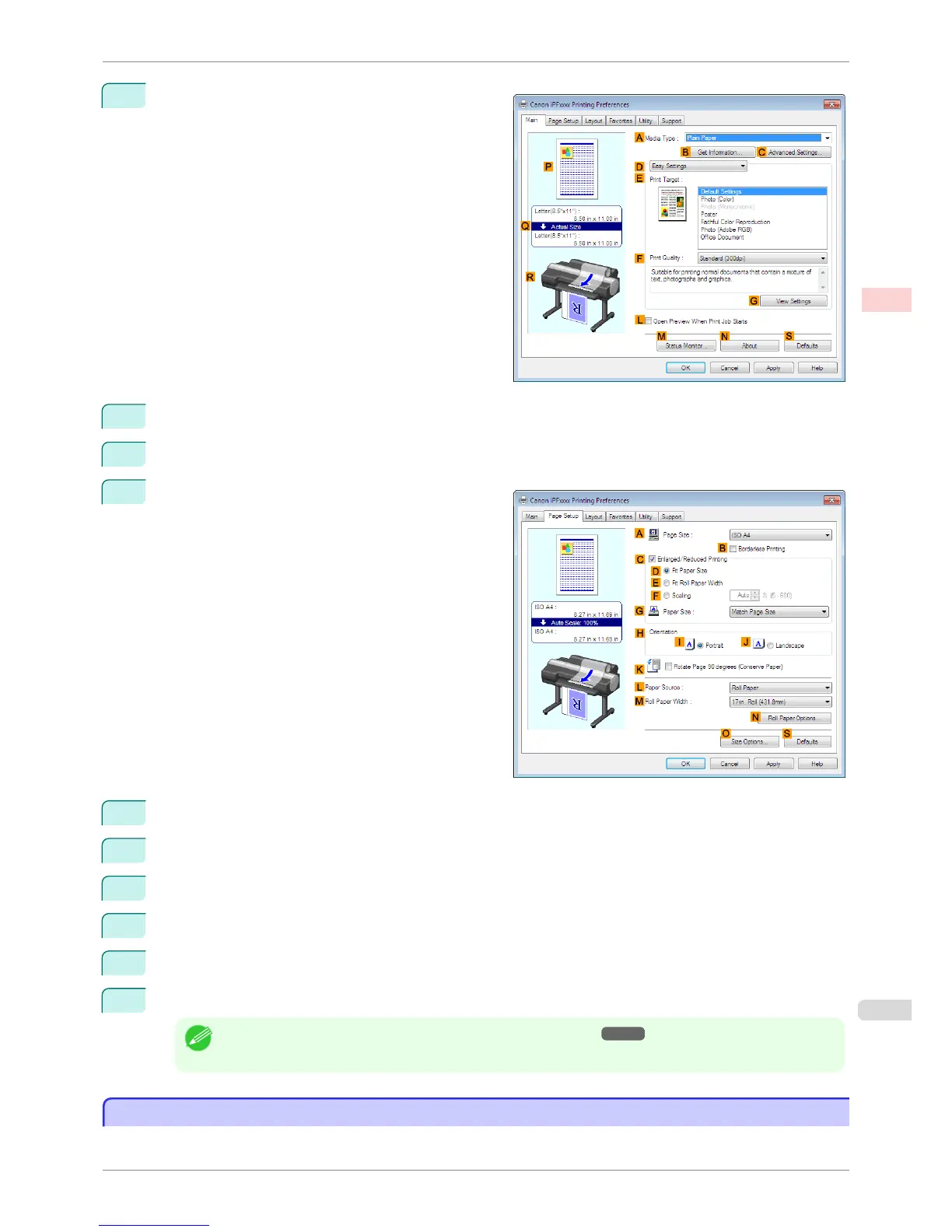
Make sure the Main sheet is displayed.
5
In the A Media Type list, select the type of paper that is loaded.
6
After confirming that D Easy Settings is selected, select from the E Print Target list.
7
Click the Page Setup tab to display the Page Setup
sheet.
8
Click Cut Sheet in the L Paper Source list.
9
Click Custom Size in the A Page Size list to display the Custom Size Settings dialog box.
10
Confirm that mm is selected in Units.
11
Enter 430 (16.9 in) in both Width and Height.
12
Click OK to close the Custom Size Settings dialog box.
13
Confirm the print settings and print as desired.
Note
• For tips on confirming print settings, see "Confirming Print Settings ." ➔ P.153
Printing on Non-Standard Paper Sizes (Mac OS)
Printing on Non-Standard Paper Sizes (Mac OS)
For printing on non-standard size paper, first register the paper size in the printer driver.
iPF6400S
Printing on Non-Standard Paper Sizes (Mac OS)
User's Guide
Enhanced Printing Options Printing banners or at other non-standard sizes
103













 To Next Page