Lowering the Up-down Unit of the Spectrophotometer Unit (option) Manually
Lowering the Up-down Unit of the Spectrophotometer Unit (option) Manually
Lowering the Up-down Unit manually before printing makes it easier to handle paper from the front of a printer
equipped with a Spectrophotometer Unit (option).
Note
• You can also perform operations from the back of the printer without lowering the Up-down Unit manually.
1
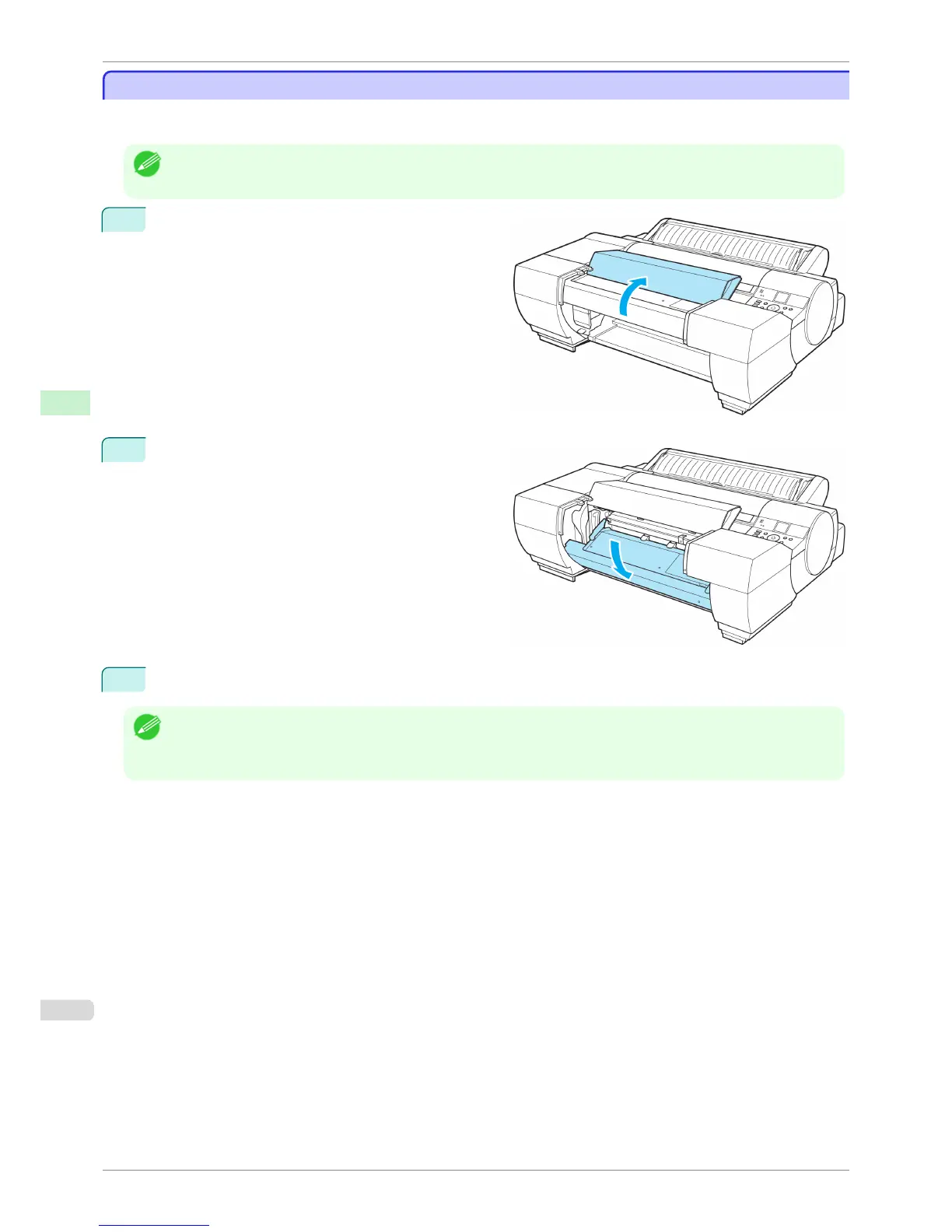
Open the Spectrophotometer Unit Cover.
2
Press down on the center (near the blue label) of the
Up-down Unit to lower the Up-down Unit.
Perform the target operation in this state.
3
Close the Spectrophotometer Unit Cover.
Note
• When pressing down on the Up-down Unit, handle the central part (near the blue label). Handling the ends may cause
damage.
• After the paper operations are complete, the Up-down Unit will automatically return to its original position.
Lowering the Up-down Unit of the Spectrophotometer Unit (option) Manually
iPF6400S
User's Guide
Handling and Use of Paper Handling rolls
494













 To Next Page