Please calibrate using above paper.
Please calibrate using above paper.
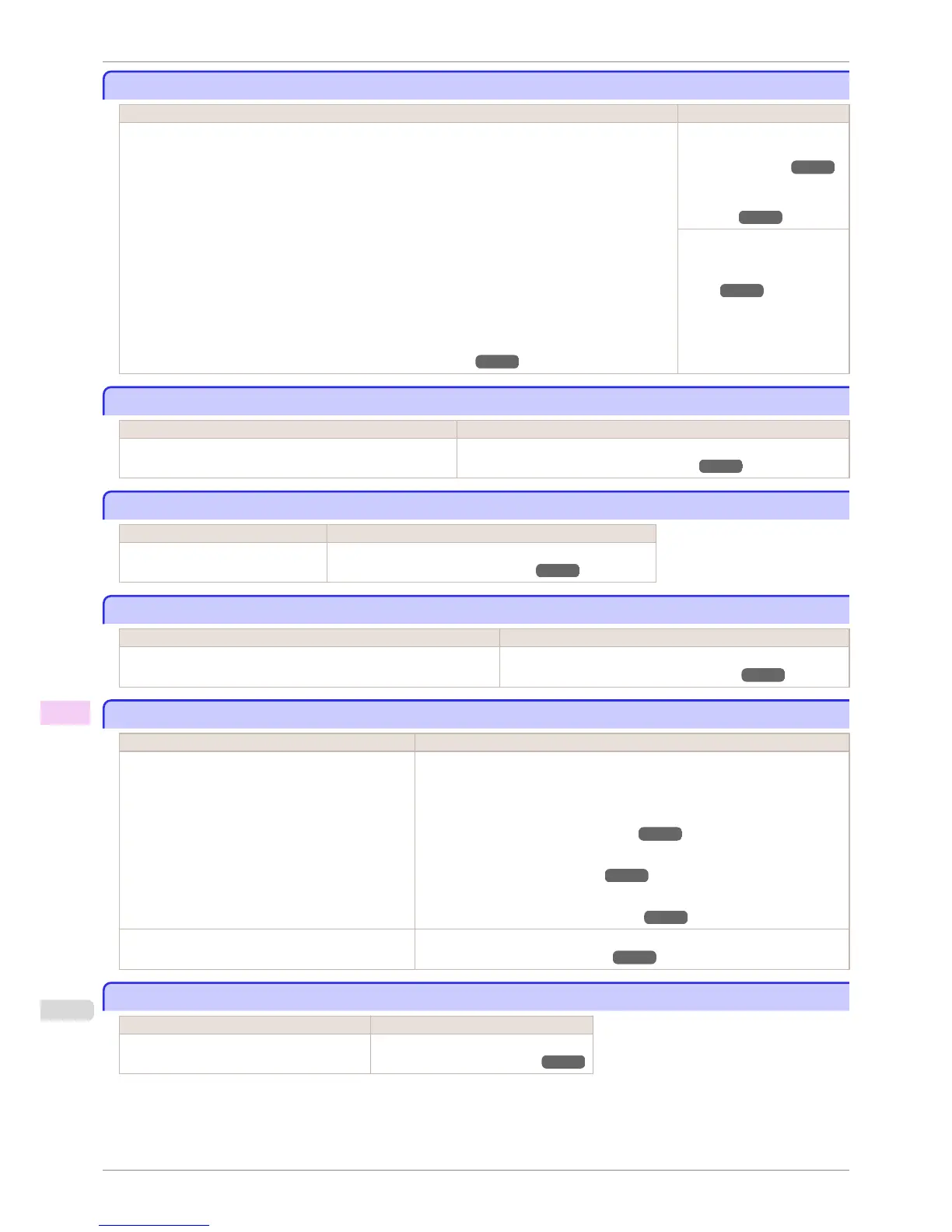
Cause Corrective Action
It is now recommended that you execute Unique calibration.
Note that this is displayed when Set Exec. Guide in the Control Panel menu is set to On and any of the
following is true.
•
If the printer is loaded with a type of paper on which color calibration can be executed, but there is no
record of having executed color calibration on that paper or a record of having executed Common
calibration other any other type of paper.
•
If the printer is loaded with a type of paper on which color calibration can be executed, there is a re-
cord of having executed color calibration on that paper, and the predefined conditions since executing
the color calibration the last time have been reached.
•
The Spectrophotometer Unit (optional) is installed. Although a media type that color calibration can be
executed on using the Spectrophotometer Unit is loaded in the printer and the result of a color check
on that media exceeded the threshold value, the color calibration has not been performed.
(See "Color Checks Using the Spectrophotometer Unit (option).") ➔ P.745
Execute Unique calibration.
(See "Color Calibration Using
the Printer Sensor.") ➔ P.736
(See "Color Calibration Using
the Spectrophotometer Unit
(option).") ➔ P.742
Set Set Exec. Guide to Off
on the Control Panel menu.
(See "Menu Struc-
ture.") ➔ P.582
Before borderless printing, move the blue platen switch.
Before borderless printing, move the blue platen switch.
Cause Corrective Action
The blue Switch on the platen was set to the side opposite ●
when a borderless print job was received.
Before borderless printing, set the blue Switch on the platen to the ● side.
(See "Setting the Blue Switch on the Platen.") ➔ P.886
Blue platen switch is dirty.
Blue platen switch is dirty.
Cause Corrective Action
The blue Switch on the platen is dirty. Open the Top Cover and clean the blue Switch on the platen.
(See "Cleaning Inside the Top Cover.") ➔ P.839
Move the blue platen switch No.xx to the right. (xx represents a number)
Move the blue platen switch No.xx to the right. (xx represents a number)
Cause Corrective Action
The printer has detected that the blue Switch on the platen needed in
maintenance during printing is set away from the ● mark.
Set blue platen Switch of the indicated number toward the ● side.
(See "Setting the Blue Switch on the Platen.") ➔ P.886
Cannot adjust paper feed.
Cannot adjust paper feed.
Cause Corrective Action
The Printhead nozzles are clogged. Execute Adj. Quality again, as follows.
1.
Press the OK button to clear the error.
2.
Print a test pattern to check the nozzles.
(See "Checking for Nozzle Clogging.") ➔ P.824
3.
Clean the Printhead if the nozzles are clogged.
(See "Cleaning the Printhead.") ➔ P.825
4.
Execute Adj. Quality again.
(See "Automatic Banding Adjustment.") ➔ P.715
Highly transparent film is loaded that cannot be used
for automatic feed amount adjustment.
Press the OK button to clear the error, and then adjust the feed amount manually.
(See "Manual Banding Adjustment.") ➔ P.716
Check printed document.
Check printed document.
Cause Corrective Action
The Printhead nozzles are becoming clogged. If printing is faint, clean the Printhead.
(See "Cleaning the Printhead.") ➔ P.825
Please calibrate using above paper.
iPF6400S
User's Guide
Error Message Messages regarding printing or adjustment
914













 To Next Page