Printer parts
Printer parts
Front .................................................................................................................................................................................... 604
Back ..................................................................................................................................................................................... 605
Top Cover (Inside) .......................................................................................................................................................... 606
Paper Feed Slots ............................................................................................................................................................ 607
Inside the Roll Feed Unit Cover ................................................................................................................................ 608
Carriage .............................................................................................................................................................................. 608
Ink Tank Cover (Inside) ................................................................................................................................................ 609
Vents .................................................................................................................................................................................... 610
Control Panel .................................................................................................................................................................... 570
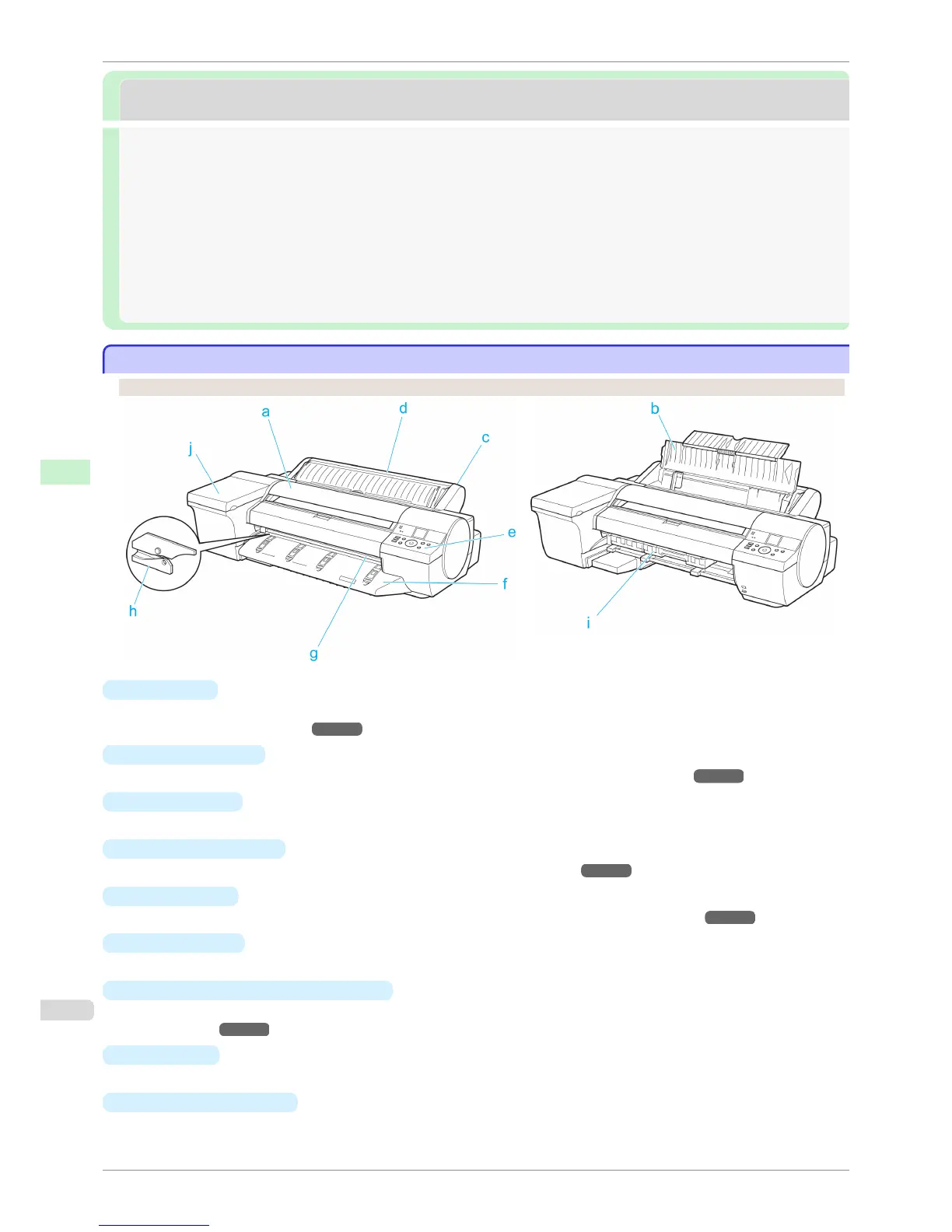
Front
Front
Standard With the Ejection Guide removed
a
Top Cover
Open this cover to install the Printhead and remove any jammed paper from inside the printer, as needed.
(See "Top Cover (Inside).") ➔ P.606
b
Paper Tray Cover
Open this cover to load a sheet in the Top Paper Feed Slot. (See "Paper Feed Slots.") ➔ P.607
c
Roll Feed Unit
Load rolls in this unit. You can also load sheets manually.
d
Roll Feed Unit Cover
Open this cover to load rolls.
(See "Inside the Roll Feed Unit Cover.") ➔ P.608
e
Control Panel
Use this panel to operate the printer and check the printer status. (See "Control Panel.") ➔ P.570
f
Ejection Guide
Supports output paper.
g
Output Tray ( Front Paper Feed Slot )
All printed documents are ejected from this slot. When loading heavyweight paper, insert it here. (See "Paper
Feed Slots.") ➔ P.607
h
Cutter Unit
A round-bladed cutter for automatic roll cutting.
i
Maintenance Cartridge
Absorbs excess ink.
Front
iPF6400S
User's Guide
Printer Parts Printer parts
604













 To Next Page