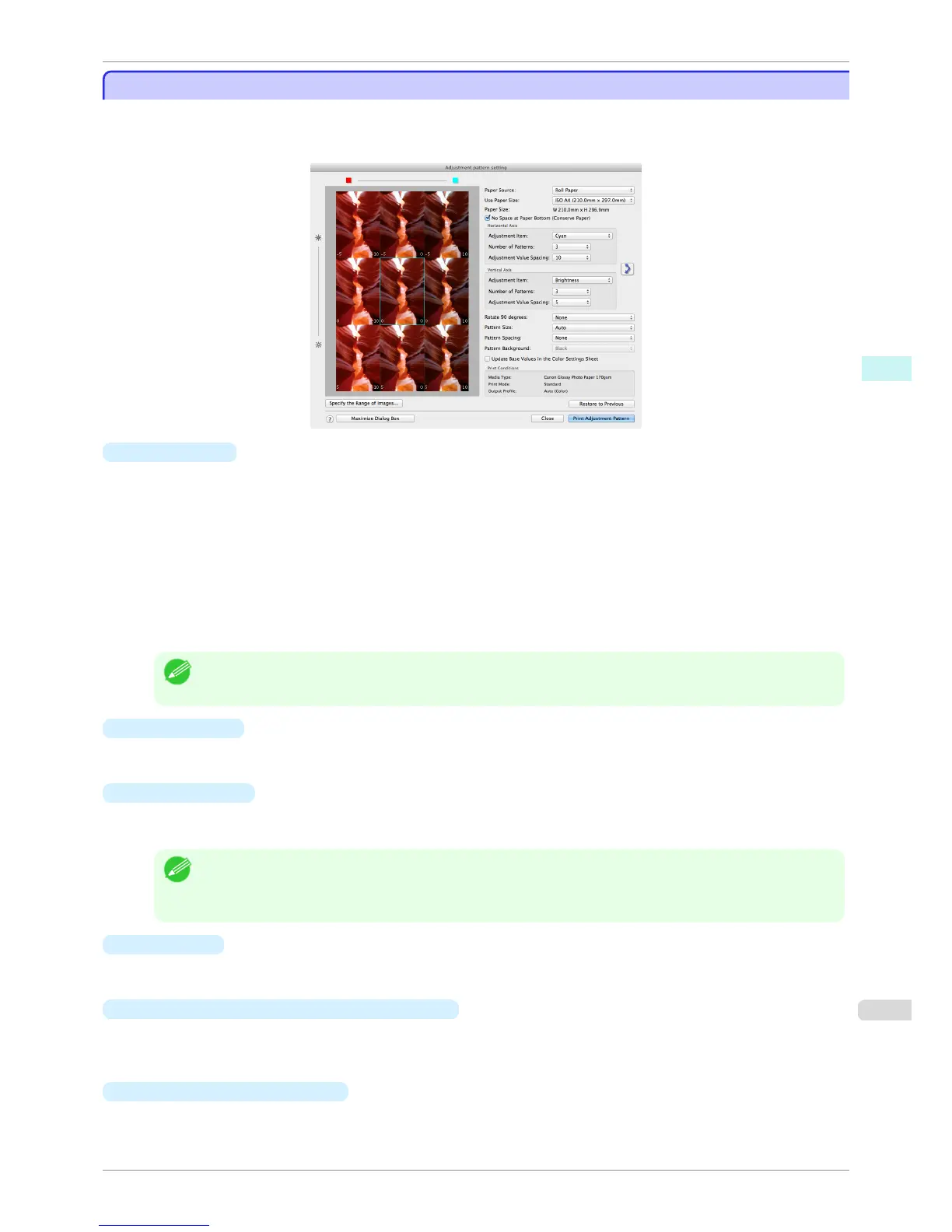
Adjustment pattern setting dialog box
Adjustment pattern setting dialog box
Displays the adjustment pattern by taking images with the adjustment values varying up and down in steps from
the baseline adjustment values in the Color Settings sheet (color or monochrome). This allows you to print the
adjustment pattern and select your preferred adjustment values while comparing the images.
•
Preview Area
This area allows you to view adjustment pattern images side-by-side to check the state when changes to ad-
justment values are applied.
The adjustment values of the image enclosed in the blue frame in the center are used as the base values, with
images arranged around this with the adjustment values varying in steps up and down from these base values.
If you click any of the images, the adjustment pattern is redisplayed with the adjustment values from that im-
age as the base values.
The adjustment values are displayed at the top of each image. If both the Horizontal Axis and Vertical Axis
are configured, the adjustment value for the Horizontal Axis is displayed on the right and the adjustment val-
ue for the Vertical Axis is displayed on the left. If the image is so small that the adjustment values cannot be
displayed, you can check the adjustment values by displaying the tool tip.
Note
• For images where the adjustment values are out of range, an adjustment pattern is not displayed and the message
Out of Range is displayed instead.
•
Paper Source
Selects the paper feed method for the paper to print the adjustment pattern on. You can split the usage be-
tween printing adjustment patterns on cut paper (manual feed) and printing work pieces on roll paper.
•
Use Paper Size
Selects the paper size to print the adjustment pattern on.
The adjustment pattern is printed so that it fits into the selected paper size.
Note
• If the image size is large and Dimensions is selected in Pattern Size, the pattern display might not fit within the
vertical direction of the paper size. In this case, select Auto in Pattern Size.
• The printed paper size is displayed in Paper Size.
•
Paper Size
Since the length in the vertical direction may differ between the Use Paper Size and actual printed material,
this displays the actual output paper size.
•
No Space at Paper Bottom (Conserve Paper)
If a margin appears at the bottom of the paper with the paper size selected in Use Paper Size, you can con-
serve paper by selecting this check box to print excluding the margin area. The state of the length in the verti-
cal direction being shortened to conserve the margin area is reflected in the displayed Paper Size.
•
Horizontal Axis
/Vertical Axis
Configures settings such as the items that change in steps and the number of patterns when multiple adjust-
ment patterns are arranged horizontally or vertically.
iPF6400S
Adjustment pattern setting dialog box
User's Guide
Mac OS Software Print Plug-In for Photoshop / Digital Photo Professional
417













 To Next Page