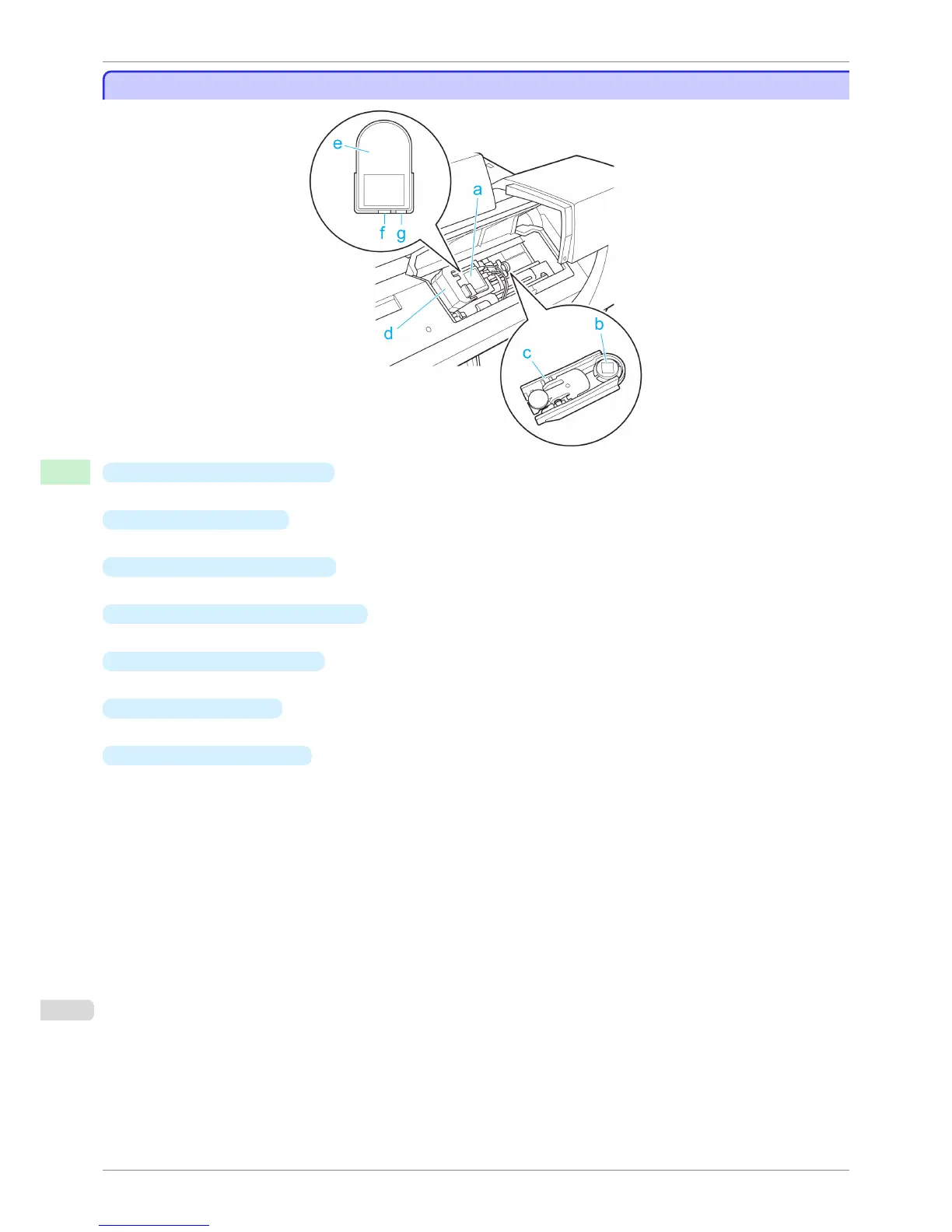
Spectrophotometer Unit Parts - 2
Spectrophotometer Unit Parts - 2
a
Spectrophotometer Carriage
Moves the Spectrophotometer Sensor to the left and right.
b
White Calibration Tile
A white color plate used as the basis for color measurement.
c
White Calibration Tile Holder
A case that fixes the White Calibration Tile in place.
d
Spectrophotometer Sensor Cover
Open this cover to replace the Spectrophotometer Sensor.
e
Spectrophotometer Sensor
Reads the colors of color measurement patterns.
f
Mini USB Connector
Connects the cable for transmitting data read by the Spectrophotometer Sensor.
g
Power Supply Connector
Connects the Spectrophotometer Sensor to a power supply.
Spectrophotometer Unit Parts - 2
iPF6400S
User's Guide
Printer Parts Optional accessories
618













 To Next Page