4
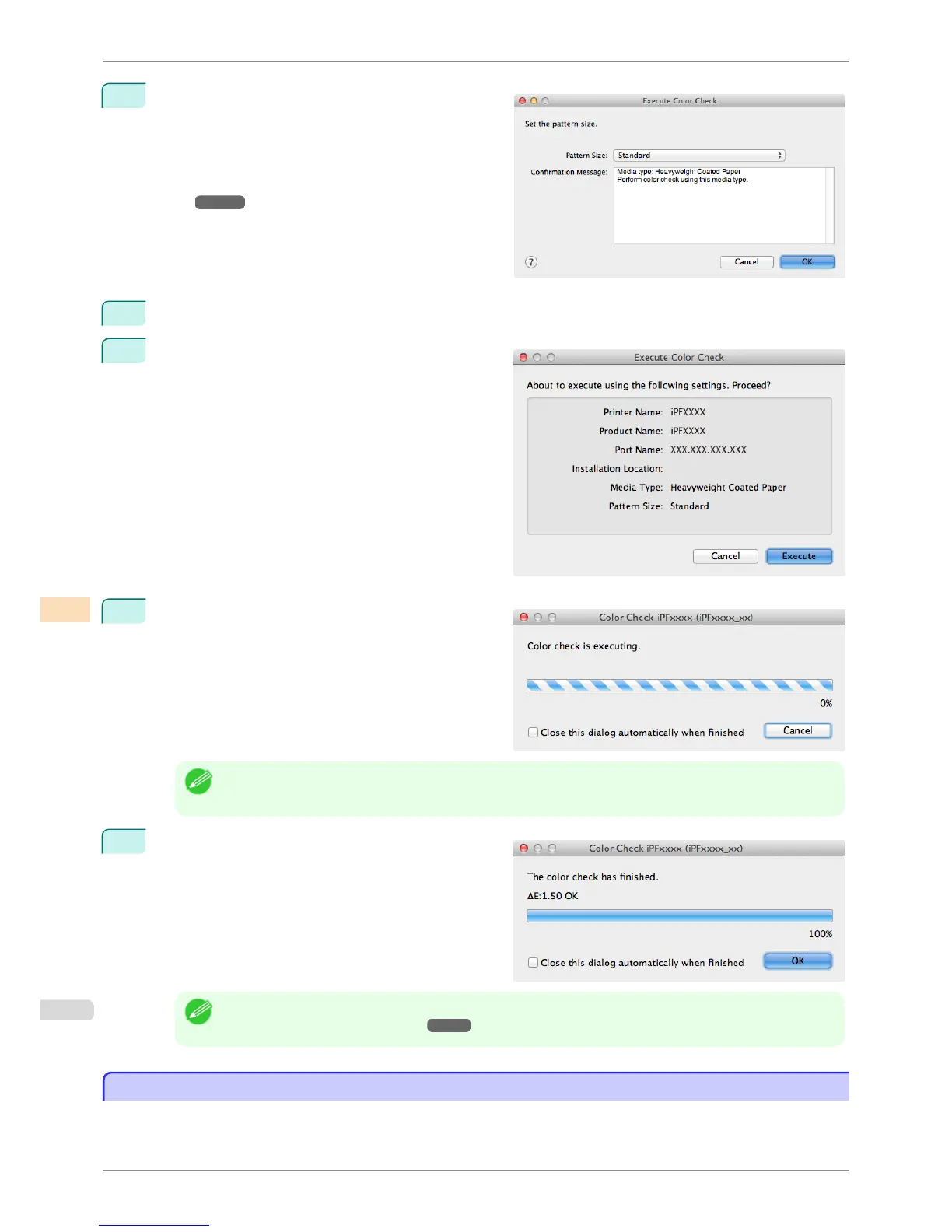
The Execute Color Check dialog box is displayed.
Select Pattern Size.
To increase the precision of the color check, we rec-
ommend that you configure the same settings as
when Auto Adjust (High Precision) was executed in
color calibration. (See "Executing Color Calibra-
tion.")
➔P.800
5
Click the OK button.
6
When the Execute Color Check dialog box is dis-
played, check the details.
7
Click the Execute button.
The color check is executed.
Note
• You can exit the color check in the middle by clicking the Cancel button. However, it may take some time to
end.
8
Check the results.
Note
• We recommend that you execute color calibration if the results exceed the threshold values.
(See "Executing Color Calibration.") ➔ P.800
Scheduling Color Check
Scheduling Color Check
You can configure a schedule to automatically perform color check at the specified dates and times.
Once configured, the color check is executed on the paper that is loaded at the specified date and time.
Scheduling Color Check
iPF6400S
User's Guide
Color Management Color Calibration Management Console (Mac OS)
810













 To Next Page