Registering Execution Logs in Favorites
Registering Execution Logs in Favorites
You can register frequently used execution logs in favorites for Acquire Color Measurement Data. Registering an
operation in favorites allows you to attach a separate name for easily recalling the operation.
Note
• This step can be executed when a printer that has a spectrophotometer unit installed is selected.
• You can register up to 30 execution logs in the favorites.
1
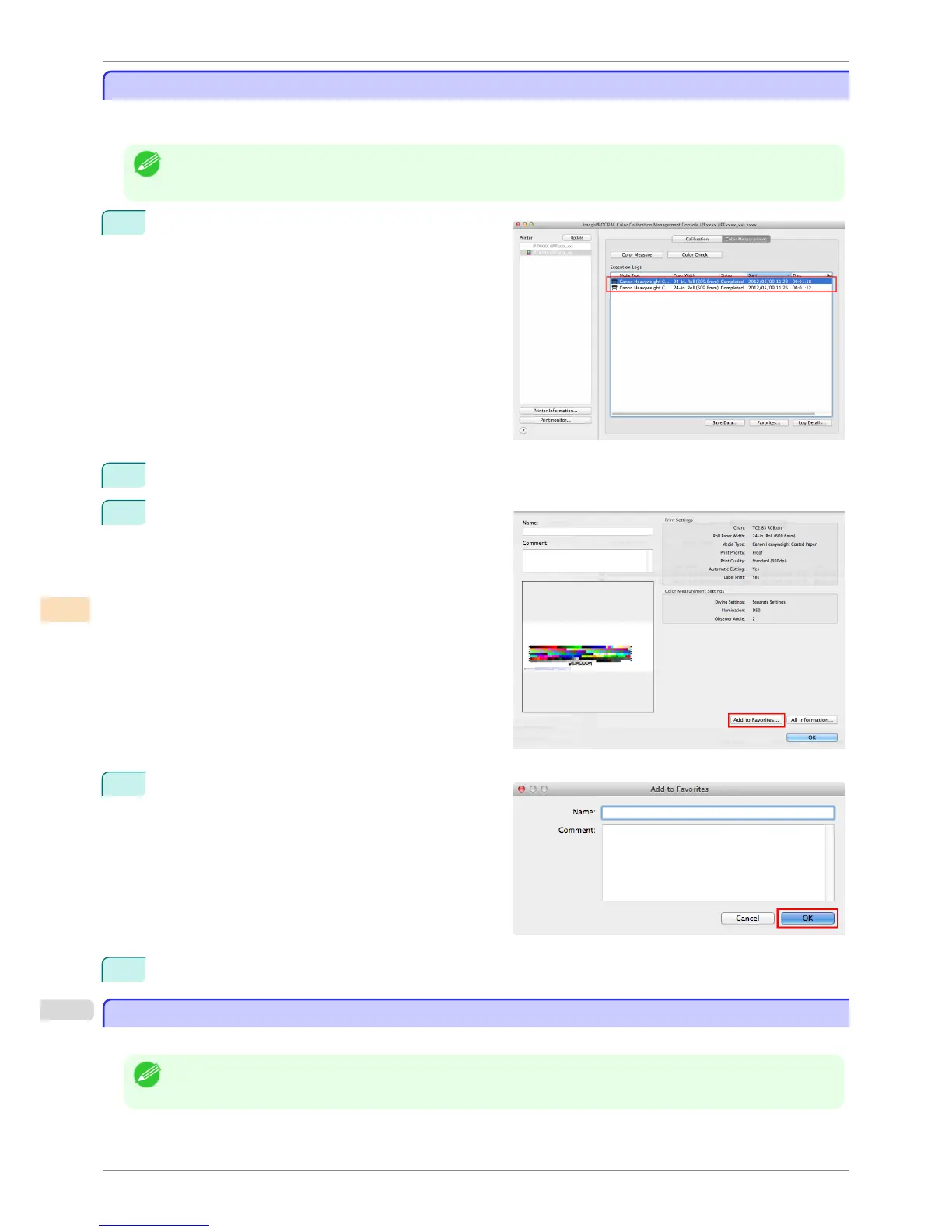
Select the execution log to register in favorites in Ex-
ecution Logs in the main window (Color Measure-
ment sheet).
2
Click the Log Details button.
3
Click the Add to Favorites button in the Execution
Log Details dialog box.
4
Enter the name in Name. Enter a comment in Com-
ment if needed.
5
Click the OK button.
Deleting Execution Logs From Favorites
Deleting Execution Logs From Favorites
You can delete Acquire Color Measurement Data execution logs from the favorites.
Note
• This step can be executed when a printer that has a spectrophotometer unit installed is selected.
Registering Execution Logs in Favorites
iPF6400S
User's Guide
Color Management Color Calibration Management Console (Mac OS)
812













 To Next Page