For more information about Set Configuration, see "Set Configuration Dialog Box." ➔ P.245
•
Defaults button
Click the button to return all of the settings on the Main sheet to their defaults.
Page Setup Sheet
Page Setup Sheet
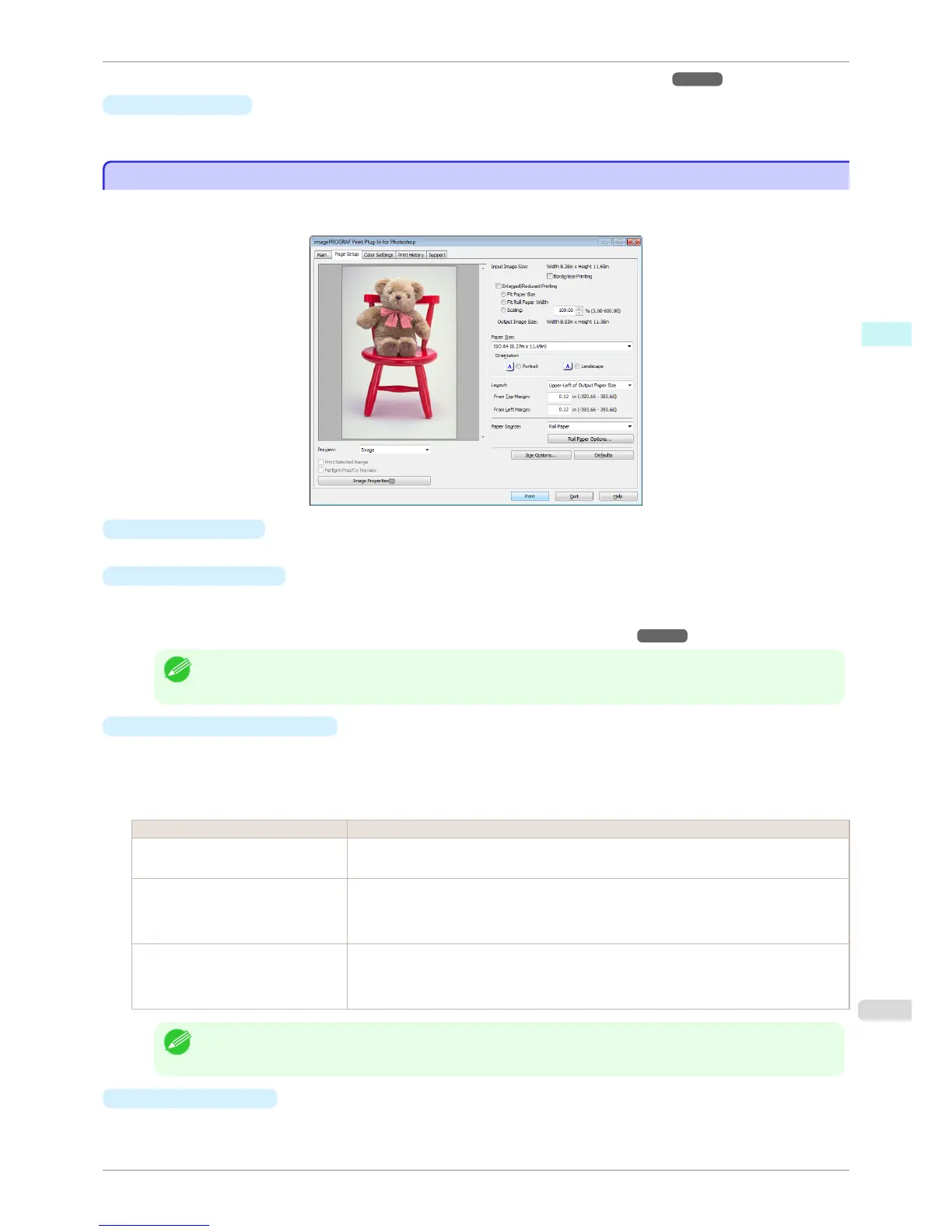
You can use this sheet to set the size of the image to be printed, the media size, and whether to enlarge/reduce the
image.
•
Input Image Size
The size of the image imported to Print Plug-In for Photoshop/Digital Photo Professional is displayed.
•
Borderless Printing
When you place a checkmark here, the Specify Roll Paper Width dialog box is displayed and you can print
an image without borders.
For more information about Borderless Printing, see "Print with No Borders." ➔ P.265
Note
• Available only if rolls are selected in Paper Source.
•
Enlarged/Reduced Printing
When you place a checkmark here, you can print enlarged/reduced images.
When printing an enlarged/reduced image, select the method for enlargement/reduction. The image size sent
to the printer is displayed matching the selected method in Output Image Size.
The following settings are available for enlarged/reduced printing.
Setting Details
Fit Paper Size This automatically enlarges/reduces the entire image imported to Print Plug-In to match the
export media size when printing.
Fit Roll Paper Width This automatically enlarges/reduces the entire image imported to Print Plug-In to match the
width of the roll paper with the width of the image when printing.
*Displayed only if rolls are selected in Paper Source.
Scaling This enlarges/reduces the entire image by the specified scaling value. Input the scaling value
in numerical characters. You can specify a range between 5-600%.
*You can change the numbers by clicking either ▲ or ▼.
Note
• This is not displayed when a checkmark is placed in Borderless Printing.
•
Output Image Size
The output image size is displayed up to one place after the decimal point in millimeters.
iPF6400S
Page Setup Sheet
User's Guide
Windows Software Print Plug-In for Photoshop / Digital Photo Professional
235













 To Next Page