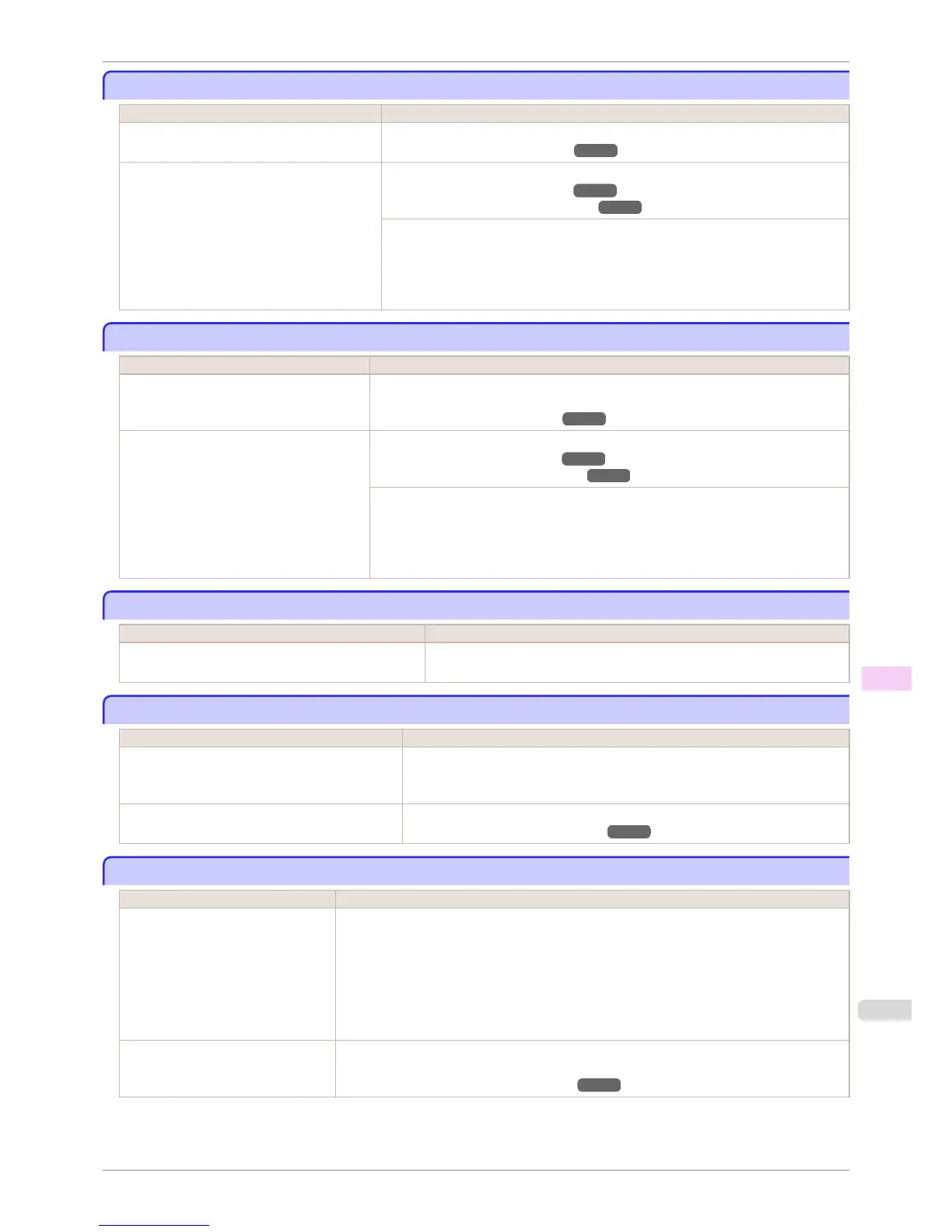
The contrast becomes uneven during printing
The contrast becomes uneven during printing
Cause Corrective Action
The paper feed amount is out of adjustment. Adjust the feed amount.
(See "Adjusting the Feed Amount.") ➔ P.714
The type of paper specified in the printer driver
does not match the type loaded in the printer.
Load paper of the same type as you have specified in the printer driver.
(See "Loading Rolls in the Printer.") ➔ P.473
(See "Loading Sheets in the Feed Slot.") ➔ P.495
Make sure the same type of paper is specified in the printer driver as you have loaded in
the printer.
1.
Press the Stop button and stop printing.
2.
Change the type of paper in the printer driver and try printing again.
The length of printed images is inaccurate in the feeding direction
The length of printed images is inaccurate in the feeding direction
Cause Corrective Action
In the Control Panel menu, Adj. Priority is
set to Print Quality.
Set Adj. Priority to Print Length in the Control Panel menu, and then execute Adjust
Length.
(See "Adjusting the Feed Amount.") ➔ P.714
The type of paper specified in the printer driv-
er does not match the type loaded in the
printer.
Load paper of the same type as you have specified in the printer driver.
(See "Loading Rolls in the Printer.") ➔ P.473
(See "Loading Sheets in the Feed Slot.") ➔ P.495
Make sure the same type of paper is specified in the printer driver as you have loaded in
the printer.
1.
Press the Stop button and stop printing.
2.
Change the type of paper in the printer driver and try printing again.
Images are printed crooked
Images are printed crooked
Cause Corrective Action
In the Control Panel menu, Skew Check Lv. is set to
Loose or Off.
In the Control Panel menu, set Skew Check Lv. to High Accuracy or Stand-
ard.
Documents are printed in monochrome
Documents are printed in monochrome
Cause Corrective Action
In the Advanced Settings of the printer driver,
Monochrome or Monochrome (Photo), is speci-
fied in Color Mode.
In the Advanced Settings of the printer driver, specify Color in Color Mode and try
printing again.
The Printhead nozzles are clogged. Print a test pattern to check the color ink nozzles and see if they are clogged.
(See "Checking for Nozzle Clogging.") ➔ P.824
Line thickness is not uniform
Line thickness is not uniform
Cause Corrective Action
In the Special Settings dialog box of
the Windows printer driver, Fast
Graphic Process is selected.
Access the printer driver Properties dialog box from Print in the File menu of the source appli-
cation, and follow these steps to print.
1.
Clear the option Open Preview When Print Job Starts on the Main sheet.
2.
Clear the option Page Layout on the Layout sheet.
3.
Click the Special Settings button on the Layout sheet to display the Special Settings dialog
box, and then clear the option Fast Graphic Process.
The blue Switch on the platen is set in-
correctly.
Move the Switch numbered corresponding to the size of paper for printing opposite to the ● posi-
tion.
(See "Setting the Blue Switch on the Platen.") ➔ P.886
iPF6400S
The contrast becomes uneven during printing
User's Guide
Troubleshooting Problems with the printing quality
889













 To Next Page