Operations and Display Screen
Operations and Display Screen
Control Panel .................................................................................................................................................................... 570
Control Panel Display .................................................................................................................................................... 572
How to View Instructions with Navigate ............................................................................................................... 576
Checking Instructions During Printer Operations ............................................................................................ 577
Control Panel
Control Panel
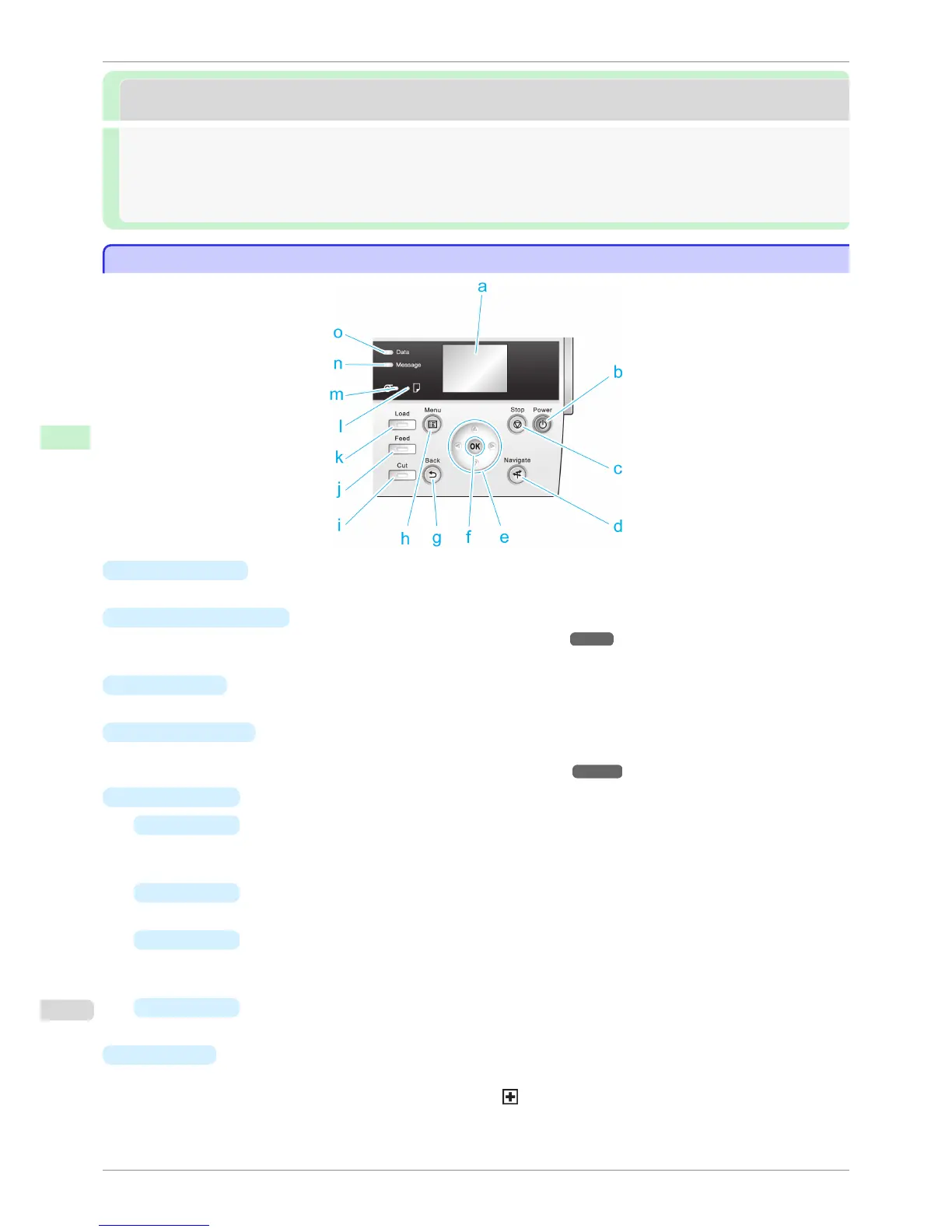
a
Display Screen
Shows printer menus, as well as the printer status and messages.
b
Power button (green)
Turns the printer on and off. (See "Turning the Printer On and Off.") ➔ P.21
The Power button is lit when the printer is on or in Sleep mode.
c
Stop button
Cancels print jobs in progress and ends the ink drying period.
d
Navigate button
Enables you to check instructions for loading and removing paper or replacing ink tanks or printheads, as well
as other operations. (See "How to View Instructions with Navigate.") ➔ P.576
e
Arrow buttons
•
◀ button
Press this button on the Tab Selection screen to move to another tab.
In menu items requiring numerical input, press this button to move to another digit.
•
▲
button
Press this button when viewing menus to display the next menu item or setting value.
•
▶
button
Press this button on the Tab Selection screen to move to another tab.
In menu items requiring numerical input, press this button to move to another digit.
•
▼
button
Press this button when viewing menus to display the next menu item or setting value.
f
OK
button
Press this button on the Tab Selection screen to display the menu of the tab shown.
Pressing this button in menu items of each tab for which
is displayed at left will move to the lower level of
the menu item, enabling you to execute menu commands or set menu values.
Also press this button if the Display Screen indicates to press the OK button.
Control Panel
iPF6400S
User's Guide
Control Panel Operations and Display Screen
570













 To Next Page