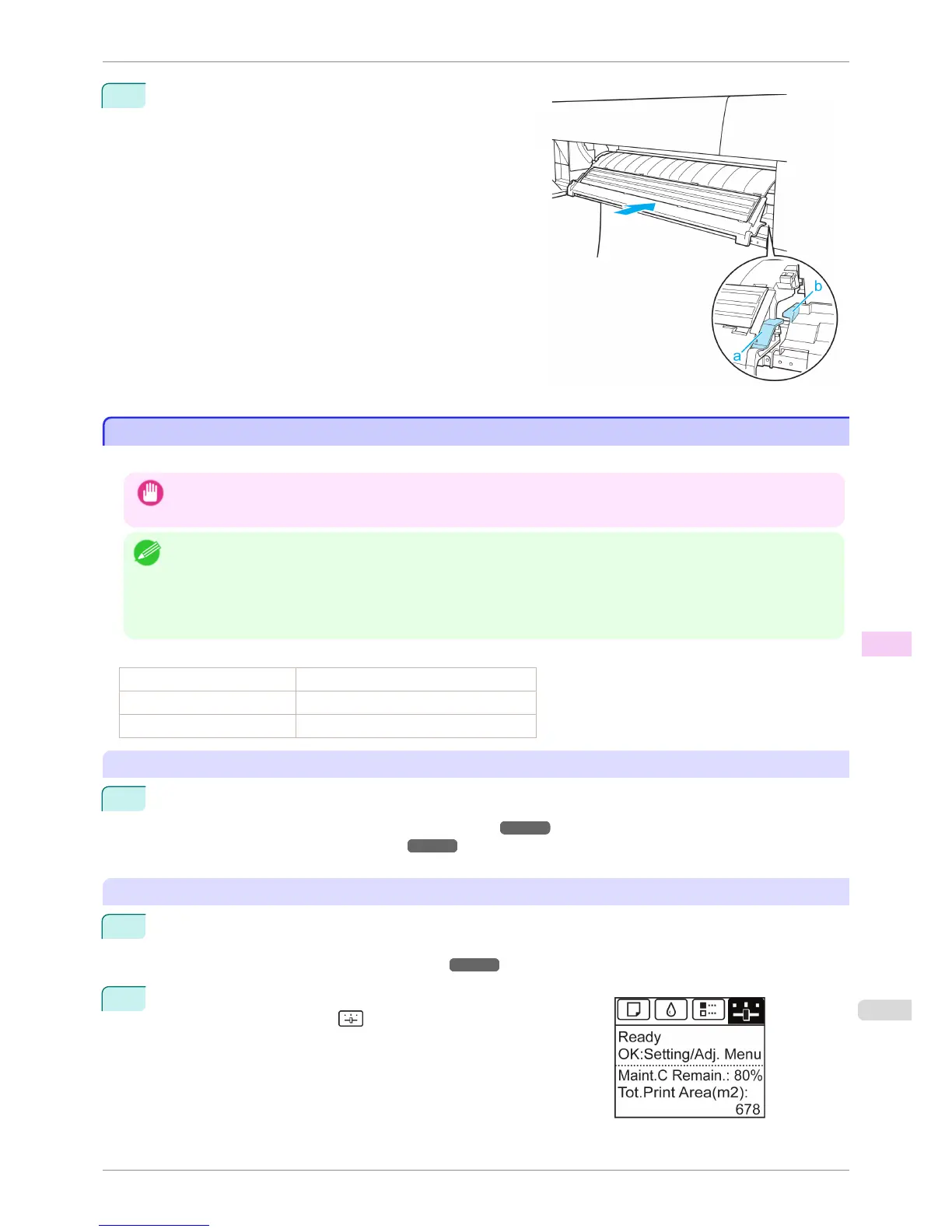
3
Grasp the blue handles on the left and right sides of the
Spectrophotometer Eject Guide, align the protruding
parts of the Spectrophotometer Eject Guide (a) with the
Spectrophotometer Unit guide (b), and push it in until it
clicks.
Preparing to Transfer the Printer
Preparing to Transfer the Printer
To protect the internal parts in transit, always follow these steps before transferring the printer to a new location.
Important
• Avoid tilting the printer excessively during transit. This may cause ink in the printer to leak and cause stains. If it is
necessary to tilt the printer in transit, contact your Canon dealer.
Note
• Depending on the state of the printer, part replacement may be necessary when preparing to transfer the printer (that is,
when you execute the printer menu item to prepare for transfer).
• This work is not necessary when carrying the printer or moving it while mounted on the optional stand.
When carrying the printer, always have three or more people securely hold the Carrying Handles in the left and right
sides of the base and keep the printer level.
Items to Prepare
Setup Guide Used for reference when packing the printer
Packaging material Used to pack the printer
New Maintenance Cartridge (2) Used to draw in ink
Remove paper
1
Remove the paper.
•
Rolls (See "Removing the Roll from the Printer.") ➔ P.478
•
Sheets (See "Removing Sheets.") ➔ P.504
Access the Prep.MovePrinter menu
1
If the Display Screen shows a message instructing you to replace the Maintenance Cartridge, replace the
Maintenance Cartridge.
(See "Replacing the Maintenance Cartridge.") ➔ P.832
2
On the Tab Selection screen of the Control Panel, press ◀ or ▶ to
select the Settings/Adj. tab ( ).
iPF6400S
Preparing to Transfer the Printer
User's Guide
Maintenance and Consumables Other Maintenance
855













 To Next Page