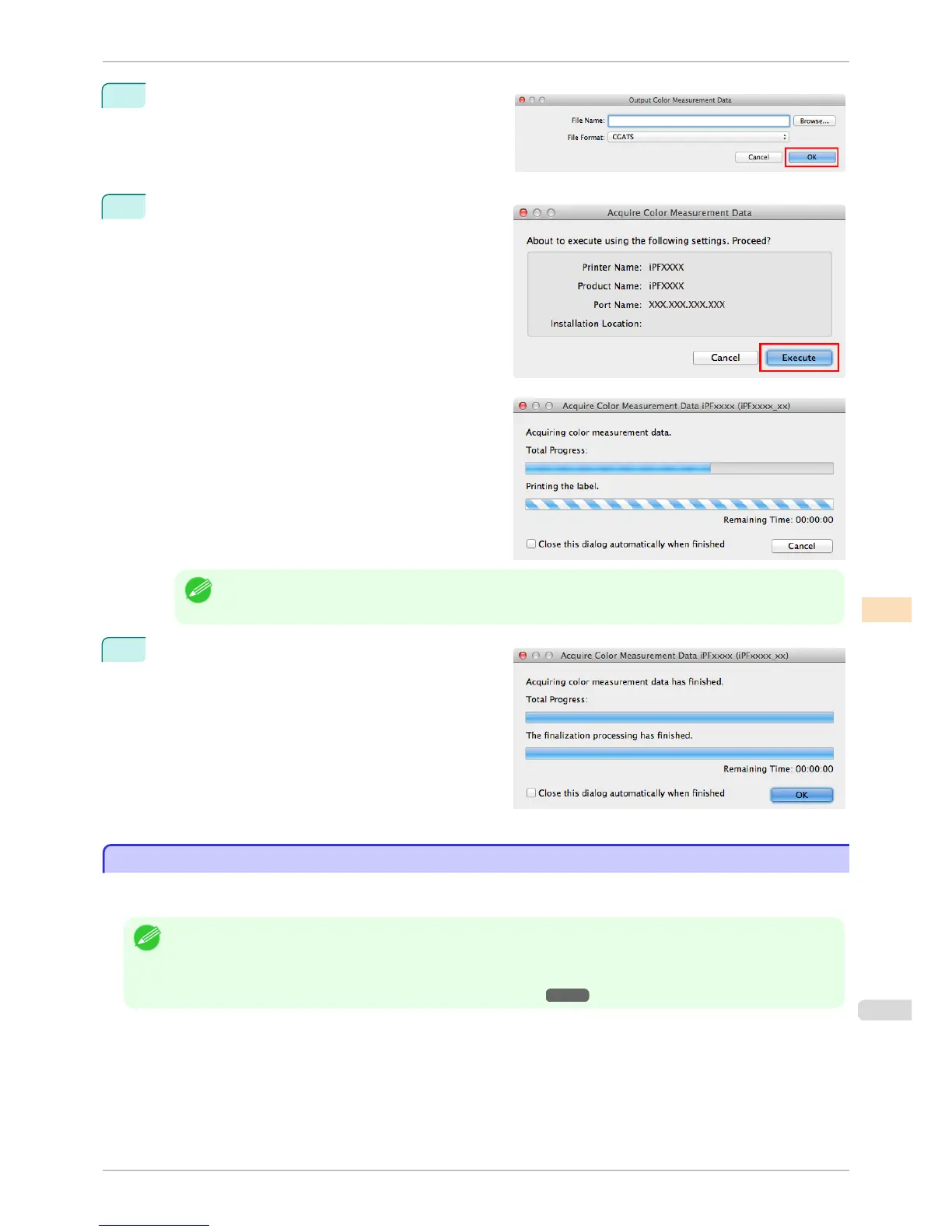
9
The Output Color Measurement Data dialog box is
displayed.
Select the file to save the color measurement data in-
to and click the OK button.
10
The Acquire Color Measurement Data dialog box is
displayed.
Click the Execute button.
The color chart is printed and color measurement be-
gins.
Note
• You can exit the acquire color measurement data operation in the middle by clicking the Cancel button. Howev-
er, it may take some time to end.
11
Click the OK button.
Once the color measurement has finished, the color
measurement data is saved on the computer.
Executing Color Check
Executing Color Check
When a color check is executed, a built-in pattern is printed, the color difference from a calibration target registered
in the printer is calculated, and the check results are displayed.
Note
• This step can be executed when a printer that has a spectrophotometer unit installed is selected.
• When printing the color check adjustment pattern, the calibration adjustment values are applied even if Use Adj. Value is
set to Disabled in the Control Panel menu.
(See "Color Calibration Using the Spectrophotometer Unit (option).") ➔ P.742
iPF6400S
Executing Color Check
User's Guide
Color Management Color Calibration Management Console (Mac OS)
807













 To Next Page