Customize Media Settings
Customize Media Settings
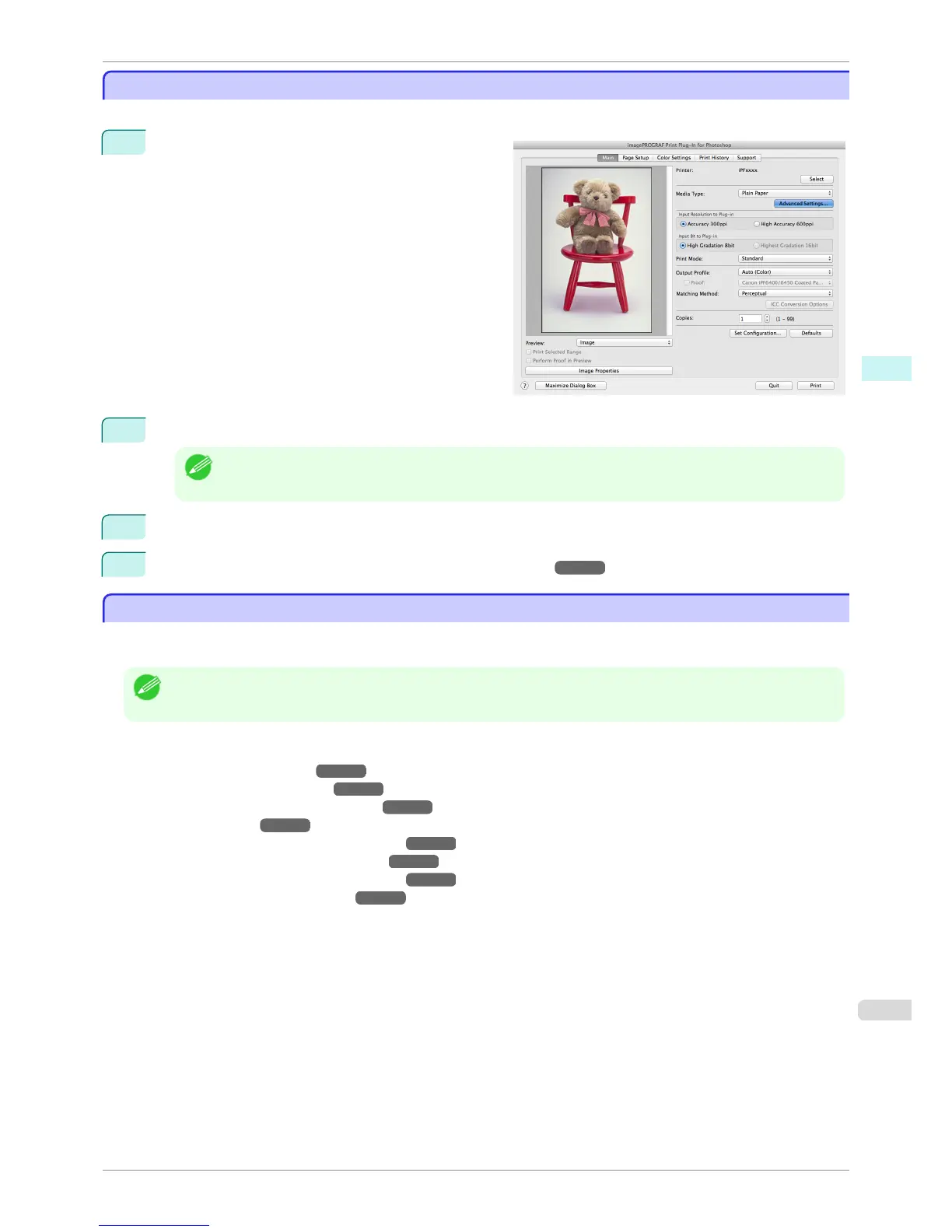
You can customize media settings.
1
Display the Main sheet.
2
Select the media type that you wish to customize in Media Type.
Note
• Always select media type that is actually set in the printer. When the media you chose is different from the
media set in the printer, you may not receive the desired print results.
3
Click the Advanced Settings button.
4
Perform the settings in the Paper Detailed Settings Dialog Box ➔ P.420 and click the OK button.
Utilize Print History
Utilize Print History
When you perform various settings and print in Print Plug-In, those settings are saved as print history. Also, you
can export and import as files. You can store often-used print history under a specified name in print preferences.
Note
• You can save up to 200 print history items. All items over 200 are deleted in chronological order.
You can do the following things using print history.
•
Confirm Print History Details ➔ P.444
•
Apply Print History to an Image ➔ P.445
•
Store Print History to Print Preferences ➔ P.445
•
Delete Print History ➔ P.447
•
Export Print History from Print Preferences ➔ P.448
•
Import Print History to Print Preferences ➔ P.449
•
Delete Print History from Print Preferences ➔ P.450
•
Set Information to Print with Image ➔ P.451
iPF6400S
Customize Media Settings
User's Guide
Mac OS Software Print Plug-In for Photoshop / Digital Photo Professional
443













 To Next Page