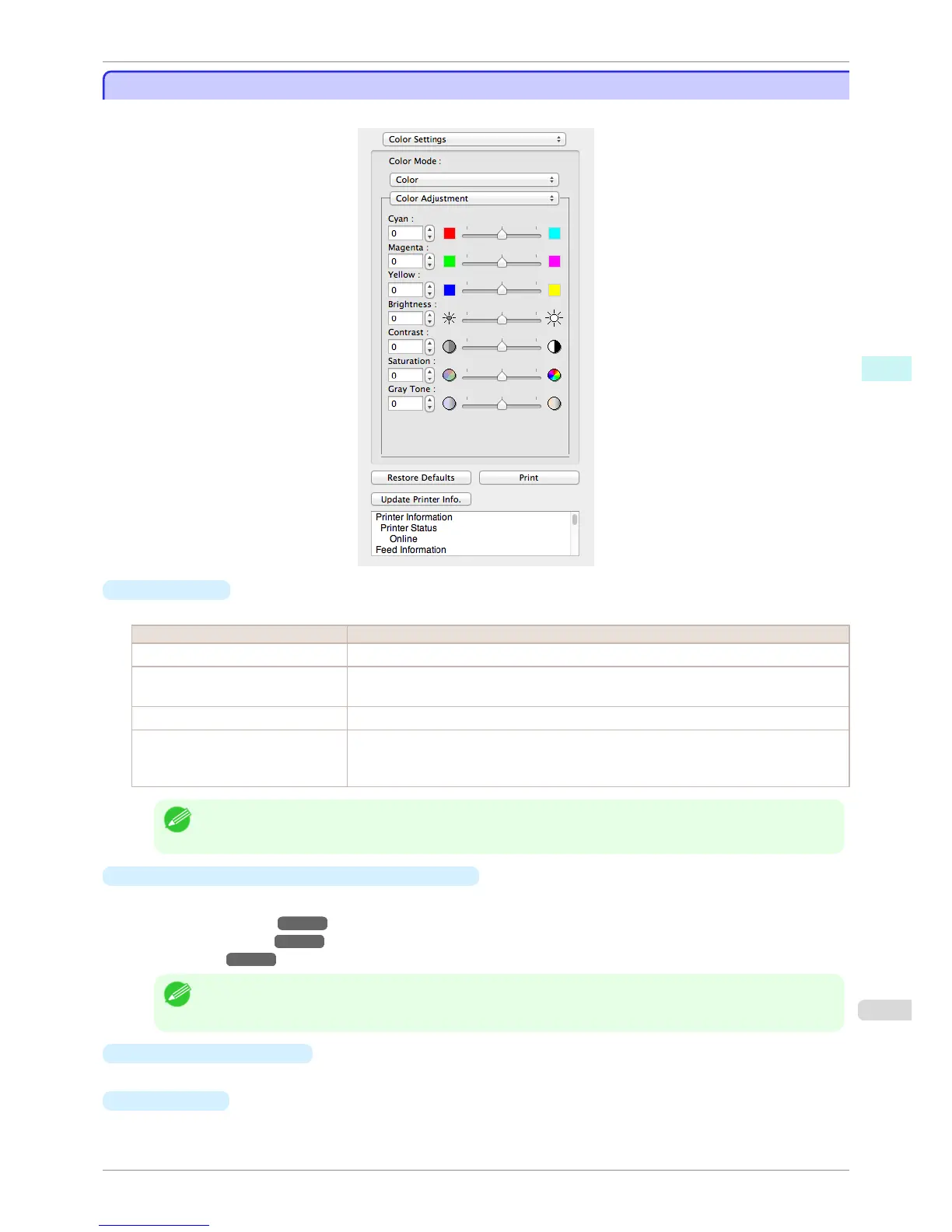
Color Settings Panel
Color Settings Panel
This panel appears when you select Color Settings in the dialog area.
•
Color Mode
You can select a color mode to suit the print job.
Setting Details
Color Enables color printing.
Monochrome (Photo) Prints monochrome photo image data in a gray scale that is free of color casting (phenomenon
of grays that appear tinted).
Monochrome Disables color printing and converts image from continuous color to grayscaled monochrome.
No color correction Prints without performing color matching in the printer driver. Select this when color matching
is performed by the application such as Adobe Photoshop or when you want to print color
charts using the profile creation tool.
Note
• The availability of settings depends on the print priority and media type selections.
•
Color Adjustment / Gray Adjustment / Matching
You can set the color adjustment and matching.
•
Color Adjustment ➔ P.368
•
Gray Adjustment ➔ P.369
•
Matching ➔ P.371
Note
• You can select Gray Adjustment only after Monochrome (Photo) has been selected in Color Mode.
• Matching is not displayed if No color correction has been selected in Color Mode.
•
Restore Defaults
Button
Click the button to reset to the setting when starting Free Layout.
•
Print
Button
Click the button to begin printing.
iPF6400S
Color Settings Panel
User's Guide
Mac OS Software Free Layout
367













 To Next Page