7
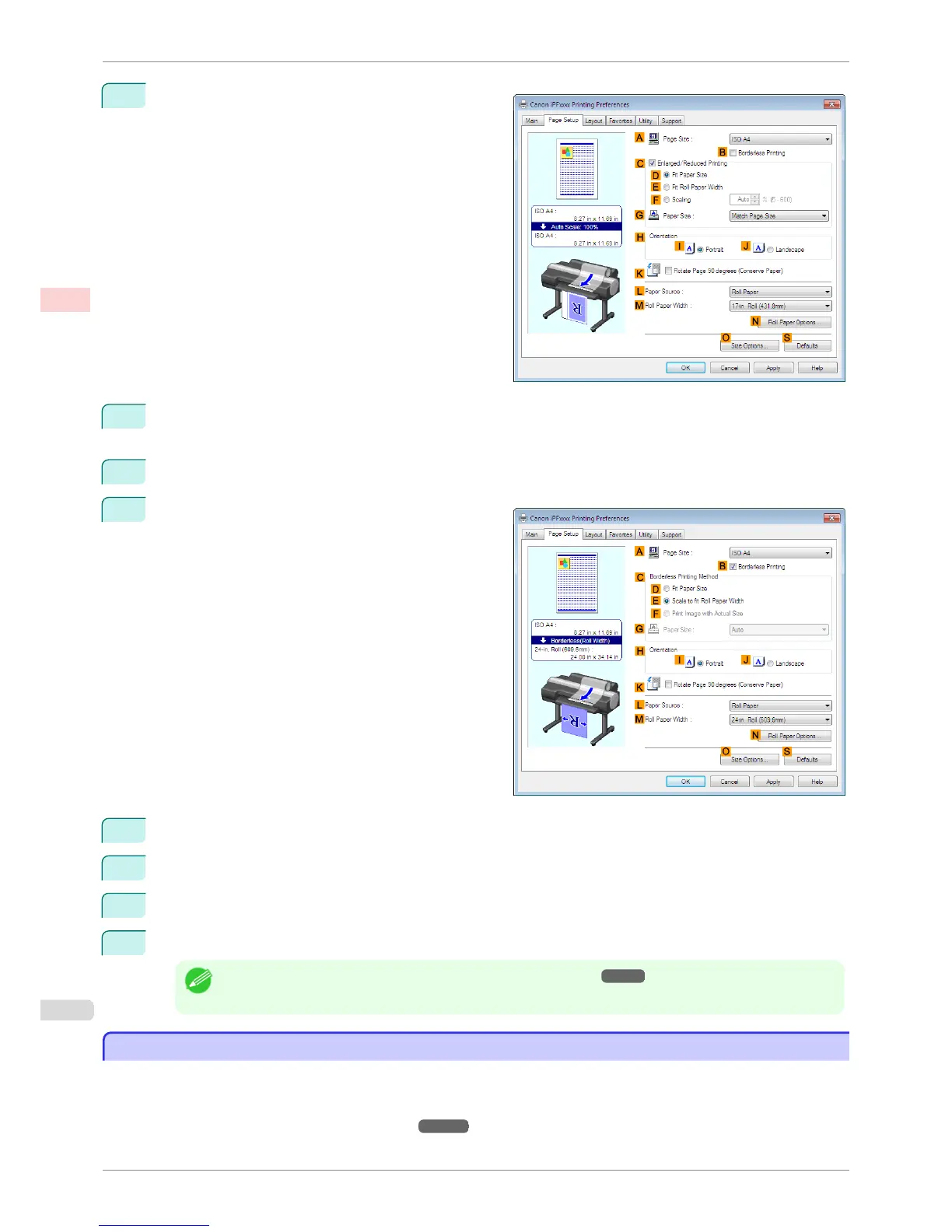
Click the Page Setup tab to display the Page Setup
sheet.
8
In the A Page Size list, click the size of the original as specified in the application. In this case, click ISO
A4.
9
Select and click a roll paper in the L Paper Source list.
10
Select the B Borderless Printing check box to dis-
play the Information dialog box.
11
Select the width of the loaded roll in the Roll Paper Width list—in this case, click 10-in. Roll (254.0mm).
12
Click OK to close the Information dialog box.
13
In C Borderless Printing Method, make sure E Scale to fit Roll Paper Width is selected.
14
Confirm the print settings and print as desired.
Note
• For tips on confirming print settings, see "Confirming Print Settings ." ➔ P.153
Borderless Printing by Resizing Originals to Fit the Roll Width (Mac OS)
Borderless Printing by Resizing Originals to Fit the Roll Width (Mac OS)
This topic describes how to enlarge originals before borderless printing to match the roll width, based on the follow-
ing example.
If you use an A1 or A2 roll for borderless printing, insert the provided Spacer for Borderless Printing on the Roll
Holder. (See "Loading Rolls on the Roll Holder.") ➔ P.471
Borderless Printing by Resizing Originals to Fit the Roll Width (Mac OS)
iPF6400S
User's Guide
Enhanced Printing Options Borderless Printing
90













 To Next Page