4
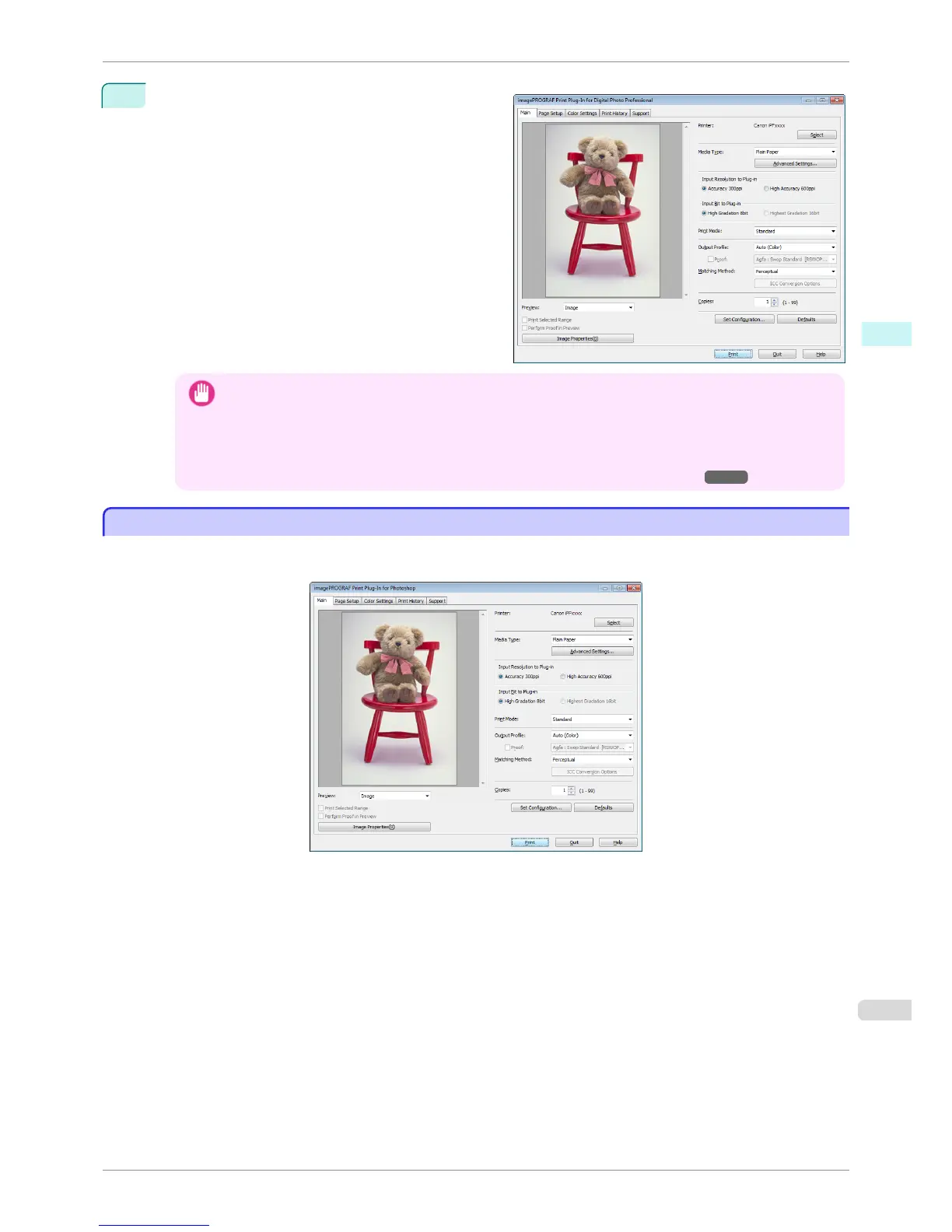
Select Plug-in printing from the File menu and then
select the output plug-in that matches your printer.
The imagePROGRAF Print Plug-In for Digital Photo
Professional window (hereinafter referred to as the
Print Plug-In window) is displayed.
Important
• When a profile is created with a commercially available profile creation tool, it may be created in ICCv4 format.
When an image source profile is ICCv4, you must install AdobeCMM or use Print Plug-In in a Windows Vista
or later environment.
When Adobe CMM is not installed in a Windows XP environment, a message is displayed, and the source
profile changes to Adobe RGB. To use an ICCv4 profile in a Windows XP environment, exit Plug-In and then
install Adobe CMM. For details on installing Adobe CMM, refer to "Using Adobe CMM" ➔ P.258 .
Print Plug-In for Photoshop/Digital Photo Professional Main Window
Print Plug-In for Photoshop/Digital Photo Professional Main Window
The Print Plug-In for Photoshop/Digital Photo Professional main window consists of the sheet selection area, and
the preview and button area.
iPF6400S
Print Plug-In for Photoshop/Digital Photo Professional Main Window
User's Guide
Windows Software Print Plug-In for Photoshop / Digital Photo Professional
229













 To Next Page