Note
• You can select multiple paper.
3
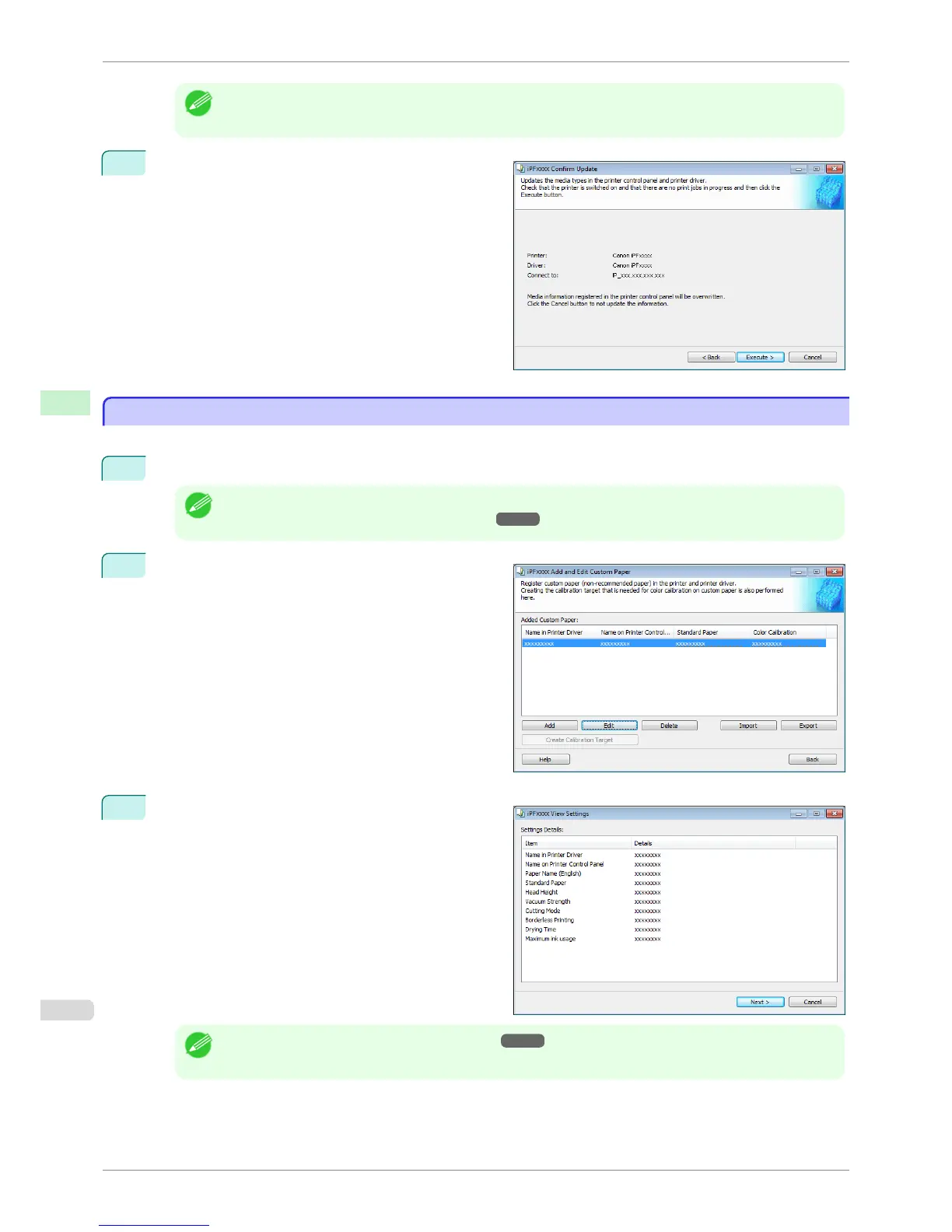
The Confirm Update dialog box is displayed.
Confirm the updates and then click the Execute but-
ton.
The custom paper is deleted from the control panel of
the printer and from the printer driver of the PC you
are using.
Edit Custom Paper
Edit Custom Paper
You can change the settings of custom paper you have already added.
1
Open the Add and Edit Custom Paper dialog box.
Note
• For details on the procedure for opening the Add and Edit Custom Paper dialog box, see "Using Paper Other
than Genuine Paper and Feed Confirmed Paper." ➔ P.523
2
Select the paper you want to edit from the Added
Custom Paper list and then click the Edit button.
3
The View Settings dialog box is displayed.
Follow the on-screen directions and change the set-
tings as required.
Note
• Refer to Steps 5 to 15 of the "Add Custom Paper" ➔ P.526 for details on how to configure each setting.
Edit Custom Paper
iPF6400S
User's Guide
Handling and Use of Paper Media Configuration Tool (Windows)
532













 To Next Page