•
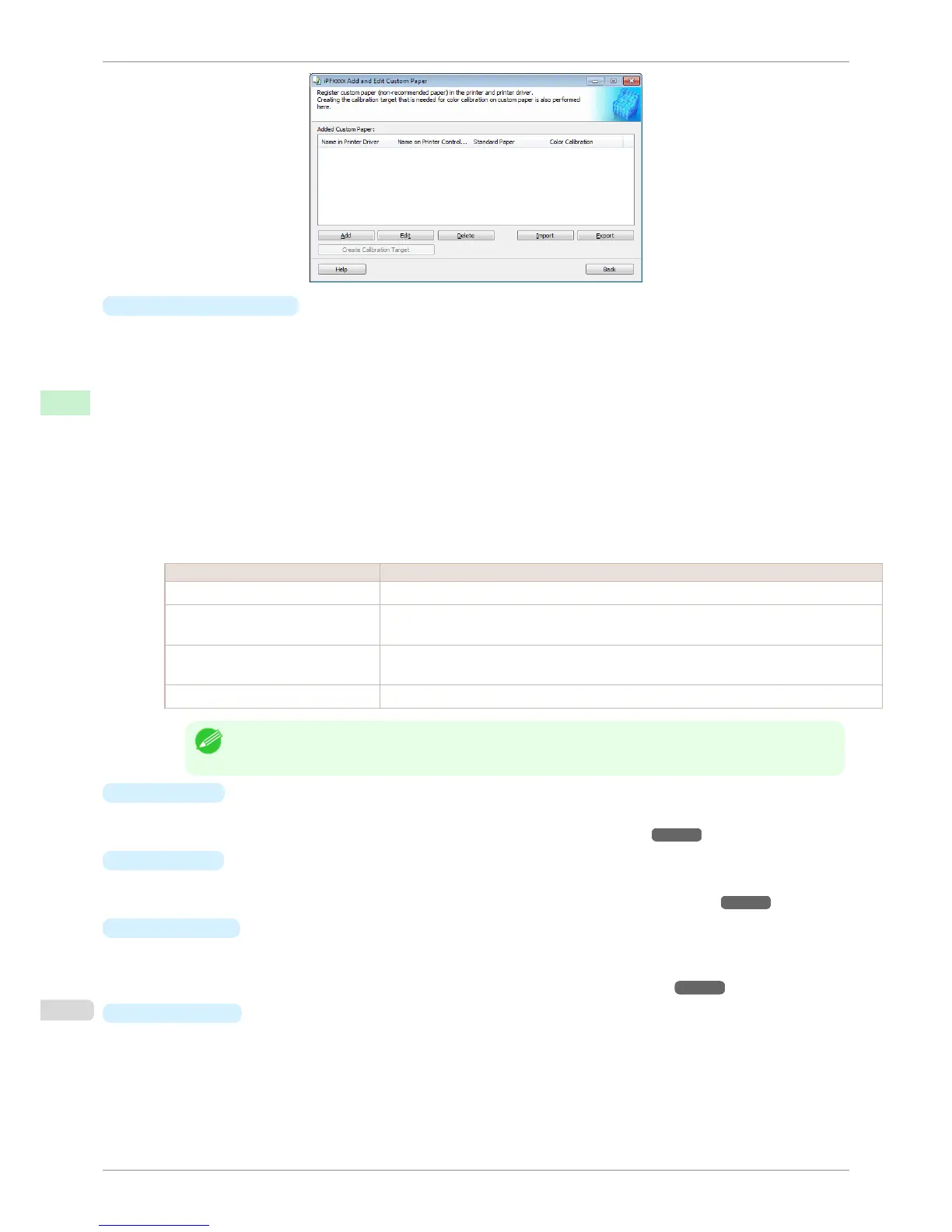
Added Custom Paper
Added custom paper is displayed here.
•
Name in Printer Driver
Added custom paper is displayed in the printer driver using this name.
•
Name on Printer Control Panel
Added custom paper is displayed on the printer control panel using this name.
•
Standard Paper
Displays the paper selected as the standard paper when the custom paper was added.
•
Color Calibration
Displays whether or not color calibration can be executed in the control panel and imagePROGRAF Color
Calibration Management Console.
In order to perform color calibration, you need to create a calibration target and register the calibration
target in the printer in advance.
Setting Details
Can execute Color calibration Auto Adjust and Auto Adjust (High Precision) can be executed.
Only Auto Adjust (High Precision)
allowed
Color calibration Auto Adjust (High Precision) can be executed. Auto Adjust cannot be exe-
cuted.
Target not registered Color calibration cannot be executed because the calibration target is not registered in the
printer.
Cannot execute Color calibration cannot be executed on this paper.
Note
• The optional spectrophotometer unit is required in order to create a calibration target.
•
Add Button
To add new custom paper to the printer control panel and printer driver, click this button.
For details on the procedure for adding custom paper, see "Add Custom Paper." ➔ P.526
•
Edit
Button
To change the settings of added custom paper, select the paper to edit and click this button.
For details on the procedure for changing custom paper settings, see "Edit Custom Paper." ➔ P.532
•
Delete
Button
To delete added custom paper from the printer control panel and printer driver in your computer, select the
paper to delete and click this button.
For details on the procedure for deleting custom paper, see "Delete Custom Paper." ➔ P.531
•
Import
Button
To add custom paper to the printer control panel and printer driver by importing a Custom Media Information
File saved in a folder, click this button.
The Custom Media Information File is common to the iPF6400S, iPF8400S, and iPF9400S.
If an imported custom media information file contains calibration target information, the calibration target is al-
so registered in the printer main unit.
Using Paper Other than Genuine Paper and Feed Confirmed Paper
iPF6400S
User's Guide
Handling and Use of Paper Media Configuration Tool (Windows)
524













 To Next Page