1
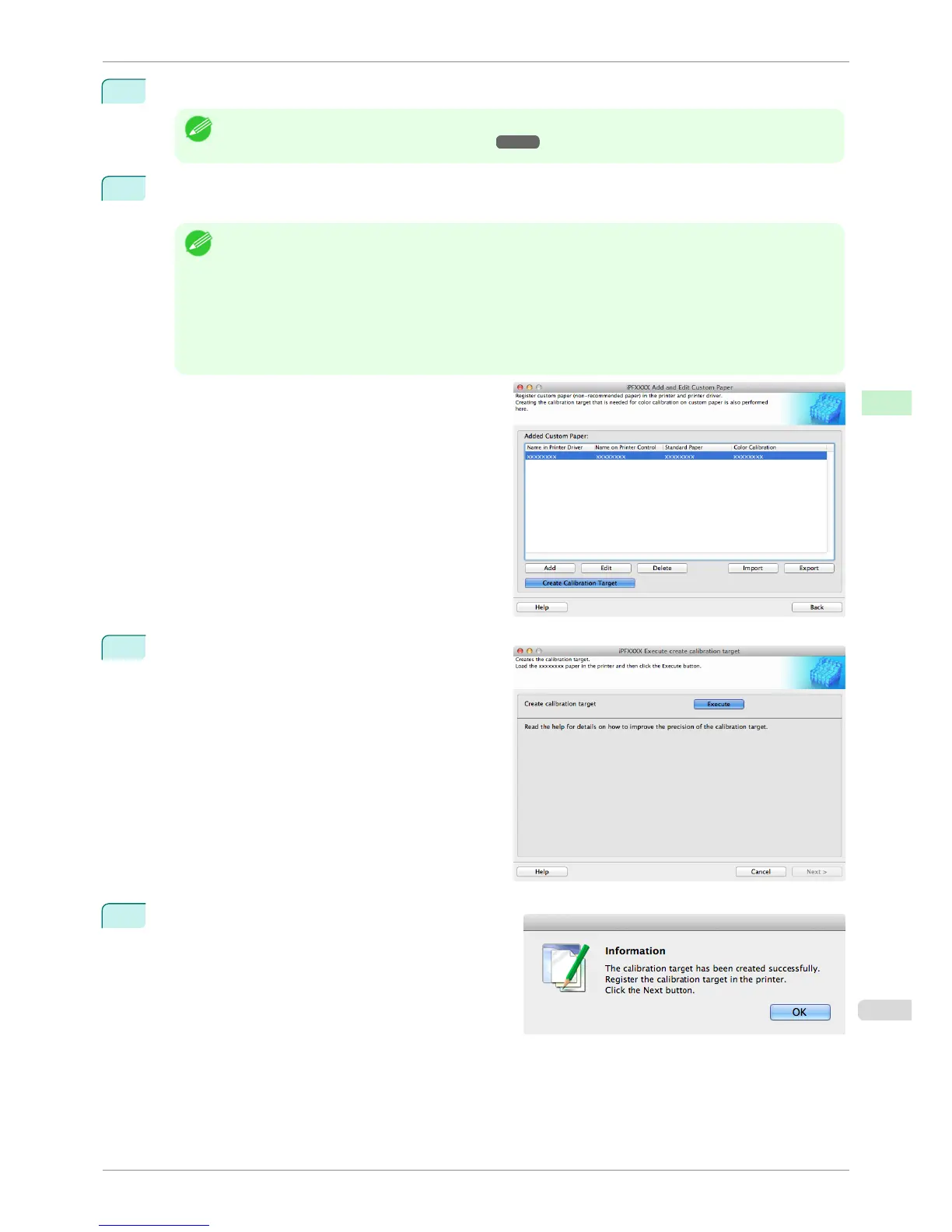
Open the Add and Edit Custom Paper dialog box.
Note
• For details on the procedure for opening the Add and Edit Custom Paper dialog box, see "Using Paper Other
than Genuine Paper and Feed Confirmed Paper." ➔ P.552
2
Select the paper that you want to create the calibration target for from the Added Custom Paper list and
click the Create Calibration Target button.
Note
• If Color Calibration is Can execute, then the calibration target is already registered in the printer. If you per-
form color calibration using a recreated calibration target, the color tones may change.
• If Color Calibration is Only Auto Adjust (High Precision) allowed, then the calibration target for executing
color calibration Auto Adjust (High Precision) in the control panel and imagePROGRAF Color Calibration
Management Console is already registered in the printer. A calibration target is not registered for executing
Auto Adjust.
•
If Color Calibration is Cannot execute, then a calibration target cannot be created for this custom paper.
3
Load the custom paper into the printer and click the
Execute button in Create Calibration Target.
4
Once the calibration target is registered in the printer,
click the Next button in the Execute create calibra-
tion target dialog box.
iPF6400S
Create Calibration Target
User's Guide
Handling and Use of Paper Media Configuration Tool (Mac OS)
565













 To Next Page