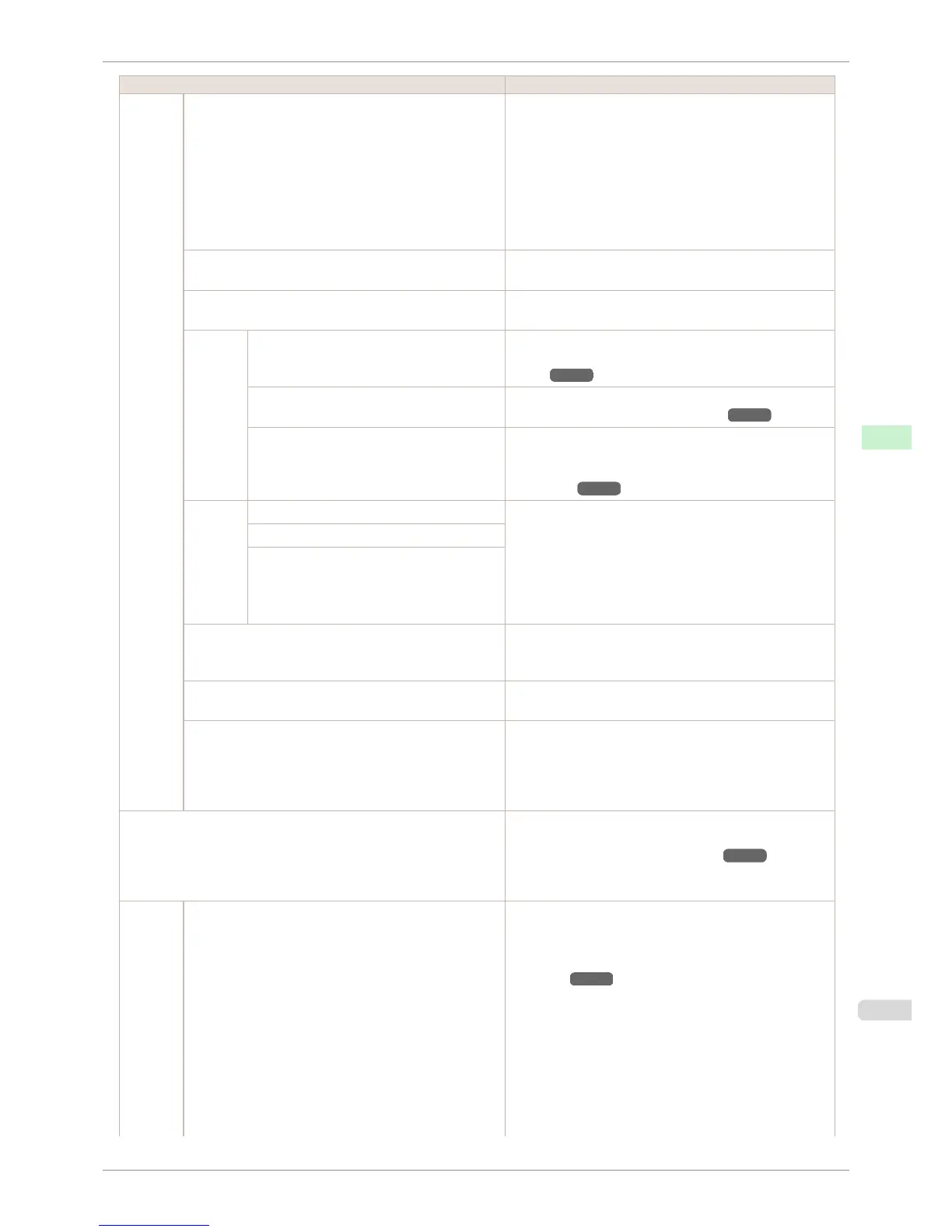
Setting Item Description, Instructions
System
Setup
Nozzle Check In Frequency, specify the timing for automatic checks of
nozzle clogging. Choose Standard to have the printer adjust
the timing for checks based on the frequency of nozzle use.
Choose 1 page to check once per page. Choose 10 pages
to check once per 10 pages. Choose Off to not execute
check.
If On is selected in Warning, a warning may be displayed on
the Control Panel depending on the result of the nozzle
check.
Use RemoteUI Choosing Off prohibits access from RemoteUI. Settings can
only be configured from the control panel.
Reset PaprSetngs Restores settings that you have changed with Media Config-
uration Tool to the default values.
Erase
HDD Da-
ta
High Speed Erases file management data for print job data stored on the
printer's hard disk. (See "Erasing Data on the Printer's Hard
Disk.") ➔ P.613
Secure High Spd. Overwrites the entire hard disk with random data. (See
"Erasing Data on the Printer's Hard Disk.") ➔ P.613
Secure Overwrites the entire hard disk with 00, FF, and random data
(one time each). Verification is performed to check if the data
was correctly written. (See "Erasing Data on the Printer's
Hard Disk.") ➔ P.613
Output
Method
Print Select the printing method for jobs received from software
other than the printer driver. When using the printer driver,
configure settings on the printer.
To print as usual, select Print. Selecting Print (Auto Del) will
print the job and then delete the data from the printer's hard
disk. Selecting Save: Box 01 will only save the print job in
the box, without printing it.
Print (Auto Del)
Save: Box XX
Print After Recv A setting for jobs received from software other than the print-
er driver. When using the printer driver, configure settings on
the printer. Select On to print the job after it has been saved.
Common Box Set. Select Print (Auto Del) to print without saving jobs in the box
shared among multiple users.
Show Job Log Selecting Off prevents display of the log in Job Menu > Job
Log. Additionally, the log is not printed if you choose Job
Menu > Print Job Log. Note that because job logs are not
collected, the Status Monitor accounting functions will not
work correctly.
Prep.MovePrinter When transferring the printer to another location, choose the
level of transfer and follow the instructions on the screen.
(See "Preparing to Transfer the Printer.") ➔ P.855
Not displayed during a warning message that the remaining
Maintenance Cartridge capacity is low.
Admin.
Menu
Change Password The password that can be entered is a number from 0 to
9999999.
The restriction states and main items are shown below. For
more specific information on restricted items, see "Menu
Structure." ➔ P.582
•
Viewing and configuration by administrators only
Change Password
Init.Admin.Pswd
Etc.
•
Viewing and configuration by administrators, and only
viewing by other users
Date & Time
iPF6400S
Menu Settings
User's Guide
Control Panel Printer Menu
595













 To Next Page