7. Other Field Service Ver. 1.0 Aug. 2005
68
bizhub 200/250/350
Maintenance
14. Remove the CCD Unit cover.
15. Apply lock paint to adjusting screws A, B, C, and D.
16. Reinstall the CCD Unit cover.
17. Reinstall the Original Glass, Front Holding Bracket and IR Upper Left Cover.
18. Reinstall all covers that have been removed.
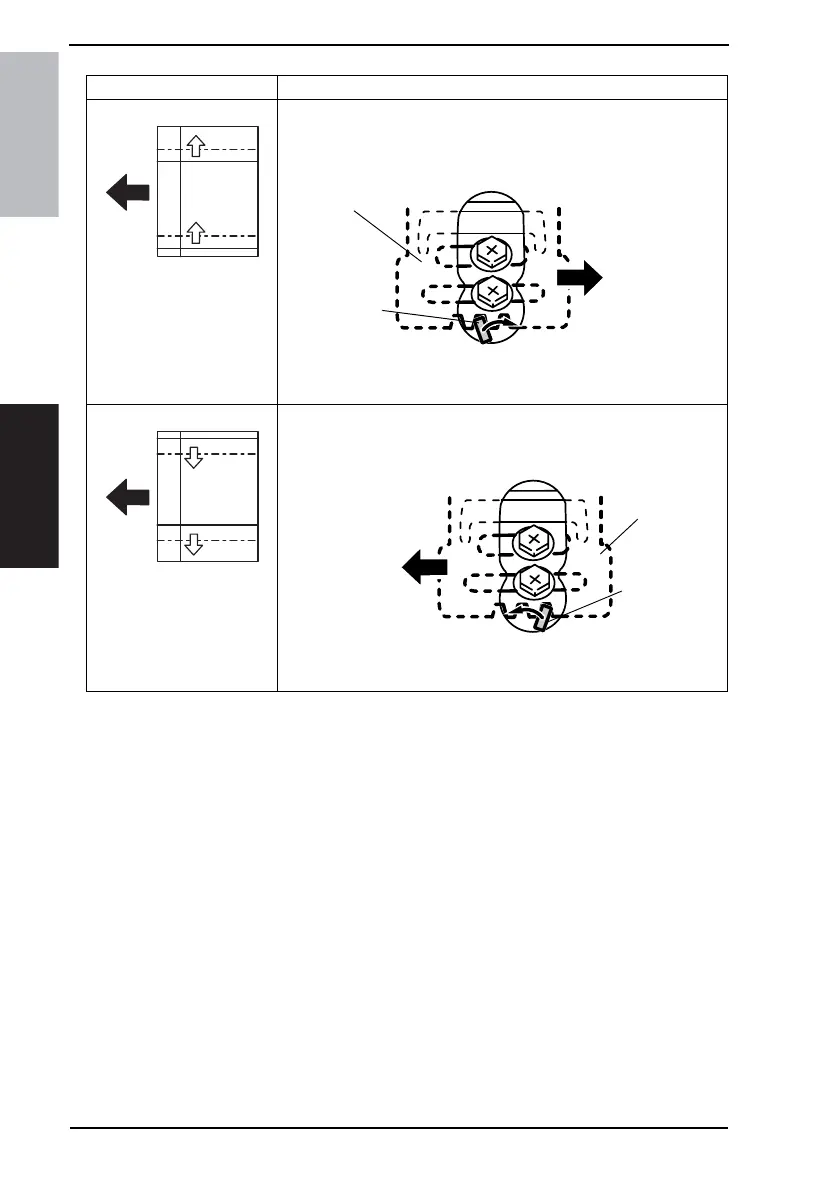
CD Deviation Adjustment Procedure Using Adjustment Plate E
• If deviation in the CD direction is as shown on the left
1. Using a flat-blade screwdriver, turn adjustment plate E counterclock-
wise.
2. Tighten screws C and D.
• If deviation in the CD direction is as shown on the left
1. Using a flat-blade screwdriver, turn adjustment plate E clockwise.
2. Tighten screws C and D.
4030D597AA
Adjustment
plate
Flat-blade
screwdriver
4030D598AA
Adjustment
plate
Flat-blade
screwdriver











 To Next Page