Field Service Ver. 1.0 Aug. 2005 8. Mechanical adjustment
31
FS-508/PU-501/OT-601Adjustment / Setting
8.3 Punch Hole Deviance Adjustment (PU-501)
NOTE
Make this adjustment after any of the following procedures has been performed.
• When the Punch Kit has been replaced.
• When the Punch Kit has been removed.
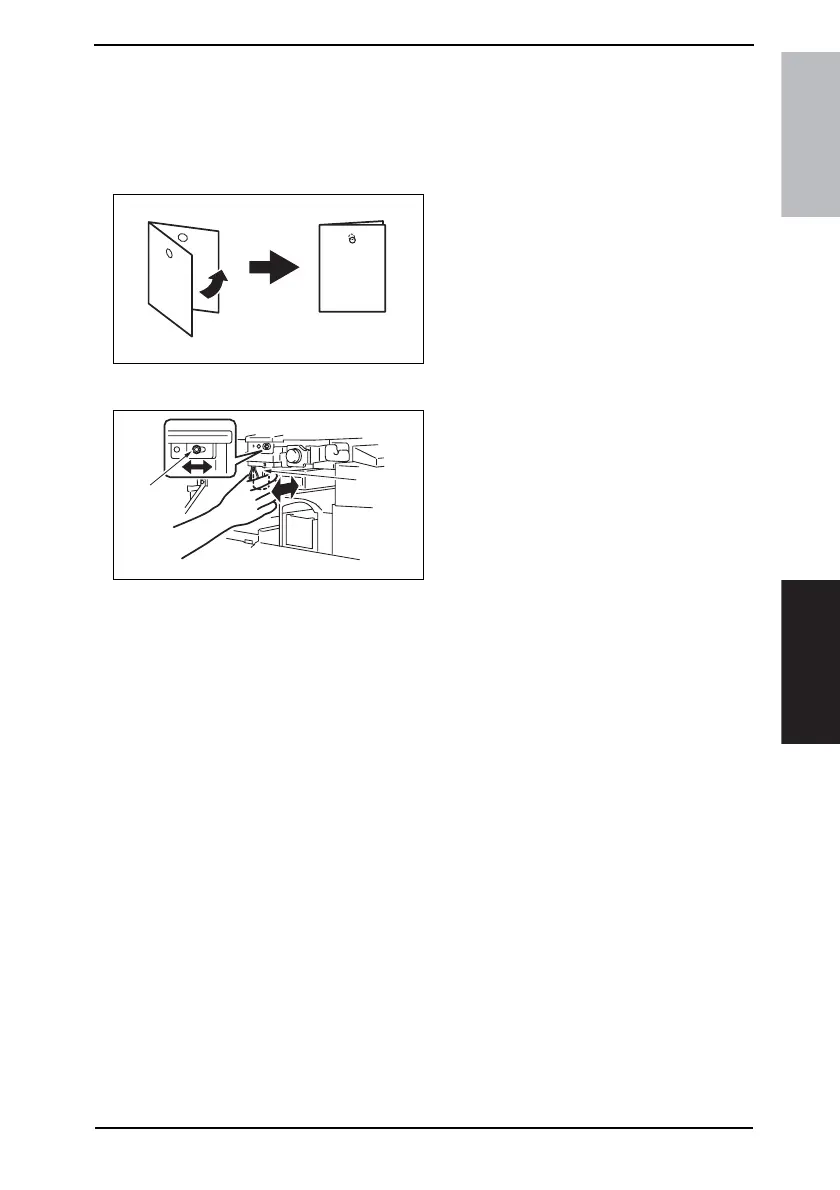
1. Set the copier into the Hole Punch
mode and make a 1-sided copy from
a 1-sided original.
2. Fold the output paper in half and
check whether the punch hole posi-
tions are aligned.
Specification: 0±2 mm
3. If the punch hole position is mis-
aligned, adjust with the following pro-
cedure.
4. Remove the Horizontal Transport
Lower Front Cover.
☞ 12
5. Loosen the adjustment screw [1],
and move the Punch Unit [2] forward
or backward to make the adjustment.
6. Make another copy and check the
punch hole position.
4349F3C508DA
4349F3C509DA
[2]
[1]











 To Next Page