4. Other Field Service Ver. 1.0 Aug. 2005
18
FS-508/PU-501/OT-601
Maintenance
4.3.13 Storage Paddle Drive Clutch
A. Removal Procedure
1. Remove the Sorted Copy Tray.
☞ 15
2. Remove the Horizontal Transport
Unit.
☞ 15
3. Remove the Horizontal Transport
Upper Cover.
☞ 12
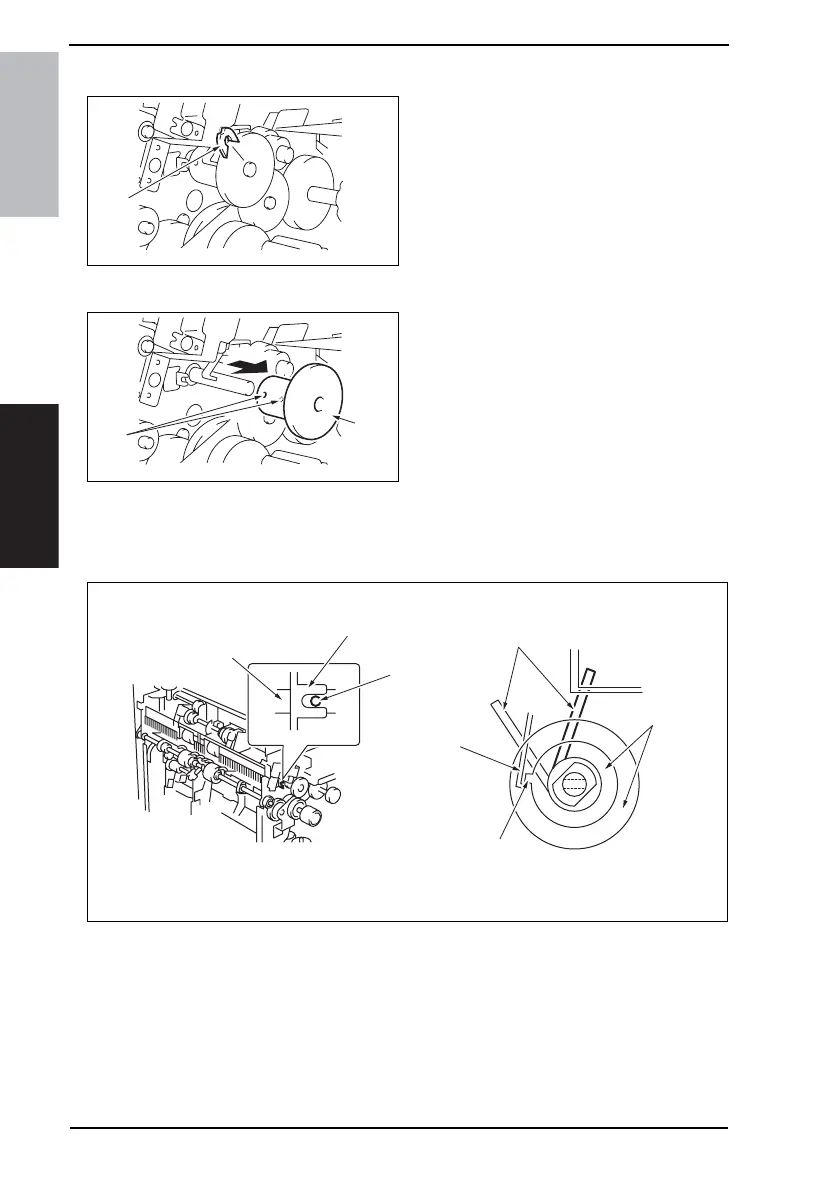
4. Remove the C-ring [1].
5. Loosen two hexagonal socket head
screws [2], and remove the Storage
Paddle Drive Clutch Assy [3].
B. Reinstallation Procedure
1. Check that the 2-mm hole [2] of the storage paddle drive shaft [1] and the cutout of the
frame [3] are aligned and install the Storage Paddle Drive Clutch Assy [4].
2. Refer to the figure below and check the paddle position [5].
3. Hook the Solenoid Flapper [7] to the tab [6] of the Storage Paddle Drive Clutch Assy
[4].
4. Attach the C-ring and reinstall the Storage Paddle Drive Clutch Assy.
5. Adjust the spacing between the C-ring and the Storage Paddle Drive Clutch Assy to 0.2
mm and tighten two hexagonal socket head screws.
4349F2C522DA
[1]
4349F2C523DA
[2]
[3]
4349F2C525DA
[3]
[1]
[2]
[5]
[4]
[7]
[6]











 To Next Page