19. Malfunction code Field Service Ver. 1.0 Aug. 2005
238
bizhub 200/250/350
Troubleshooting
*1: Not supported by this machine
19.2 How to reset
• Different malfunction resetting procedures apply depending on the rank of the trouble
code.
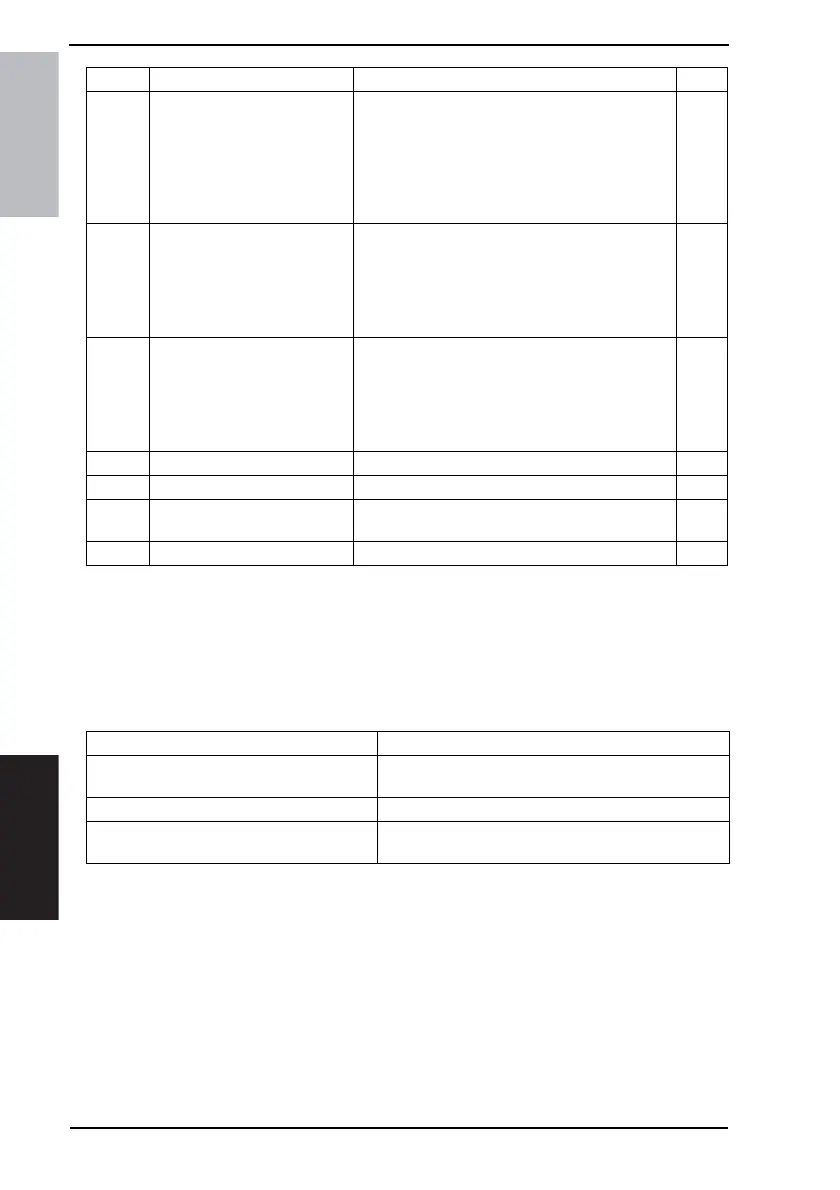
* List of Malfunction Resetting Procedures
C5351
Power Supply Cooling Fan
Motor Failure
• The Power Supply Cooling Fan Motor Lock sig-
nal remains set to H for a set period of time while
the Power Supply Cooling Fan Motor is turning.
• The Power Supply Cooling Fan Motor Lock sig-
nal remains set to L for a set period of time while
the Power Supply Cooling Fan Motor remains
stopped.
B
C5352 Cooling Fan Motor Failure
• The Cooling Fan Motor Lock signal remains set
to H for a set period of time while the Cooling
Fan Motor is turning.
• The Cooling Fan Motor Lock signal remains set
to L for a set period of time while the Cooling Fan
Motor remains stopped.
B
C5353 IU Cooling Fan Motor Failure
• The IU Cooling Fan Motor Lock signal remains
set to H for a set period of time while the IU Cool-
ing Fan Motor is turning.
• The IU Cooling Fan Motor Lock signal remains
set to L for a set period of time while the IU Cool-
ing Fan Motor remains stopped.
B
C8301 EDH Fan Motor Failure
☞ See DF-605 Service Manual. C
CA052 MIO Device Failure • The MIO device does not operate properly. C
CC153 Flash ROM Failure
• The Flash ROM data was determined to be faulty
when the unit was turned on.
B
CC155 Exit Option Flash ROM Failure
☞ See FS-508 Service Manual. B
Code Item Description Rank
Trouble Code Rank Resetting Procedures
Rank A
•Trouble Reset
☞ For details, see Adjustment/Setting.
Rank B • Opening/Closing the front door
Rank C
• Turn OFF the Main Power Switch, wait for 10 sec. or
more, and turn ON the Main Power Switch.











 To Next Page