Field Service Ver. 1.0 Aug. 2005 9. Tech. Rep. Mode
31
FK-503Adjustment / Setting
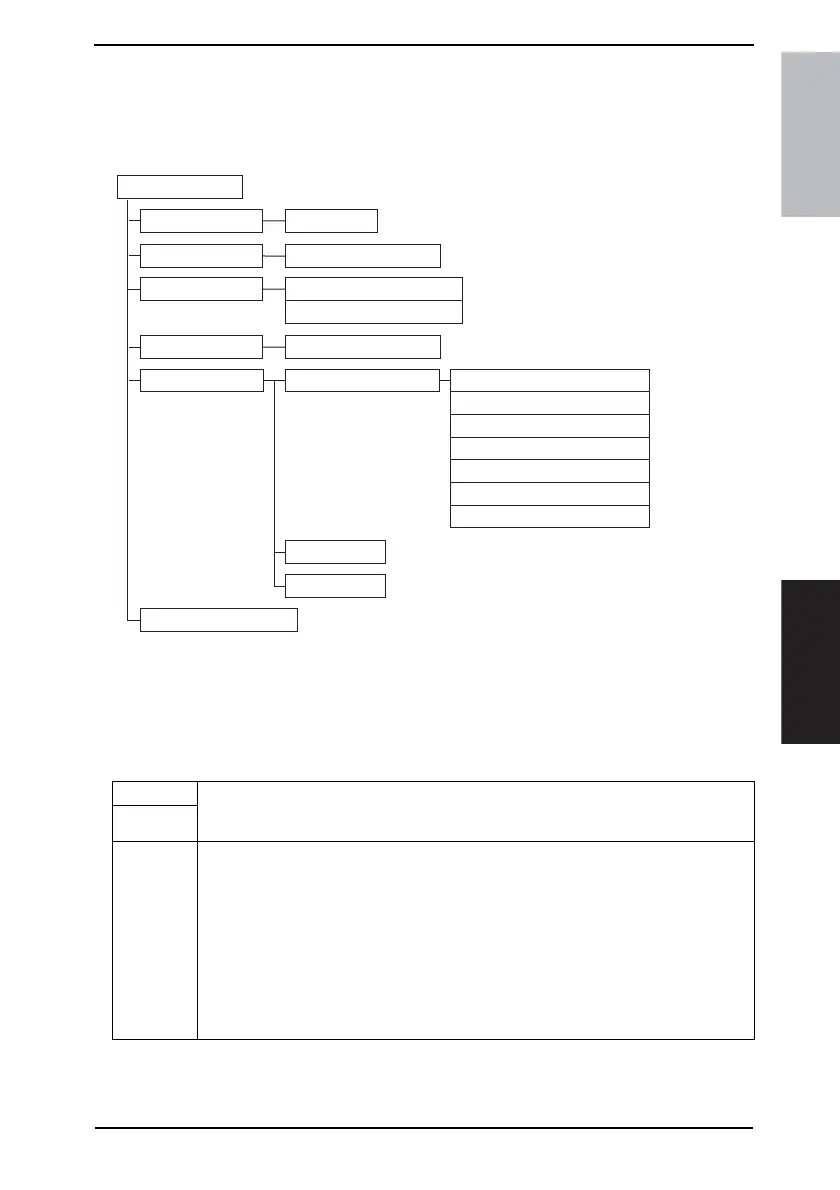
9.2 Tech. Rep. Mode function tree
NOTE
• Of the Tech. rep. mode functions, only those related to the fax machine will be
described in the following.
9.3 Settings in the Tech. Rep. Choice
9.3.1 Country Set
4040F3E564DA
Tech. Rep. Mode
Counter
Function
Application Counter
Fax Connection Error
F7-2
System Input
Machine Configuration
Tech. Rep. Choice
Country Set
FAX Set
Soft Switch Settings
Stamp
Terminal TX
Service Call Set Maintenance Date/Toner Type
Service Destination
TX Condition
Transmission Method
Service FAX Number
Contact Number
User System Code
Functions • To set the default value for each country for communications-related choice functions.
• The function becomes available on the screen to choose only for the machine that is to
be marketed in Europe or Others and that is equipped with the optional fax function.
Use
Setting/
Procedure
• Select the applicable country.
<For Europe>
GermanyFrance U.K. Italy Austria
Swiss Belgium Holland Spain Portugal
DenmarkNorway Sweden Finland Czech
Hungary Poland
<For Others>
South AfricaAustralia Hong Kong Singapore New ZealandMalaysia
ArgentinaKorea Taiwan other 1
other 2











 To Next Page