Field Service Ver. 1.0 Aug. 2005 4. Other
13
FS-508/PU-501/OT-601Maintenance
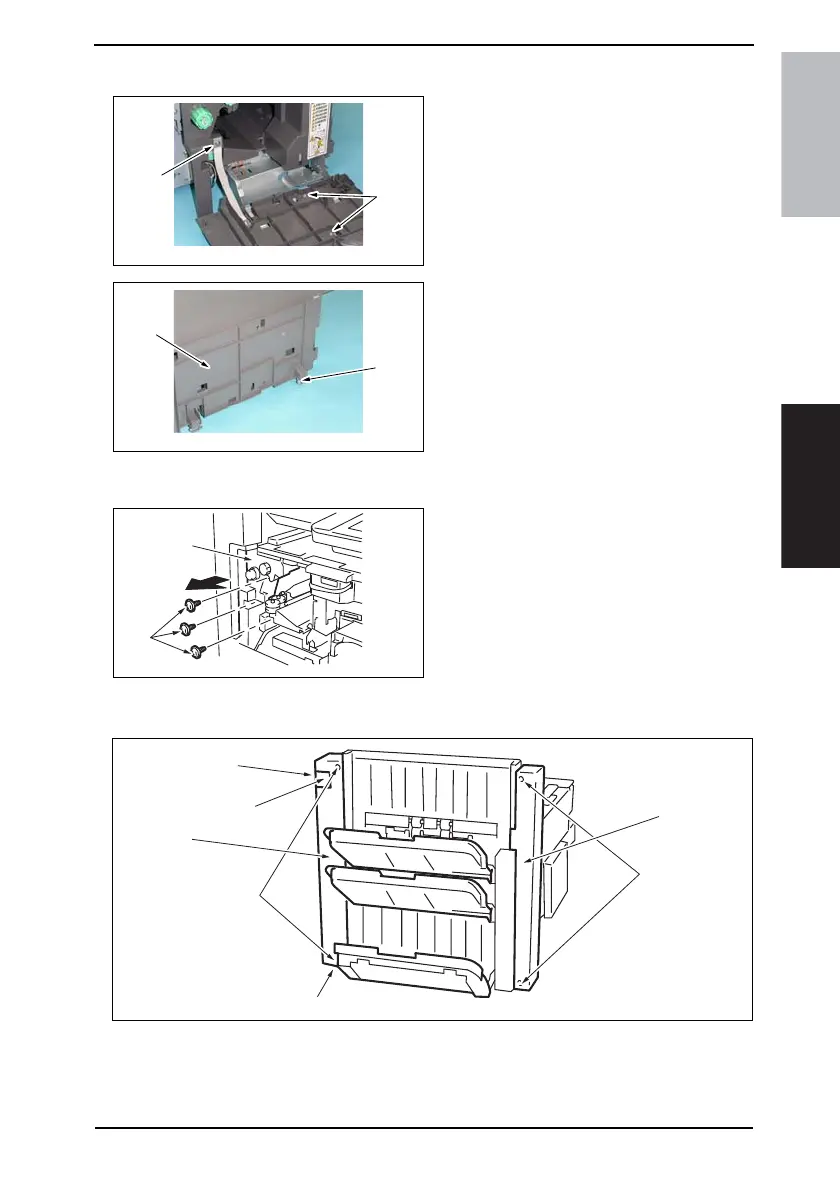
4.3.3 Front Door
1. Open the Front Door.
2. Remove the screw [1], and remove
the stopper.
3. Remove two screws [2], and remove
the dummy cover.
4. Close the Front Door.
5. Remove the clip [3], and remove the
Front Door [4].
4.3.4 Horizontal Transport Left Front Cover
1. Remove three screws [1], and
remove the Horizontal Transport Left
Front Cover [2].
4.3.5 Paper Exit Front Cover/Paper Exit Rear Cover/Connector Cover
1. Remove two screws [1], and remove the Paper Exit Front Cover [2].
2. Loosen the screw [3], remove two screws [4], and remove the Paper Exit Rear Cover
[5].
3. Remove the screw [6], and remove the Connector Cover [7].
4349F2C535DA
[1]
[2]
4349F2C536DA
[3]
[4]
4349F2C508DA
[1]
[2]
4349F2C537DA
[7]
[5]
[3]
[4]
[1]
[2]
[6]











 To Next Page