Field Service Ver. 1.0 Aug. 2005 11. Soft Switch List
51
FK-503Adjustment / Setting
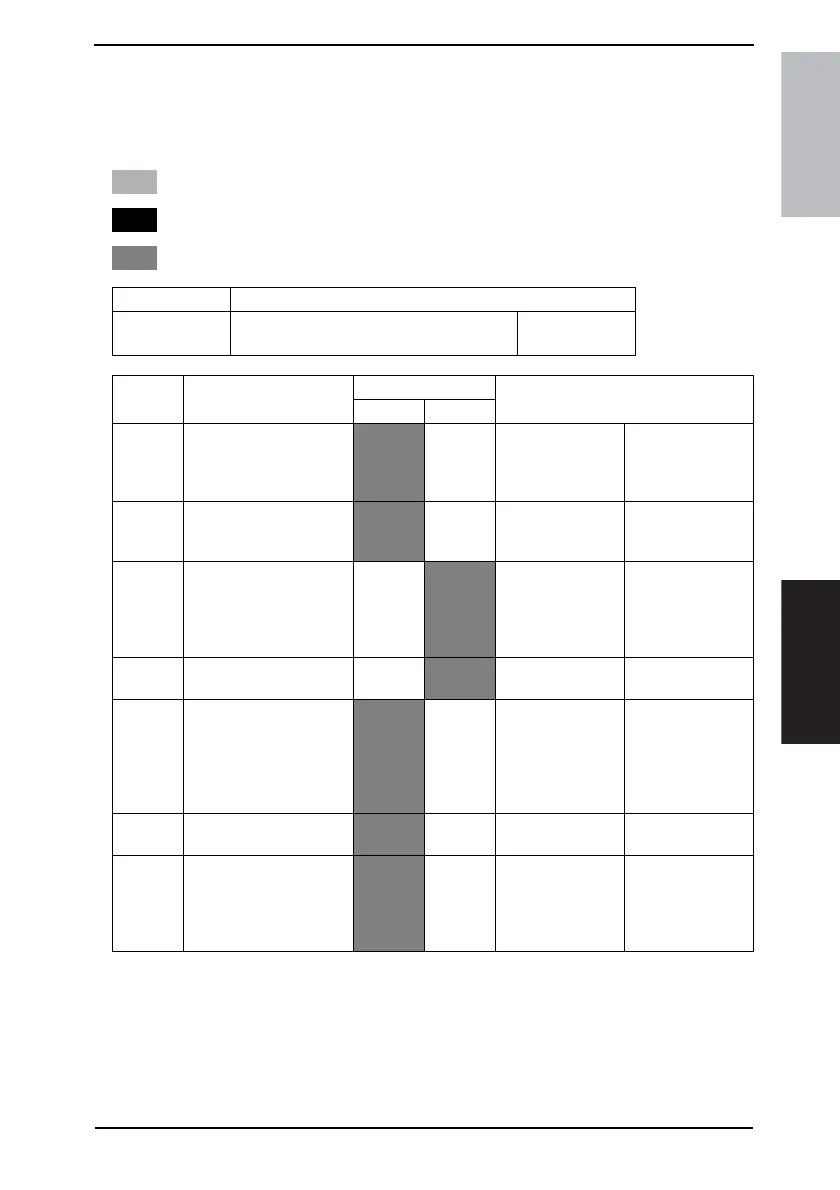
11.3 List of Soft Switches
NOTE
• If no bit settings are given in the soft switch list that follows, the factory settings
for those particular bits are fixed and should never be changed.
NOTE
• The features with (*) are settable by users. *: Screen setting <*>: Soft switch setting
: Default settings of U.S.
: Default settings of Europe
: Default settings are common
MODE Factory setting bit
000
Bit: 7654 3210
0011 0000
HEX:30
Bit Feature
Logic
Description
01
7 Specifies whether TX
markers are return to ON
or OFF after completing
operations. <*>
OFF Ye s
6 Select position of TX
markers. <*>
Top &
bottom
of doc.
bottom of
doc.
5 Specifies whether print-
ing TSI on transmitted
document is returned to
ON or OFF after complet-
ing operations. *
No
Yes
4 Select position of TSI. * Outside
doc.
Outside
doc.
3 Specifies whether con-
firming communication
password at TX is
returned to ON or OFF
after completing opera-
tions. <*>
No Ye s
2 Confirm communication
password at RX. <*>
No Ye s
1 Specifies which TX
method is returned to ON,
memory-stored TX or
nonstorage TX, after com-
pleting operations. *
Memory-
stored
Non-
stored
Memory-stored TX
includes quick
memory TX.











 To Next Page