16. Mechanical adjustment Field Service Ver. 1.0 Aug. 2005
212
bizhub 200/250/350
Adjustment / Setting
16. Mechanical adjustment
16.1 Mechanical adjustment of the scanner section
16.1.1 Scanner Position Adjustment
Make this adjustment after any of the following procedures has been performed:
• After the Scanner Drive Cables have been replaced.
• When the Scanner has been removed.
1. Remove the IR Upper Left Cover.
☞ 49
2. Remove the Front Holding Bracket.
☞ 49
3. Remove the Original Glass.
☞ 49
4. Remove the Exposure Unit.
☞ 78
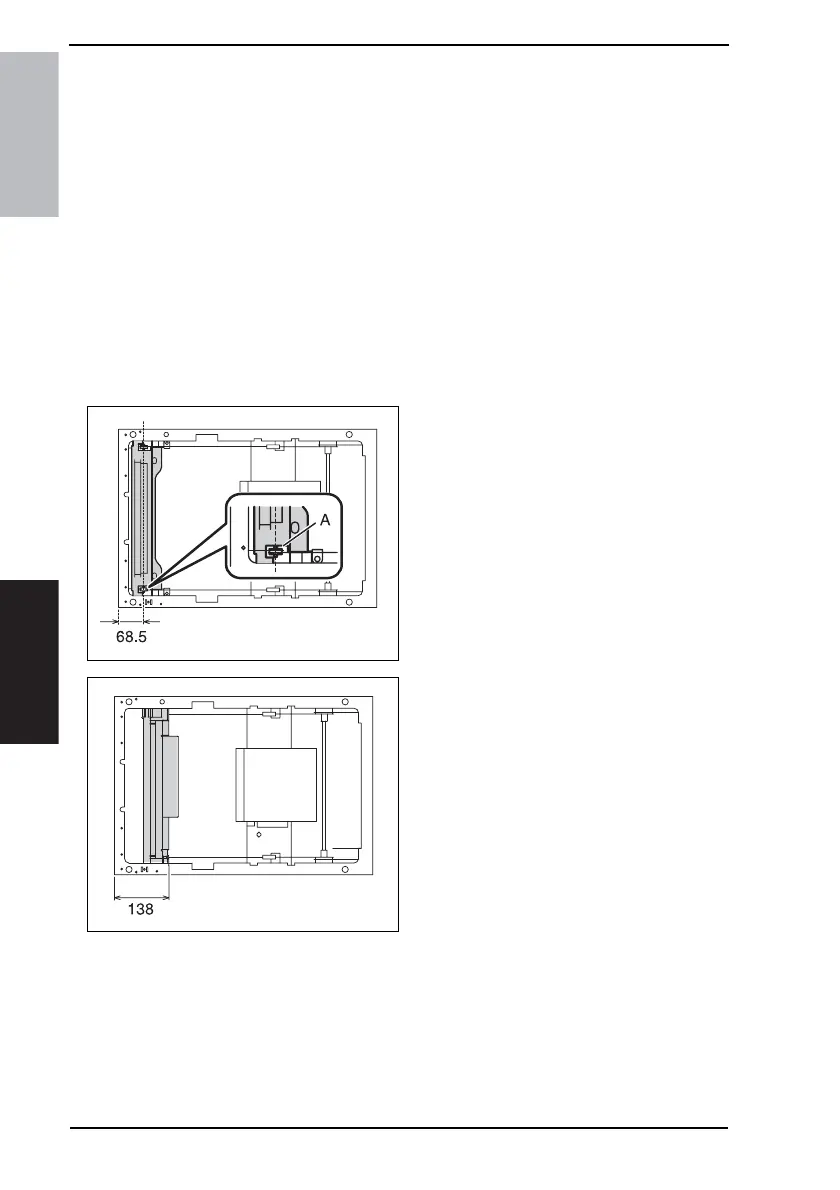
5. Move the Mirror Unit to the position
shown on the left.
• Distance of part A from the IR left side
surface: 68.5 mm
6. Wind the cables on the Exposure
Unit.
7. 7. Mount the Exposure Unit at the
location shown on the left.
• Distance of the right side surface of
the Exposure Unit from the IR left side
surface: 138 mm
4040F2C691DA
4040F2C692DA











 To Next Page