7. Other Field Service Ver. 1.0 Aug. 2005
80
bizhub 200/250/350
Maintenance
7.3.33 Scanner Drive Cables
A. Removal Procedure
1. Remove the Upper Rear Cover.
☞ 50
2. Remove the IR Upper Left Cover.
☞ 49
3. Remove the Front Holding Bracket.
☞ 49
4. Remove the Original Glass.
☞ 49
5. Remove the Exposure Unit.
☞ 78
6. Remove the Scanner Motor.
☞ 77
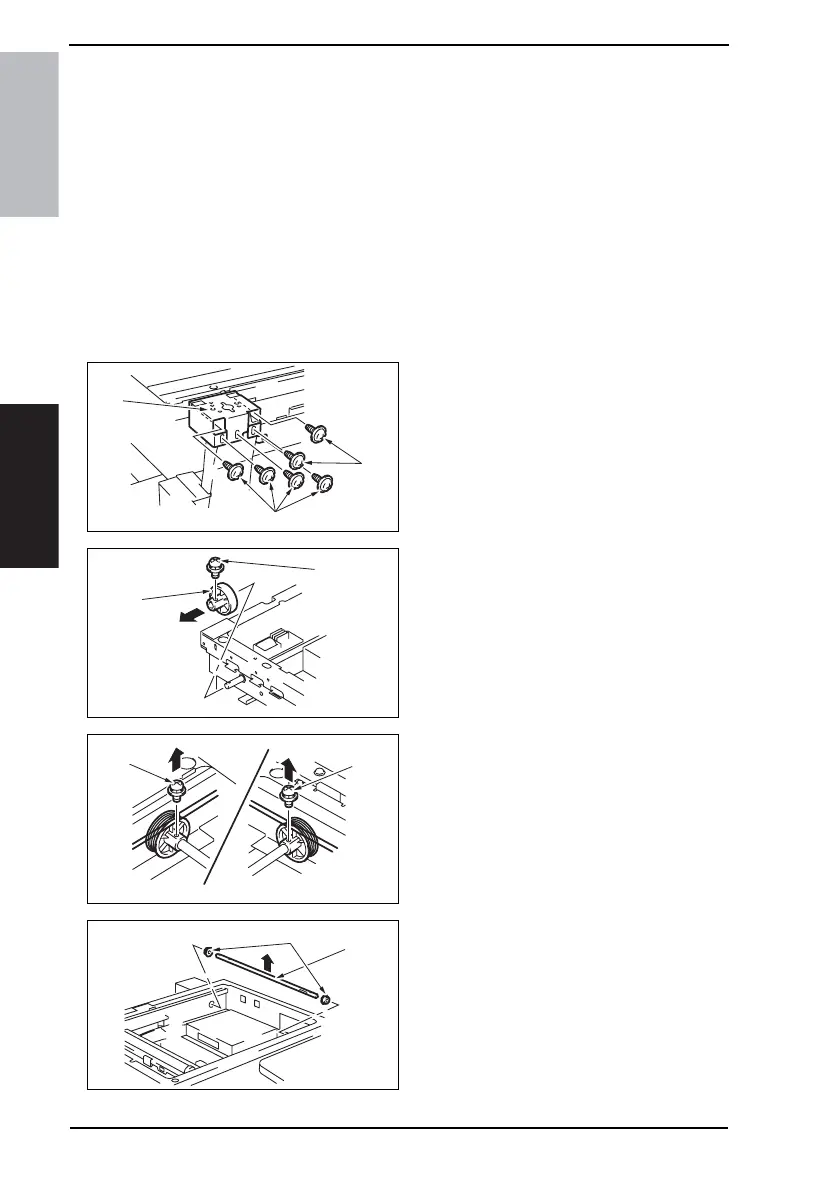
7. Remove six screws [1] and the Origi-
nal Cover hinge support [2].
8. Remove the screw [3] and the Scan-
ner Drive Gear [4] from the shaft.
9. Remove two screws [5] and the front
and rear pulleys.
10. Remove the bearing [6] and shaft
[7].
11. Remove the Scanner Drive Cables
from each hook.
4040F2C707DA
[1]
[1]
[2]
4040F2C711DA
[3]
[4]
4040F2C712DA
[5]
[5]
4040F2C713DA
[6]
[7]











 To Next Page