Field Service Ver. 1.0 Aug. 2005 4. Periodical check
31
bizhub 200/250/350Maintenance
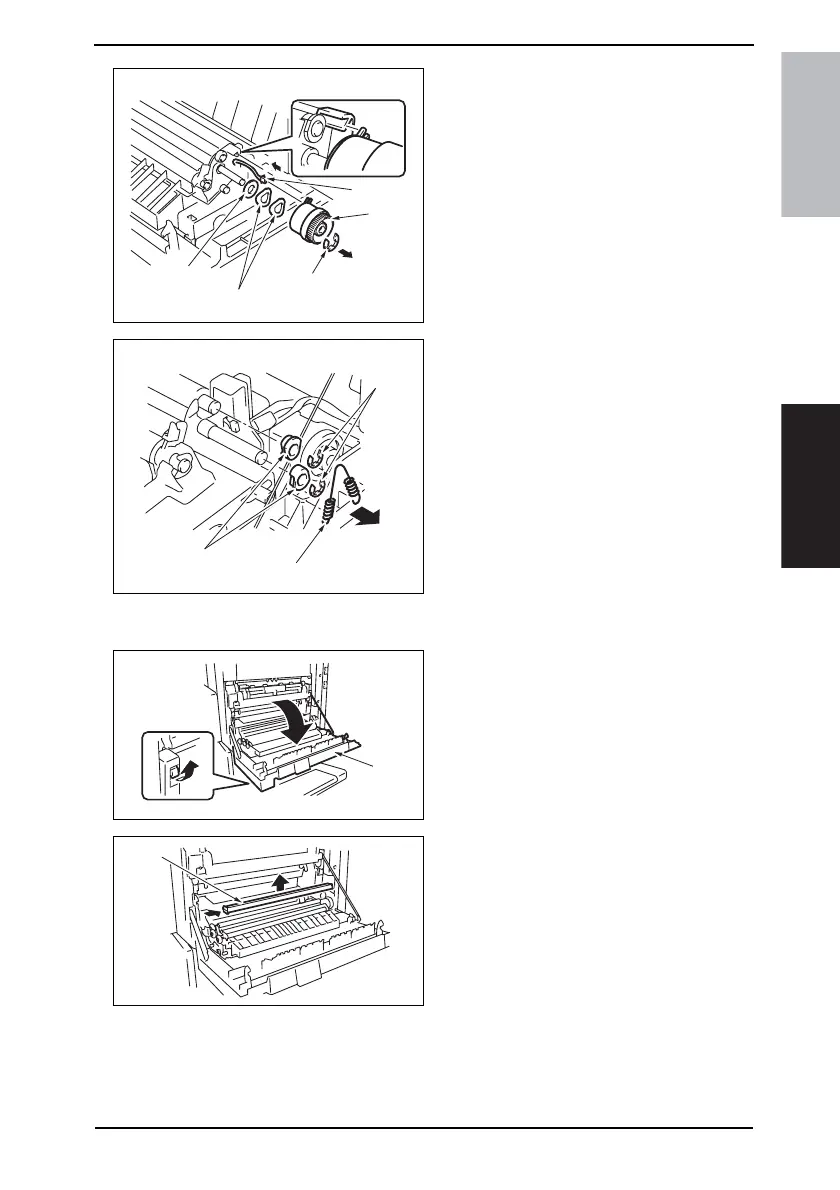
5. Remove the E-ring [11] and unplug
the connector [12]. Then, remove the
Registration Roller Clutch [13].
6. Remove the washer [14] and two
wave washers [15].
7. Remove the spring [16], two E-rings
[17], and two Registration Roller
Bearings [18].
NOTE
• When reinstalling the bearings,
make sure that the flanges of the
bearings are on the outside.
4.5.10 Cleaning of the Paper Dust Remover
1. Open the Right Door [1].
2. Remove the Paper Dust Removal [2].
4040F2C548DA
[11]
[13]
[14]
[15]
[12]
4040F2C549DA
[16]
[17]
[18]
4040F2C540DA
[1]
4040F2C541DA
[2]











 To Next Page