7. Mechanical adjustment Field Service Ver. 1.0 Aug. 2005
26
DF-605
Adjustment / Setting
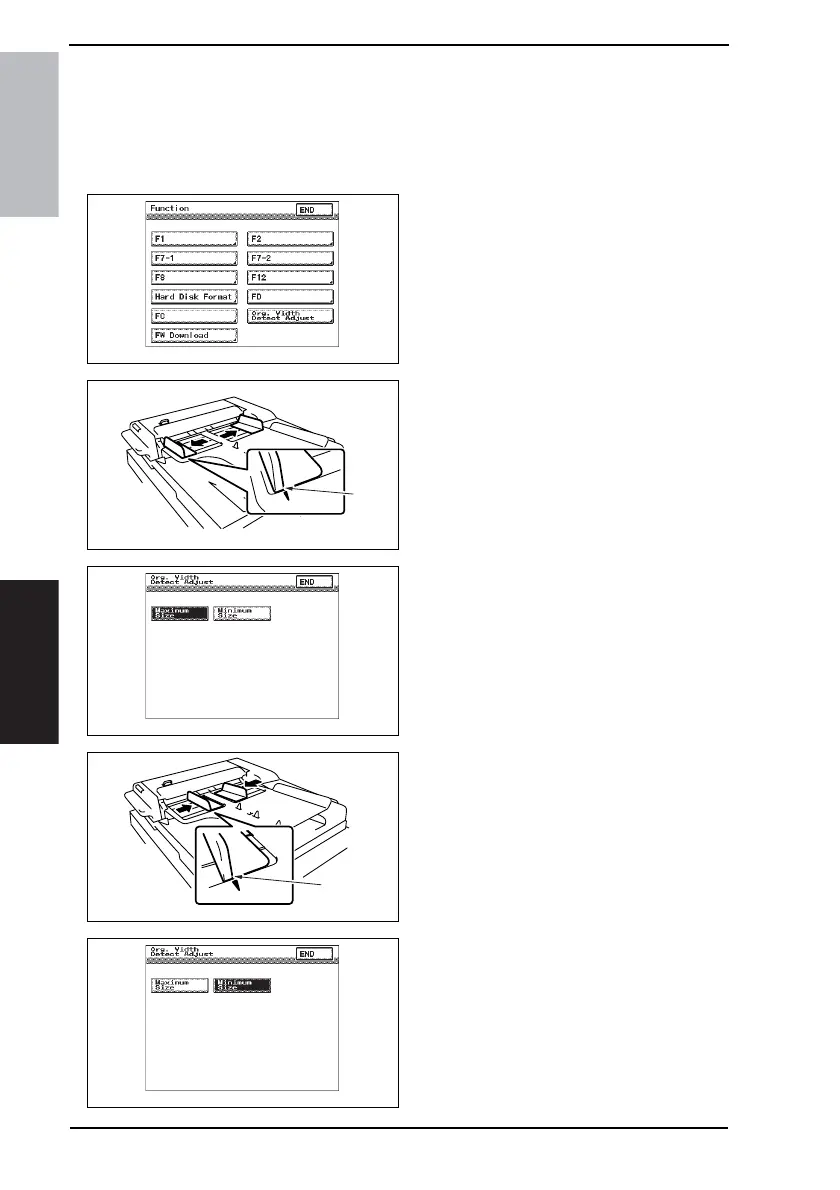
7.4 Document Size Detection Adjustment
NOTE
Make this adjustment after any of the following procedures has been performed.
• When the Variable Resistor has been replaced.
• When the backup data has been initialized.
1. Display Tech. Rep. Mode.
2. Touch the [Function].
3. Touch the [Org. Width Detect Adjust].
4. Align the original edge plane of the
Side Edge Stop [1] of the Original
Feed Tray to the outside ▼ mark.
5. Touch the [Maximum Size].
6. Press the Start key.
7. Align the original edge plane of the
Side Edge Stop [2] of the Original
Feed Tray to the inside ▼ mark.
8. Touch the [Minimum Size].
9. Press the Start key.
10. Check whether size detection oper-
ates normally.
4344F3E524DA
4344F3C514DA
[1]
4344F3E525DA
4344F3C516DA
[2]
4344F3E526DA











 To Next Page