7. Mechanical adjustment Field Service Ver. 1.0 Aug. 2005
22
DF-605
Adjustment / Setting
7. Mechanical adjustment
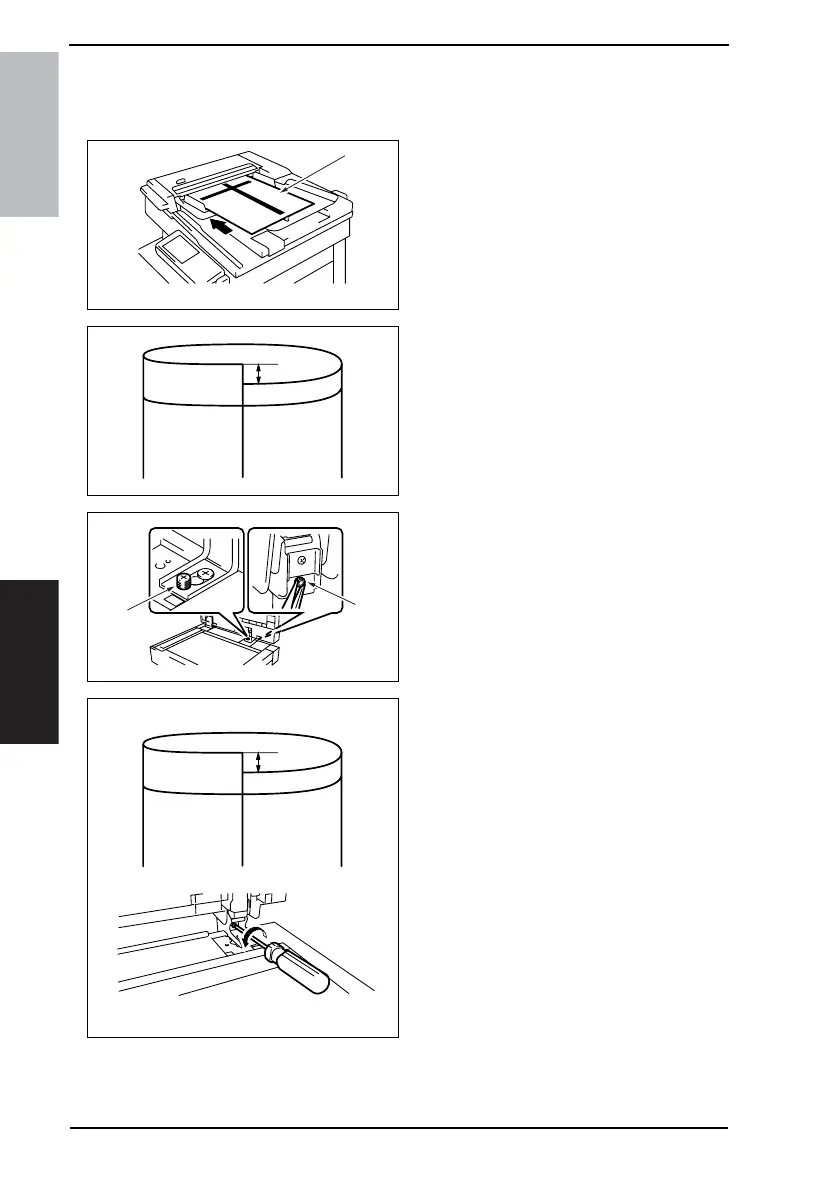
7.1 Leading Edge Skew Adjustment
1. Load the test chart [1] in the Reverse
Automatic Document Feeder and
make one 1-sided copy five consecu-
tive times.
2. Fold each of the sample copies as
illustrated and check for any devia-
tion.
Specifications: 0 ± 3.0 mm
3. If the deviation does not fall within
the specified range, perform the fol-
lowing adjustment procedure.
4. Loosen the decorative screw [2] and
the nut [3] in the back to the right.
5. If there is a deviation as shown on
the figure, turn the screw counter-
clockwise to adjust it.
4344F3C501DA
[1]
4344F3C502DA
[3]
[2]
4344F3C503DA











 To Next Page