12. Troubleshooting Field Service Ver. 1.0 Aug. 2005
162
FK-503
Troubleshooting
12.2 Communication Error Codes
NOTE
• Cause - Re: Remote, Li: Line, Lo: Local
12.2.1 Errors in operations
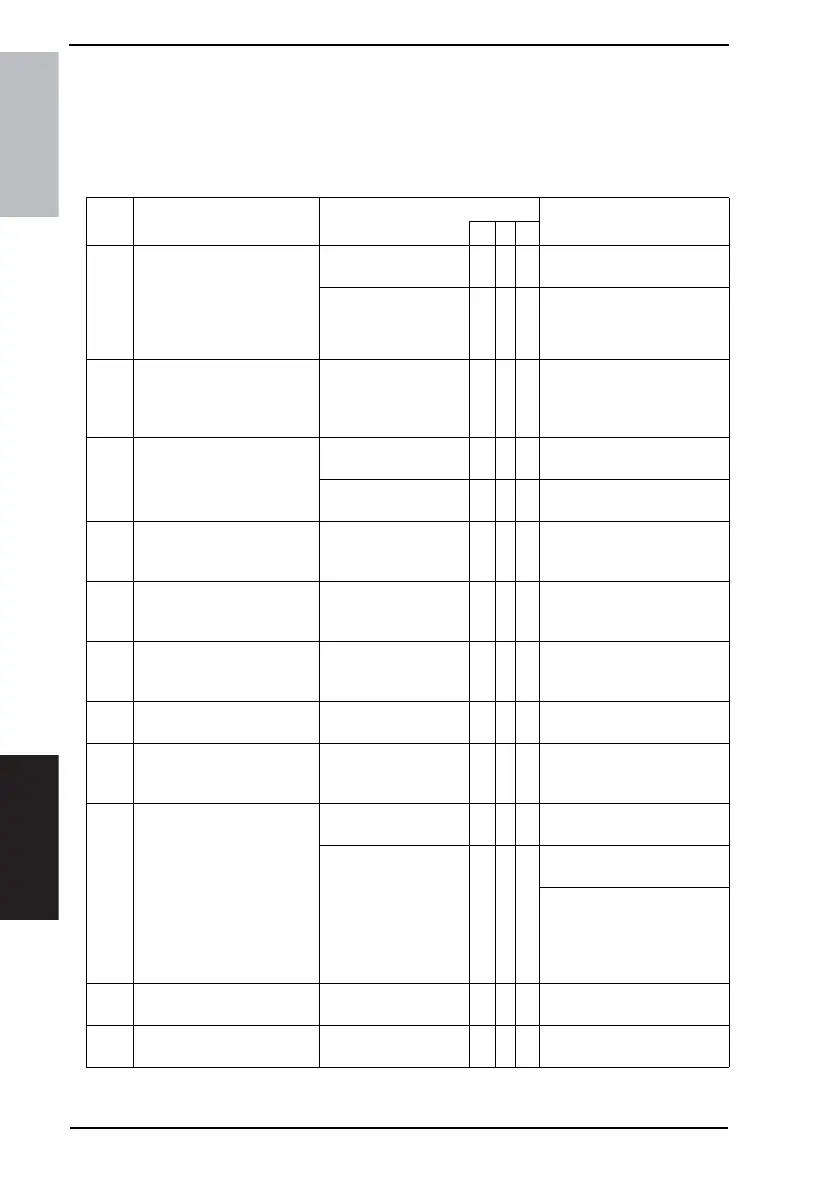
Code Description Cause Remedy
Re Li Lo
00 • Received DIS but no doc-
ument in local terminal
• Polling Reception is
requested
• Software failure at time of
connection
Error in operation
|
Reload a document and retry
TX.
Error in operation at
remote end
|
Ask to reload a document
and retry TX.
01 • Document pulled out while
transmitting.
• Document size was too
small
Error in operation
|
Reload a correct document
and retry TX.
02 • Illegal dialing operation
(Example; dialing * or #
with DP setting)
Error in setting up
|
Check the soft switch (MODE
006 Bit5 & MODE 011 Bit 5).
Error in registration
|
Check the registered one-
touch dialing number.
03 • Mismatched TX password Sender’s password
and receiver’s are not
matched.
||
Check the group password of
both sides.
04 • Mismatched RX password Sender’s password
and receiver’s are not
matched.
||
Check the group password of
both sides.
05 • Mismatched password
while polling
Incorrect password
was entered for set-
ting up polling.
|
Check the status of the
remote machine and the local
password.
06 • Remote system has no
relay function
Failure in remote
machine
|
Check the status of the
remote machine.
07 • Remote system has not
confidential communica-
tion function
Failure in remote
machine |
Check the status of the
remote machine.
09 • Incompatibility (Example;
no document in local sys-
tem while polling RX)
• TX failure due to mis-
match of communication
type and/or transmission
speed
Error in operation on
remote side
|
Ask the remote end to reload
the document again.
Transmission speeds
are set 4800/2400 bps.
Remote machine has
only V.29.
||
Check the soft switch (MODE
049 Bit 4 -0).
Check the maximum trans-
mission speed for each one-
touch dialing (only for regis-
tration in maintenance fea-
tures).
10 • Error in F code TX Failure in remote
machine
|
Check the status of the
remote machine.
11 • Error in F code RX Failure in remote
machine
|
Check the status of the
remote machine.











 To Next Page