3. Other Field Service Ver. 1.0 Aug. 2005
12
DF-605
Maintenance
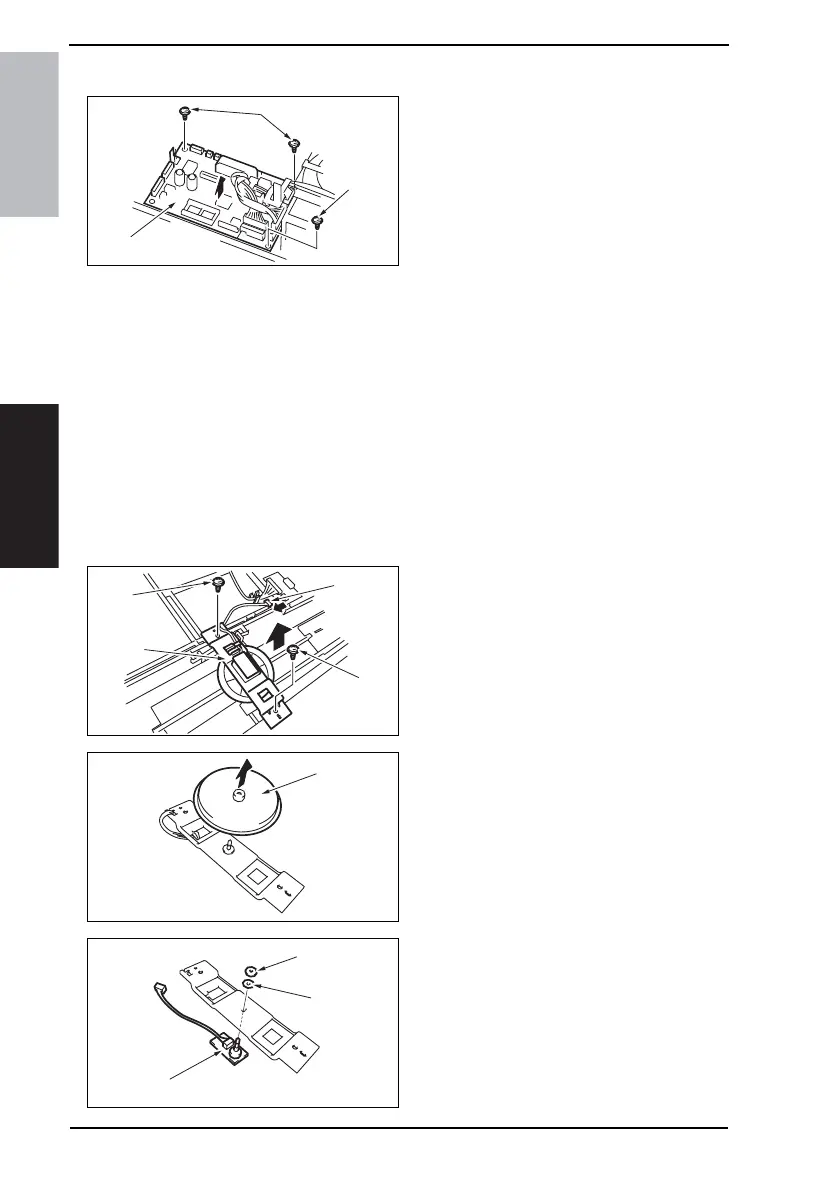
3.3.2 Main Control Board
1. Turn OFF the Main Power Switch.
2. Remove the Rear Cover.
☞ 11
3. Disconnect all the connectors on the
board.
4. Remove three screws [1], and then
remove the Main Control Board [2].
NOTE
• Be sure to perform the following operation when the Main Control Board is
replaced.
5. Initialize the backup data.
☞ 21
6. Perform document width detection adjustment.
☞ 18
7. Turn OFF the Main Power Switch and turn it ON again and check whether size detec-
tion operates normally.
8. Upgrade the firmware.
☞ 16
3.3.3 Variable Resistor
A. Removal Procedure
1. Turn OFF the Main Power Switch.
2. Remove the Original Feed Tray Rear
Cover.
☞ 11
3. Disconnect the connector [1].
4. Remove two screws [2] and the
mounting bracket [3].
5. Remove the gear [4].
6. Remove the nut [5] and the washer
[6], and remove the Variable Resistor
[7].
4344F2C514DA
[1]
[1]
[2]
4344F2C522DA
[1]
[2]
[3]
[2]
4344F2C523DA
[4]
4344F2C524DA
[5]
[6]
[7]











 To Next Page