Field Service Ver. 1.0 Aug. 2005 3. Firmware upgrade
7
FS-508/PU-501/OT-601Maintenance
3. Firmware upgrade
3.1 Preparations for Firmware rewriting
3.1.1 Service environment
• Drive which enables writing/reading of Compact flash
• Compact flash (with 32 MB or more)
3.1.2 Writing into the Compact flash
• Copy the firmware files using the computer.
NOTE
• Copy only those files to be upgraded to the compact flash.
• If wrong firmware is copied, no screen display is given and thus no firmware can
be downloaded.
3.1.3 Checking ROM version
• Before attempting to upgrade the firmware, check the current ROM version.
☞ See the Adjustment/Setting of the main unit service manual.
3.2 Firmware rewriting
3.2.1 Finisher
NOTE
• NEVER remove or insert the Compact Flash card with the machine power
turnedÅ@ON.
• Make sure that the MSC firmware has not been copied to the compact flash card.
• The engine firmware and Finisher firmware can be upgraded at the same time.
☞ See the Maintenance of the main unit service manual.
• If the files copied to the compact flash card are those of either the engine or Fin-
isher, or wrong, no screen display is given and thus no firmware can be down-
loaded.
1. Turn OFF the main power switch.
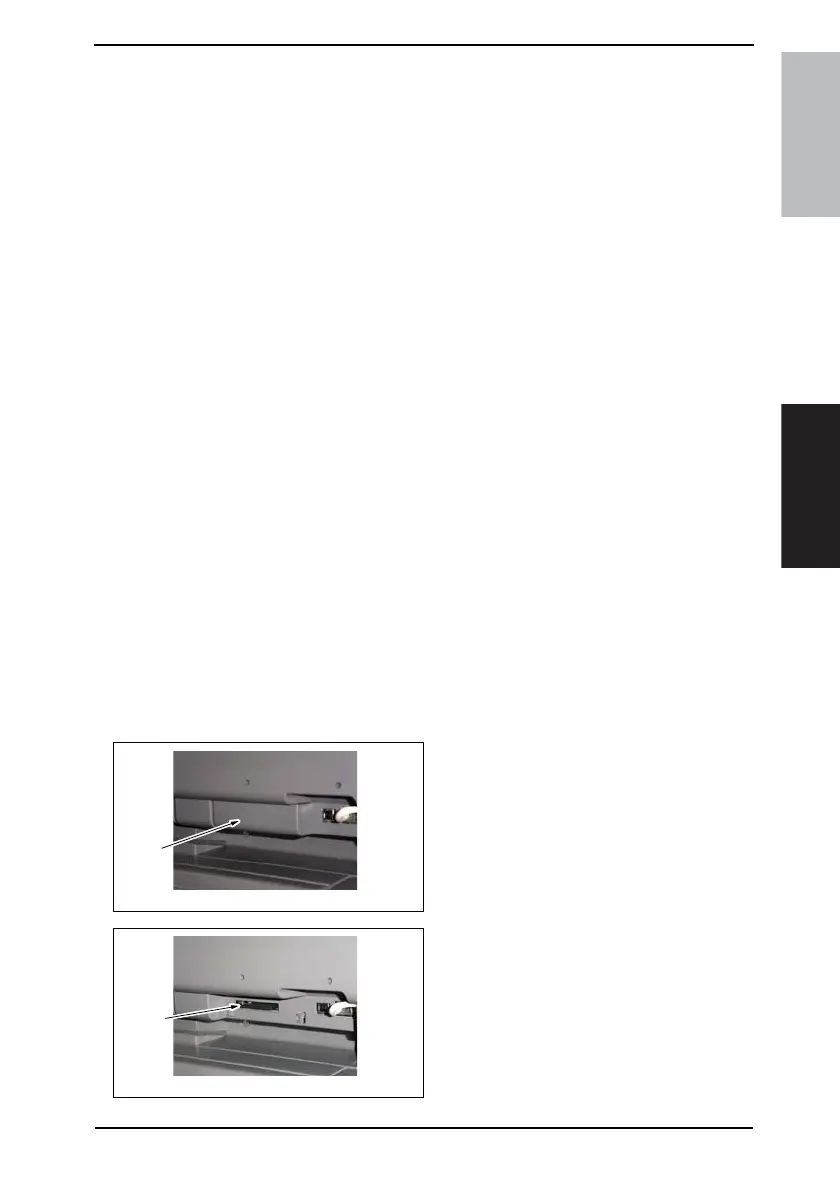
2. Remove the Compact flash Cover
[1].
3. Insert the compact flash card [2], to
which the finisher upgrading files
have been copied, into the slot.
4040F2C596DA
[1]
4040F2C597DA
[2]











 To Next Page